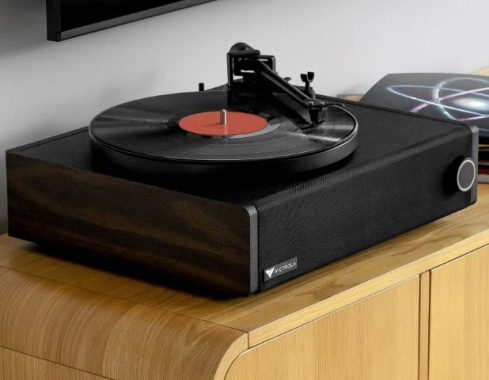
Home Blog Page 59

Review: Victrola Premiere V1 Turntable Music System

0

If you’re looking for an all-in-one music system that can handle both analog and digital formats, the Victrola Premiere V1 turntable is a great option. This system includes a belt-drive turntable with built-in powered stereo speakers, as well as several inputs and outputs for connecting to other devices.

One of the standout features of the V1 is its Bluetooth input, which allows you to stream music from a compatible device. Additionally, the VinylStream wireless output feature lets you stream your music to a set of wireless speakers or headphones (which are sold separately).

The Victrola Premiere V1 Turntable is a fantastic choice for anyone looking for a high-quality belt-driven turntable with a built-in powered stereo speaker system. With 10 watts x 2 built-in amplification, you can enjoy your music with excellent sound quality that is sure to impress.
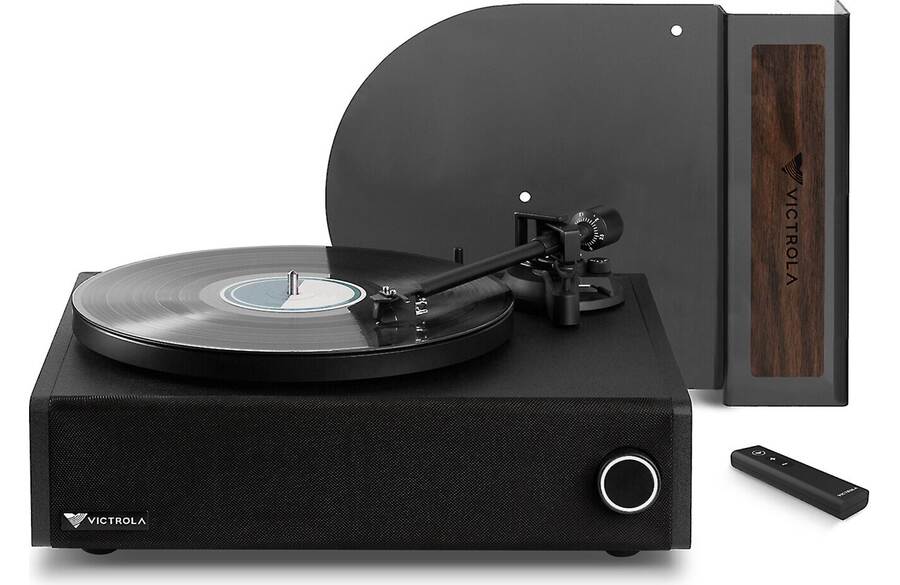
Victrola Premiere V1 Turntable Music System
Victrola Premiere V1 Turntable Music System _ photo:Victrola

The Bluetooth 5.0 feature allows you to stream music from a compatible device, making it easy to play your favorite tracks. The semi-automatic belt-driven turntable is easy to use, and the anti-resonant aluminum platter helps to reduce any unwanted vibrations or noise.

The straight aluminum tonearm with factory-installed VPC-190 moving magnet cartridge is another great feature of this turntable. You can choose between speeds of 33-1/3 and 45 rpm with the speed selector switch on the rear panel.

One of the standout features of this turntable is the Vinyl Stream technology, which allows you to stream your record to an external Bluetooth speaker or headphones (sold separately). The rear-panel connections include an optical digital input for connecting a CD player or compatible TV, a 3.5mm analog aux input, a stereo RCA line level output, a 3.5mm headphone output, and a mono RCA subwoofer output. There is even a wireless subwoofer pairing button for added convenience.

The illuminated function knob for power on, source selection, and volume control makes it easy to adjust the settings, and the included cover for the tonearm and platter helps to keep them protected when not in use. The remote control included with the turntable is also a nice touch.Victrola Premiere V1 Turntable Music System

The Victrola Premiere V1 Turntable is an excellent choice for anyone looking for a high-quality turntable with built-in speakers and a range of great features. Whether you’re a vinyl enthusiast or just looking to enjoy your music with great sound quality, this turntable is definitely worth considering.

On the back panel of the V1, you’ll find several wired inputs and outputs. For digital sources, there is an optical input that can be used to connect a CD player or compatible TV. For analog sources, there is a 3.5mm aux input that can be used to directly connect an audio source. Additionally, there is a 3.5mm headphone output for private listening. If you prefer to play your music through larger speakers, there is also a stereo RCA line output that can pass the signal to your existing receiver or amplifier. Finally, there is a subwoofer output that can be used to add a powered sub, like the matching Victrola Premiere S1.

The Victrola Premiere V1 turntable music system is a great option for anyone looking for a versatile, all-in-one music system that can handle a variety of sources and outputs. With its Bluetooth and VinylStream wireless capabilities, as well as its range of inputs and outputs, this system is sure to please even the most discerning music lover.

The Victrola Premiere V1 turntable is a good choice for people looking for an affordable and easy-to-use record player. Here are some of its pros and cons:

Pros:

  • Affordability: The Victrola Premiere V1 is a relatively affordable turntable compared to some of its competitors.
  • Built-in speakers: The turntable comes with built-in speakers, making it easy to use right out of the box without having to invest in additional speakers.
  • Bluetooth connectivity: The Victrola Premiere V1 also has Bluetooth connectivity, allowing you to stream music wirelessly from your smartphone or other Bluetooth-enabled device.
  • Portable: The compact and lightweight design of the Victrola Premiere V1 makes it easy to move from room to room or take with you on the go.

Cons:

  • Sound quality: While the built-in speakers are a convenient feature, they may not offer the best sound quality compared to external speakers.
  • Belt-driven turntable: The Victrola Premiere V1 is a belt-driven turntable, which some audiophiles believe can lead to speed inconsistencies and decreased sound quality.
  • Lack of adjustability: The turntable does not have many adjustable features, such as anti-skate or tonearm height adjustments, which can limit your ability to fine-tune the sound.
  • Build quality: Some users have reported issues with the build quality of the turntable, including the tonearm being too lightweight and flimsy, and the platter feeling loose.

On its own, the all-in-one audio system produces a decent sound. However, with only two built-in speakers and no fancy digital signal processing (DSP), it doesn’t offer anything exceptional. The wooden case does add some warmth to the sound, making it comparable to a good Bluetooth speaker. Nevertheless, when coupled with the S1 subwoofer, the audio quality becomes more interesting. It took some adjusting of the subwoofer’s volume and crossover settings, but once dialed in, the subwoofer made a significant difference. The audio gained the low end that was missing before, had more punch, and even a little more depth.

The turntable itself performed well, with no skipping even when mounted on top of the two speakers. The VPC 190 cartridge from Victrola proved to be more capable than typical all-in-one offerings. Additionally, the turntable comes equipped with a damped cue lever and auto-stop. However, the speed selector is an unusual choice – a rocker switch located on the back panel. While this keeps the top of the turntable clean, it can be inconvenient if you regularly switch between albums and singles.

The V1 has a unique feature that may not be suitable for some users. Unlike traditional turntables that come with a hinged dust cover that can be used during vinyl playback, the V1 has a custom design that sits flat on the turntable and arches over the tonearm. This means that the cover can only be used when the turntable is not in use, and it can be challenging to find a suitable place to put it during vinyl playback.

While some users may appreciate the V1’s unique design and the way it looks, others may find the departure from traditional turntable design to be a deal-breaker.

The Victrola Premiere V1 Music System is a definite step up from the usual all-in-one offerings if you’re looking for an audio system anchored by a turntable. The turntable is more capable, and the audio performance from the integrated speakers plus wireless subwoofer is superior. It has a modern look rather than a retro one and can double as a TV soundbar. While it lacks a built-in CD player, you can always connect one. Priced at $499, the Victrola Premiere V1 Music System is an excellent choice for those seeking a mid-range, all-in-one audio system.

Victrola Premiere V1 Turntable Music System

Victrola Premiere V1 turntable music system specs:

TURNTABLE2-SPEED BELT-DRIVEN WOODEN TURNTABLE WITH ALUMINUM PLATTER
CARTRIDGEVICTROLA PREMIERE VPC-190 MOVING MAGNETIC CARTRIDGE
INPUTSTV/OPTICAL, AUX, BLUETOOTH
OUTPUTSRCA LINE-LEVEL, VINYL STREAM, HEADPHONE
S1 CONNECTIONSWIRELESS SYNC TO VICTROLA V1, RCA LINE IN, LFE
S1 CONTROLSVOLUME CONTROL, LOW PASS CROSSOVER CONTROL
IN THE BOXV1: V1 SOUNDBAR SYSTEM & DUST COVER, 45 RPM ADAPTER, REMOTE CONTROL WITH BATTERIES, SILICONE SLIPMAT, DIGITAL OPTICAL CABLE, POWER CABLE
S1: S1 6.5″ POWERED WIRELESS SUBWOOFER, PREMIUM STEREO SUBWOOFER CABLE, POWER CABLE
DIMENSIONSV1: 16.5″L X 15.1″W X 8″H
S1: 9.1″L X 9.1″W X 10.2″H
WEIGHTV1: 17.4 LBS
S1: 10.4 LBS
POWERV1: 20W [2 X 10W(RMS), (PMPO 40S)]
S1: 70W

Marantz SR5015 – 7.2 CHANNEL 8K AV RECEIVER WITH HEOS

0

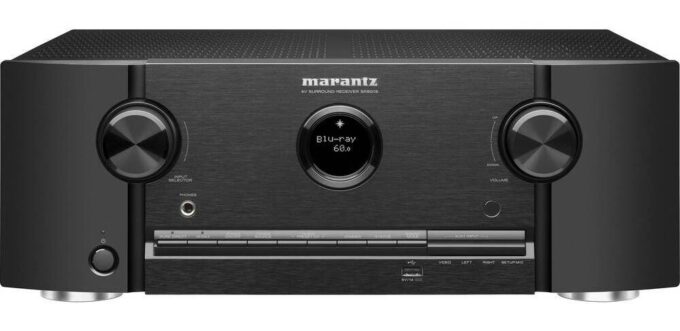
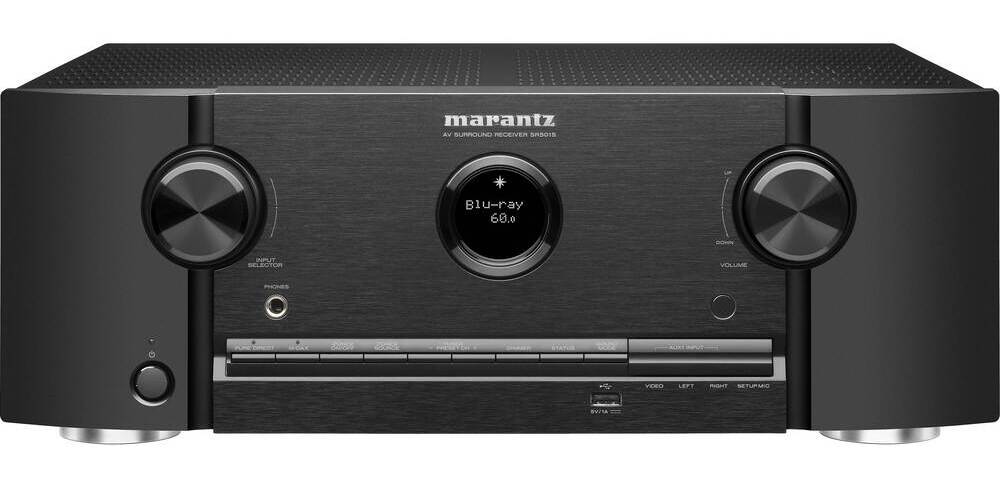
The Marantz SR5015 home theater AV receiver is a top-of-the-line option for those looking to elevate their home theater experience. With its 7-channel amplifier and 100 watts per channel output, this receiver delivers exceptional sound quality that will truly immerse you in your favorite movies and music.

One of the standout features of the Marantz SR5015 is its Hyper Dynamic Amplifier Modules (HDAM), which offer exceptional detail and dynamic range while also reducing noise. This technology ensures that you’ll hear every subtle nuance of your favorite music or movie, making for an incredibly rich and satisfying listening experience.

Marantz SR5015 home theater receiver
Marantz SR5015 _ photo Marantz

The Marantz SR5015 AV receiver also features Dolby and DTS surround sound decoding, as well as Dolby Atmos processing for use with in-ceiling or “height” speakers. The Atmos Height Virtualization and DTS Virtual:X create three-dimensional effects without height speakers, further enhancing the immersive quality of this receiver.

In addition to its impressive audio capabilities, the Marantz SR5015 also offers analog-to-HDMI video conversion and can upscale standard-definition video signals to HD and Ultra HD (up to 8K). It also includes Audyssey MultEQ XT auto setup and room calibration system, which ensures that your speakers are perfectly calibrated for your specific room and listening preferences.

Digital and streaming music options are plentiful with built-in Wi-Fi for listening to music from a networked PC, free internet radio, and music services. The receiver also includes HEOS Built-in technology, which wirelessly connects compatible HEOS components for whole home audio. It supports Pandora, SiriusXM, and Spotify (subscription required for some services) and works with Amazon Alexa and Google Assistant voice control assistants.

Marantz SR5015 home theater receiver
Marantz SR5015 home theater AV receiver

With Apple AirPlay 2, you can stream directly from an iPhone or iPad and ask Siri to play Apple Music. The Marantz SR5015 AV receiver also supports multi-room audio with compatible wireless speakers, and includes built-in Bluetooth for wireless music listening with smartphones, tablets, and compatible computers. You can even play audio through Bluetooth headphones only, or through Bluetooth headphones and connected speakers simultaneously.

Multi-room audio/video is also a breeze with dual-room/dual-source audio output and powered stereo outputs for the second room, allowing playback in both rooms at once. All Zone Stereo mode ensures that both zones stay in sync when playing the same source, and All Zone TV Audio lets you play surround sound in your main room and downmixed stereo in your 2nd room. It supports both analog and digital audio connections.

The Marantz SR5015 AV receiver also includes HDMI 2.1 audio/video switching with 6 in and 2 out, with 1 input and 2 outputs supporting 8K/60Hz and 4K/120Hz video. All inputs and outputs support 4K/60Hz video, and HDCP 2.3 technology ensures compatibility with Ultra HD sources and TVs. The receiver is also HDR-compatible for extended picture contrast and brightness with compatible TVs and HDR-encoded content, and supports HDR10, HDR10+, Dolby Vision, and HLG.

The Marantz SR5015 home theater AV receiver is an exceptional option for those looking for the best in audio and video quality. With its impressive array of features and technologies, this receiver will take your home theater experience to the next level.

Marantz SR5015 AV receiver specs:

HDMI Inputs: Back / Front6 / 0
HDCP2.3 supportYes
HDMI Outputs: Main / Zone2 / No
Video Conversion Analog -> HDMIYes
Analog to HDMI Scaling480i/576i up to 8K 60/50
HDMI to HDMI Scalingup to 8K 60/50
GUI Overlay on HDMIYes
HDMI 2.1: 8K/60Hz / 4K/120HzYes / Yes
HDMI 2.0: 3D / 4K / CEC / ARCYes / Yes / Yes / Yes / No
Enhanced ARCYes
HDR / HLG / Dolby Vision / HDR10+ / Dynamic HDRYes / Yes / Yes / Yes / Yes (update)
ALLM (Auto Low Latency Mode) Pass-through for gamingYes
Variable Refresh Rate / Quick Flame Transport / Quick Media SwitchingYes (update) / Yes (update) / Yes (update)
3D Signal Pass-ThroughYes
8K signal pass-through / scaling / GUI overlayYes / Yes / Yes
4K Signal Pass-Through / Scaling / GUI OverlayYes / Yes / Yes
HDMI Pass-Through in Standby ModeYes
Picture Adjust / Noise ReductionYes / Yes
CECYes
DSD Audio CapabilityNo
Audio Return ChannelYes
Auto LipSyncYes
-Marantz SR5015 home theater receiver
HEOS Multi-Room IntegratedYes
HEOS Link Compatibility: IR/ IPYes / Yes
Multi-Room Zones2
Zone Audio Source: HDMI / Opt, Coax / Network, USB / AnalogYes (2ch) / Yes (2ch) / Yes / Yes
Zone Audio Output: Speaker / PreoutYes / Yes
Zone HDMI Output from HDMI SourceNo
IP Control / RS232 Control / Web Control / App ControlYes / Yes /Yes / Yes
IR Flasher InYes
Marantz Remote BusYes
DC Trigger Output1
HDMI DiagnosticsYes
Auto Speaker Setup by MicrophoneAudyssey MultEQ XT
FL Displayport hole
Graphic User Interface – GUIAdvanced
ISF CertificationYes
GUI Languages3
Setup AssistantYes
Smart SelectYes
Firmware Update by Network / USBYes / Yes
Variable Cross OverYes
Optimized Bass RedirectionYes
Bass SyncNo
ECO ModeYes
Auto Power offYes
Sleep / TimerYes

Inputs/Outputs

Composite In / Out2+1 / 1
Component In / Out2 / 1
HDMI In / Out6 / 2
Multi-Room Video Out: Video / HDMINo / No
Analog In / Out4+1 / No
Phono (MM) InYes
Digital In: Optical / Coaxial2 / 2
Multi-Room Out: Analog / Digital1 / No
Multichannel Pre OutYes (7.2)
Subwoofer Out2
7.1 Multichannel InputNo
Speaker Terminal: Gold Plated Screw / Regular ScrewNo / Yes
Number of Speaker Terminals7
Speaker A / Bassignable
Bi-Amp Driveassignable
Multi-Room Speaker Terminalassignable
Front Inputs: Audio / Composite / Digital (Opt) / HDMI / USBYes / Yes / No / No / Yes
USB Audio / Made for iPod / Made for iPhoneYes / No / No
AM/FM TunerYes
Metal Front PanelNo
System Remote ControlRC042SR
Pre-Programmed / Learnable / LCD DisplayNo / No / No
Power Consumption in W650
Power Consumption No-Sound (ECO on/off) in W45 W / 75 W
Standby Consumption in W0.2
CEC Standby Consumption in W0.5
Network Standby Consumption in W2.7
Network Control On Consumption in WNo
Maximum Dimensions
Antenna:Horizontal:(W x D x H) in inches
Antenna:Vertical :(W x D x H) in inches
W/o Antenna:(W x D x H) in inches
TBD
17.3 x 13.7 x 6.3
(17.3 x 13.7 x 9.1)
【 17.3 x 13.3 x 6.3 】

Easy Stream HBO Max on Discord – A Step-by-Step Guide

0

I want to share with you how you can stream HBO Max on your Discord server so you and your friends can watch together while playing games or just hanging out. I love using Discord to connect with my friends and share our favorite shows and movies. And the best part is, you can also stream Hulu, Netflix, and other streaming services on Discord too!

To get started, make sure you have the latest version of the Discord app and an active HBO Max subscription. Keep in mind that while the basic streaming service is accessible on Discord, only users with a paid subscription can stream in 4K. I recommend getting a Discord Nitro account to get the best streaming quality.

First, open the Discord desktop app and log into your HBO Max account on your web browser. Select the movie or series you want to share with your friends.

HBO Max on discord
HBO Max (photo)

Then, go to User Settings in the Discord app by clicking on the small gear icon in the bottom left corner next to the headset icon. Under Activity Settings, select Registered Games from the sidebar menu. Click Add it! Select the open browser where HBO Max is from the drop-down menu. Then click the Add Game button.

Next, choose the server where you want to stream HBO Max and go to the Discord voice channel. This is where you and your friends can meet up and talk while watching the show or movie together. You can even create your own server and voice chat room for watch parties.

Once you’re in the voice channel, select the Share Screen option above your username. When the pop-up window appears, select the screen or app with HBO Max opened. In the next window, you can adjust the stream quality to get the best available resolution and frame rate. Keep in mind that if you don’t have a Nitro account, you can only stream in 720p resolution and at 15 or 30fps (choose 30).

When everything is set, click the blue Go Live button at the bottom of the screen to start streaming. And that’s it! You and your friends can now enjoy the show or movie together. If you want to stop streaming, simply click the Disconnect button.

What strategies did you use to create a social media campaign for your small business?

0

Social media campaigns are a great way for small businesses to connect with their audience, build brand awareness, and drive sales. Here are some steps to create a successful social media campaign:

  1. Define your goals and objectives: Determine what you want to achieve with your social media campaign. This could be to increase brand awareness, drive website traffic, generate leads, or boost sales.
  2. Identify your target audience: Determine who your target audience is and where they spend their time on social media. This will help you tailor your messaging and content to reach your audience effectively.
  3. Choose your social media platforms: Decide which social media platforms you want to use for your campaign. Consider the strengths and weaknesses of each platform and how they align with your goals and target audience.
  4. Create engaging content: Develop content that is engaging, informative, and relevant to your target audience. Use a mix of text, images, and video to keep your audience engaged.
  5. Leverage influencers: Partner with influencers or brand ambassadors to increase your reach and credibility. This could be through sponsored posts, product reviews, or giveaways.
  6. Run social media ads: Consider running social media ads to reach a larger audience and drive traffic to your website or landing page.
  7. Monitor and analyze metrics: Track the performance of your social media campaign and use the insights to optimize your strategy. Look at metrics like engagement, reach, website traffic, and conversions to measure success.

    Social media campaigns
    photo: Pixabay

We can offer some general insights about social media campaign for your small business:

  1. Small businesses are always looking for ways to reach their target audience and promote their products or services. Social media is an effective platform for businesses to connect with their audience, build their brand, and drive sales. The inspiration to create a social media campaign can stem from the need to increase brand awareness, engage with customers, or promote a new product or service.
  2. The strategies used to create a successful social media campaign depend on the specific goals and objectives of the campaign. However, some general strategies include:
  • Defining clear goals and objectives for the campaign
  • Identifying the target audience and understanding their interests and behaviors
  • Creating engaging content that resonates with the audience
  • Using relevant hashtags and keywords to increase visibility
  • Leveraging influencers or brand ambassadors to increase reach and credibility
  • Running social media ads to reach a larger audience
  • Monitoring and analyzing metrics to make data-driven decisions and optimize the campaign
  1. Some common challenges businesses face when creating a social media campaign include:
  • Limited resources (time, budget, staff)
  • Difficulty in standing out in a crowded social media landscape
  • Difficulty in creating content that resonates with the audience
  • Difficulty in measuring the success of the campaign
  1. The success of a social media campaign can be measured in different ways, depending on the goals and objectives. Some metrics to track include:
  • Engagement metrics (likes, comments, shares)
  • Follower growth
  • Website traffic
  • Sales or leads generated
  • Brand sentiment
  1. Here are some examples of successful social media campaigns:
  • A small fashion brand created a TikTok challenge that went viral and generated over 1 million views, resulting in a significant increase in website traffic and sales.
  • A local restaurant used Instagram to showcase their menu and engage with customers, resulting in a 30% increase in followers and a 15% increase in revenue.
  • A startup used LinkedIn to connect with potential investors and partners, resulting in $50,000 in funding and a partnership with a major tech company.
  1. Some tips for small business owners looking to create a successful social media campaign include:
  • Define clear goals and objectives for the campaign
  • Identify and understand your target audience
  • Create engaging and relevant content
  • Leverage influencers or brand ambassadors
  • Monitor and analyze metrics to optimize the campaign
  • Stay up-to-date on the latest social media trends and best practices.

Hisense PX1-PRO laser home theater projector review

0

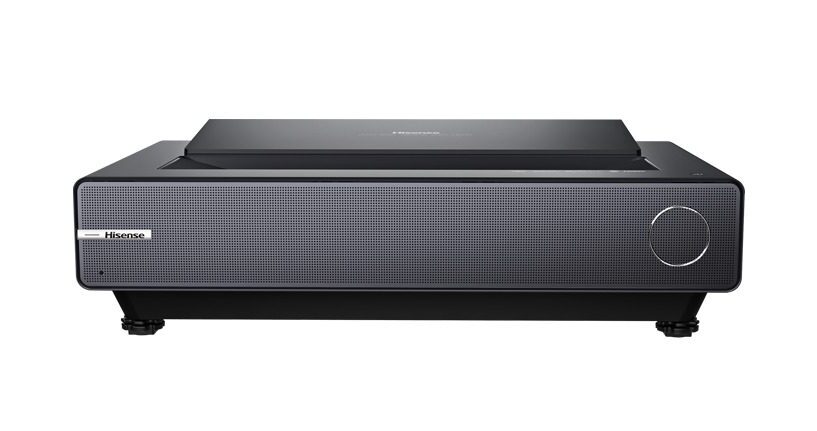
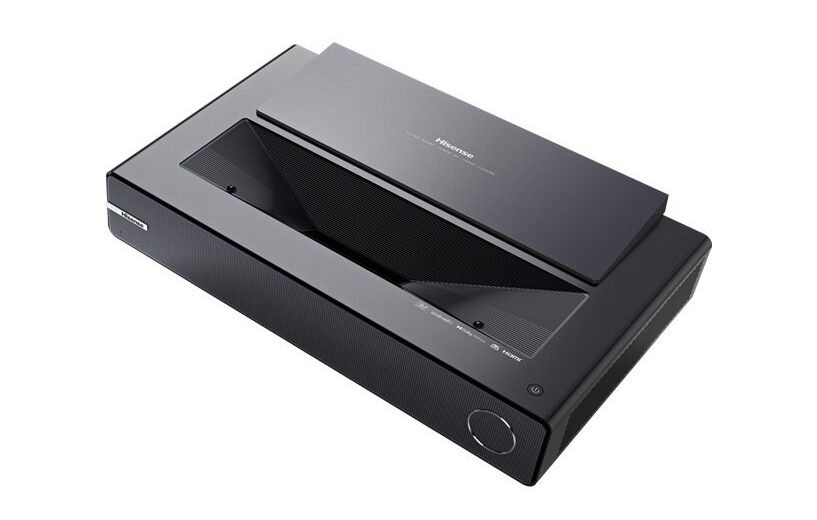
The Hisense PX1-PRO is a laser home theater projector that offers an ultra-short throw design, allowing you to place it almost directly under the screen. This projector uses a single-chip DLP system with pixel-shifting technology to display 4K resolution (3840 x 2160). The TriChroma laser engine combines pure red, green, and blue lasers for a rich, vivid color experience that can reproduce 107% of the BT.2020 color space for over one billion colors. With a light output of 2,200 lumens, this projector produces crisp image quality that is sure to impress.

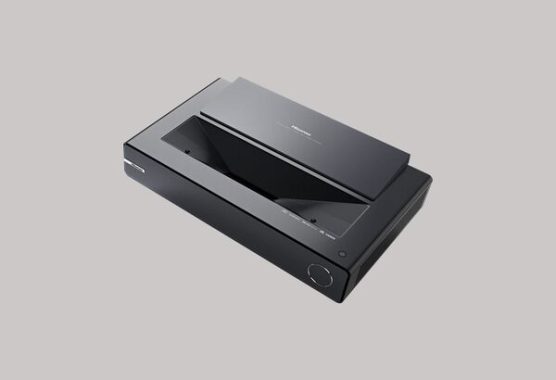
Hisense PX1-PRO laser home theater projector
Hisense PX1-PRO laser 4K home theater projector

One of the most significant benefits of the Hisense PX1-PRO is the long lifespan of its laser light source. With a lifespan of 25,000+ hours, this projector is sure to last you for many years. Safety proximity sensors also ensure that the lasers are automatically dimmed if an object comes too close.

This projector is also designed to support the latest high dynamic range (HDR) video sources, including HDR10 and HLG. It also features micro-second-level motion processing for smooth, clear action, making it perfect for gaming and watching sports.

The Hisense PX1-PRO also comes with smart features that allow you to watch streamed 4K video sources from popular services like Disney+, Amazon Prime Video, and YouTube (requires internet speed of at least 20Mbps). The Android TV interface also lets you browse movies and shows from across multiple streaming services all in one place, and Chromecast built-in lets you cast your favorite entertainment apps and video content from your phone or laptop. Built-in dual-band Wi-Fi (802.11ac) provides fast, reliable wireless streaming, and the remote even has a built-in Google Assistant, allowing you to control basic functions, search streaming services, set timers, and more. This projector is also compatible with Amazon Alexa devices.

Filmmaker Mode is another exciting feature of the Hisense PX1-PRO, which automatically adjusts picture settings to preserve the director’s intent. The Game Mode reduces input lag to keep your controls smooth and responsive, and the ALLM (Auto Low Latency Mode) recognizes gaming sources and adjusts automatically.Hisense PX1-PRO 4K laser home theater projector

In terms of connectivity, the Hisense PX1-PRO offers two HDMI inputs (version 2.1), with HDMI port 2 supporting eARC (enhanced Audio Return Channel). There’s also a Toslink optical digital audio output, an Ethernet port for a wired network connection, two USB Type-A inputs (one rear, one side) for connecting thumb drives or hard drives loaded with media, and an RF input for antenna/cable signals. The built-in tuner can receive over-the-air HDTV broadcasts (antenna required). photo: Hisense

Finally, the Hisense PX1-PRO features a built-in speaker system (30 watts) that supports Dolby audio, including Dolby Digital and Dolby Atmos. Built-in Bluetooth also allows you to stream music from your phone to the projector’s speaker system. The projector is also WiSA-ready, allowing for compatibility with wireless surround sound systems.

The Hisense PX1-PRO laser home theater projector is an excellent choice for those looking for a high-quality projector with a long lifespan and an ultra-short throw design. Its TriChroma laser engine, combined with its ability to display 4K resolution and HDR video sources, make it a great option for both movie lovers and gamers alike. Its smart features and compatibility with popular streaming services also make it a great option for those who enjoy streaming content.

Hisense PX1-PRO laser home theater projector specs:

Max. Resolution:   3840 x 2160
Screen size:   90″ to 130″
Luminance:        2200 lm (peak)
Color:       1.07 Billion
Input:         HDMI2.1 x 2  USB3.0 x 1  USB2.0 x 1  Digital Audio Out x 1  Analog Audio Out x 1
Hisense PX1-PRO

About ultra short throw laser home theater projectors

An ultra short throw laser home theater projector is a device that allows you to enjoy an immersive viewing experience without taking up much space. Unlike traditional projectors, which require a lot of distance between the projector and the screen, an ultra short throw projector can be placed almost directly under the screen.

This type of projector uses a laser light engine to produce vivid and lifelike visuals. The lasers work together to create a wider range of colors and greater brightness than traditional projectors. The lasers also offer a longer lifespan than traditional lamp-based projectors, which can save you money in the long run.

One of the main advantages of an ultra short throw laser home theater projector is its convenience. Because it can be placed so close to the screen, you don’t need to worry about running long cables or positioning the projector in a way that won’t interfere with your viewing experience. The proximity sensors on some models also ensure that the lasers will dim automatically if an object comes too close, making it a safe and practical choice for families with young children or pets.

Another advantage of an ultra short throw laser home theater projector is its ability to reproduce a wider range of colors. Some models can reproduce up to 107% of the BT.2020 color space, which means that you can enjoy a more vibrant and lifelike image. This is especially important for those who enjoy watching movies or playing games with vivid color palettes.

Overall, an ultra short throw laser home theater projector is a great option for anyone who wants a convenient and high-quality home theater experience. With its advanced laser technology and ultra short throw design, this type of projector is a practical and versatile choice for any home entertainment setup.

LG 83C2PUA OLED TV review: Premium Audio & Video Quality

0

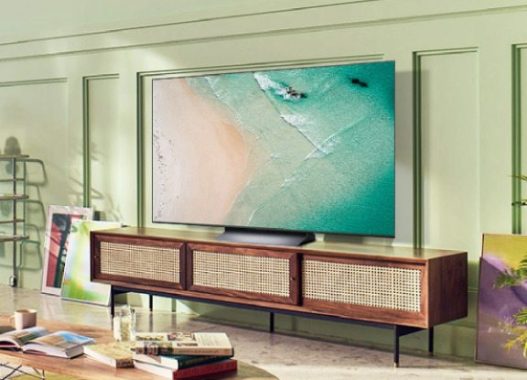
The LG 83C2PUA 83″ OLED TV is an impressive television with a stunning 4K screen resolution of 3840 x 2160 pixels. The self-illuminating OLED display panel produces near-infinite picture contrast, and pixel-level dimming enables each of the panel’s 8.3 million pixels to brighten, dim, or power off completely, resulting in exceptional detail and absolute black.

The “evo” panel technology boosts red, green, and blue subpixels for richer, more accurate colors, while the Brightness Booster makes this TV one of the brightest OLED models on the market. Additionally, the LG 83C2PUA has Cinema HDR (Dolby Vision, HDR10, and HLG) for extended picture contrast and brightness when viewing HDR content. Dolby Vision IQ optimizes your picture based on genre and the amount of ambient light in your room.

LG 83C2PUA OLED TV
LG 83C2PUA OLED TV

The Alpha 9 Gen 5 AI Processor 4K improves noise reduction, sharpness, contrast, and color, and AI Upscaling upconverts standard-def and high-def video to near-4K quality. AI Picture Pro automatically adjusts your settings based on the type of content you’re watching and its source, while Filmmaker Mode™ automatically adjusts picture settings to preserve the director’s intent. The Alpha 9 Gen 5 AI Processor uses deep learning algorithms to optimize picture quality and sound performance, making it one of the most advanced processors available for TVs. It can automatically adjust the picture and sound settings based on the content being viewed, ensuring the best possible viewing experience.

One of the key features of the Alpha 9 Gen 5 AI Processor is its ability to support a wide range of HDR formats, including Dolby Vision IQ, HDR10 Pro, and HLG Pro. This allows for more accurate and detailed image quality in high dynamic range content. In addition, the processor has advanced upscaling capabilities, which can convert lower resolution content to near 4K quality. It also features an AI Picture Pro feature, which uses deep learning algorithms to analyze the content and optimize the picture quality accordingly.

With a 120Hz refresh rate, this TV provides smooth, clear motion, making it ideal for gaming. The LG 83C2PUA also has gaming features such as Game Optimizer, 4K @ 120Hz on all HDMI inputs, and supports VRR (Variable Refresh Rate); AMD FreeSync Premium™ and Nvidia G-SYNC® compatible. It also has ALLM (Auto Low Latency Mode) for smooth, lag-free gameplay and HGiG (HDR Gaming Interest Group) mode that calibrates tone-mapping for accurate detail and shading. Moreover, it supports cloud gaming with Google Stadia and Nvidia Geoforce Now (subscriptions required).

The LG 83C2PUA OLED TV is compatible with various video sources such as Netflix®, Amazon Prime Video, and Disney+ (requires internet speed of at least 20Mbps), and the tuner receives over-the-air HDTV broadcasts (antenna required). It also has a Clear QAM tuner that decodes unencrypted digital cable signals up to 1080i without a set-top box (subscription required to receive cable channels).

The LG ThinQ® AI makes this TV the hub for all your smart devices, and it has built-in Google Assistant and Amazon Alexa intelligent voice assistants. It’s also compatible with Apple® HomeKit and AirPlay 2 to allow wireless streaming from your iPhone, iPad®, or Mac®. Sports Alert lets you set favorite teams and players to receive automated updates, and built-in Wi-Fi (802.11ac) provides fast, reliable wireless streaming. Room to Room Share lets you stream cable or satellite content to another compatible TV via Wi-Fi (sold separately).

The LG 83C2PUA OLED TV has multiple connections, including 4 HDMI 2.1 inputs that are HDCP 2.2 compatible for connecting to copy-protected 4K video sources. To view 4K and HDR content from connected sources, use a high-bandwidth cable. HDMI 2 supports eARC (enhanced Audio Return Channel) and supports 4K/120 Hz. It also has an RS-232C input, RF input for antenna/cable signals, Toslink optical digital audio output, Ethernet port for the fastest, most secure internet connection, 3 USB 2.0 inputs for connecting a thumb drive or other device, and an IR (infrared) blaster port.

What is evo panel technology ?

Evo Panel technology is a new development by LG that improves the performance of OLED (Organic Light Emitting Diode) displays. This technology utilizes a new type of material in the OLED panel that allows for brighter and more accurate colors, as well as improved efficiency and longevity.

The EVO panel technology is designed to boost the performance of the red, green, and blue subpixels, which are responsible for creating the colors we see on the screen. By enhancing the color subpixels, EVO panel technology can provide a wider range of colors with more accuracy and detail. In addition to color performance improvements, EVO panel technology also provides increased brightness. This means that the LG 83C2PUA TV, which features EVO panel technology, is one of the brightest OLED TVs on the market, capable of producing stunning HDR (High Dynamic Range) content with exceptional detail and absolute black.

EVO panel technology is a significant improvement to OLED displays, providing a more immersive and true-to-life viewing experience for users.LG 83C2PUA

4 HDMI 2.1 ports, Game Optimizer + 1 millisecond input lag – The next level of gaming!

The LG 83C2PUA OLED TV is a gamer’s dream come true. With its self-illuminating OLED display panel, the TV produces near-infinite picture contrast and pixel-level dimming, allowing each of the panel’s 8.3 million pixels to brighten, dim, or power off completely, delivering exceptional detail and absolute black. But the 83C2PUA goes further by providing gamers with input lag down to an imperceptible 1 millisecond and ALLM (Auto Low Latency Mode) that ensures games stay responsive at all times. The TV also supports VRR (Variable Refresh Rate) with both FreeSync Premium and G-Sync, keeping the picture smooth by preventing disruptive screen tearing.

With Game Optimizer, gamers can quickly adjust their settings with modes designed to help them get the most out of popular genres like first-person shooters, real-time strategy, and roleplaying games. The TV’s HGiG-approved HDR performance can also be auto-tailored for games, improving detail and shading so gamers don’t miss key visual cues while playing.

LG also includes support for cloud gaming with Google Stadia and Nvidia Geoforce built right into the TV, though a separate subscription and game controller are required. All of these features make the LG 83C2PUA 83″ OLED TV a true gamer’s delight.

LG 83C2PUA Sound quality

The LG 83C2PUA is equipped with a built-in 2.2-channel speaker system with a total power output of 40 watts. While this speaker system is sufficient for most casual viewing, it may not provide the same level of sound quality that an external soundbar or home theater system can offer.

However, the TV does feature some advanced sound technologies that can enhance the overall listening experience. For instance, the AI Sound Pro technology can simulate surround sound for a more immersive experience. Additionally, the TV is WiSA-ready, which means it is compatible with WiSA-enabled USB transmitters and WiSA certified speakers for creating a wireless audio system up to 2.1 channels. Furthermore, the TV supports Bluetooth 5.0 wireless audio streaming to a compatible speaker or set of headphones. This feature allows users to connect their favorite Bluetooth-enabled sound system or headphones to the TV wirelessly, providing more flexibility in terms of audio output options.

While the LG 83C2PUA OLED TV may not provide the same level of sound quality as a dedicated home theater system, its advanced sound technologies and wireless connectivity options make it a versatile and capable option for enhancing the overall listening experience.  photo: LGLG 83C2PUA

About Clear QAM tuner

A Clear QAM tuner is a type of digital tuner that allows users to watch unencrypted digital cable channels without the need for a cable box or a subscription. “QAM” stands for “quadrature amplitude modulation,” which is a digital signal format used by cable providers to transmit television channels.

With a Clear QAM tuner, you can receive unencrypted digital cable channels up to a maximum resolution of 1080i. This means that you can access many popular cable channels without having to pay for a cable box or a subscription. However, it’s important to note that most cable providers are moving towards encrypting all of their digital channels, which means that Clear QAM tuners are becoming less useful over time. If you’re interested in using a Clear QAM tuner, it’s important to check with your cable provider to see if they still offer unencrypted channels, and which channels are available in your area. Additionally, not all TVs come equipped with a Clear QAM tuner, so it’s important to check the specifications of your TV before making a purchase.

Whether or not the LG 83C2PUA’s 83″ screen is too large depends on personal preference and the viewing environment. For some people, an 83″ screen may be perfect for a home theater or media room, providing an immersive viewing experience for movies, TV shows, and gaming. However, for others, an 83″ screen may be too large and overwhelming for their living room or bedroom. It’s also important to consider the viewing distance. For an 83″ screen, the recommended viewing distance is typically around 8-10 feet. If you’re sitting too close to the screen, the image may appear pixelated or blurry, which can detract from the overall viewing experience.

Before purchasing a TV, it’s a good idea to measure the viewing distance and consider the size and layout of the room to determine what screen size will work best for you. It’s also worth visiting a showroom or electronics store to see different screen sizes in person and get a better sense of what will work for your needs.

  • Display Type   Self-Lighting OLED Evo Display
  • Wide Viewing Angle       Yes
  • Perfect Black                    Yes
  • Billion Rich Colors         Yes
  • Color Fidelity 100%       Yes

Sony STR-AN1000 7-Channel Amplifier Review

0

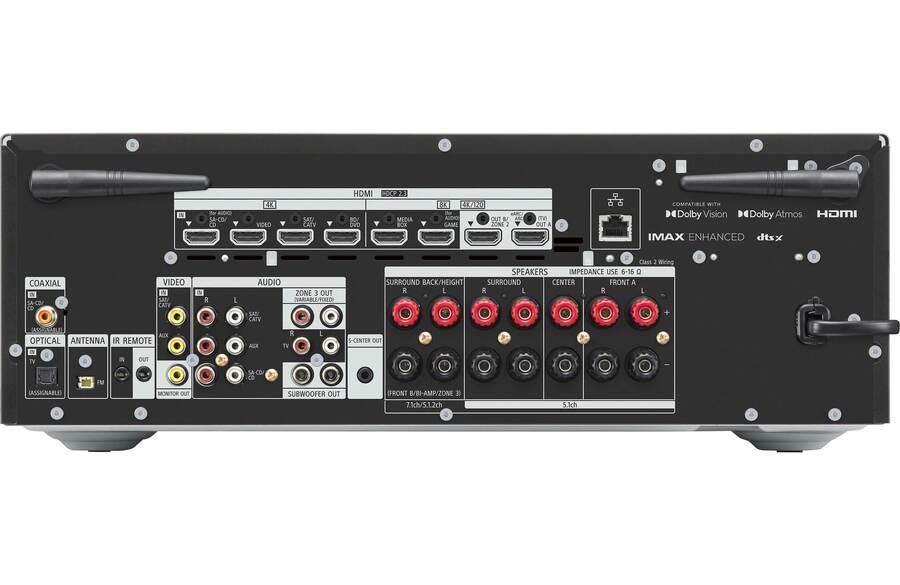
Discover the Sony STR-AN1000 7-channel amplifier, featuring 120 watts per channel, Dolby Atmos and DTS:X surround sound decoding, IMAX Enhanced, and more. Control the receiver with your smartphone using the Sony Music Center app, and enjoy digital and streaming music options with Chromecast built-in, Spotify Connect, and Apple AirPlay 2. With Digital Cinema Auto Calibration IX and 360 Spatial Sound Mapping, this amplifier delivers an immersive, three-dimensional soundstage that’s optimized for your room and speaker configuration.

Sony has launched its new Elevated Standard (ES) series of AV receivers, which includes four models primarily designed for custom installation (STR-AZ7000ES, STR-AZ5000ES, STR-AZ3000ES, STR-AZ1000ES), as well as the STR-AN1000, aimed at consumers seeking to upgrade their existing home theater system. According to Sony, the ES series represents the best receivers it has ever produced, featuring a frame beam base chassis (FBB chassis) that combines a conventional frame beam chassis with a transformer base to create a stiffer and more stable design, leading to better sound quality with less distortion. The ES series also boasts a thicker bottom plate and side walls compared to previous models, which further enhances its overall thickness. All four ES models come with a graphical user interface, and support leading control systems from Control4, Crestron, Savant, and OvrC, making them ideal for custom integrators.

When connected to a BRAVIA XR TV with Acoustic Center Sync, the ES series and STR-AN1000 can combine audio from the TV with that of the center speaker to produce a more immersive experience. Additionally, the AV receivers integrate with the BRAVIA Quick Settings menu, enabling users to change amplifier sound fields using only their TV remote. The STR-AZ5000ES and STR-AZ7000ES models offer a center-channel lift-up feature that leverages front height speakers to help raise the center channel sound location in cases where the center channel must be placed lower to the floor under the display device. Both models also offer a Dual Center Speaker function that uses both top and bottom center channel speakers to enhance the center speaker experience on very large screen displays. Overall, Sony’s ES series provides a range of high-quality AV receivers designed for custom installation, with the STR-AN1000 catering to consumers seeking an upgraded home theater experience.

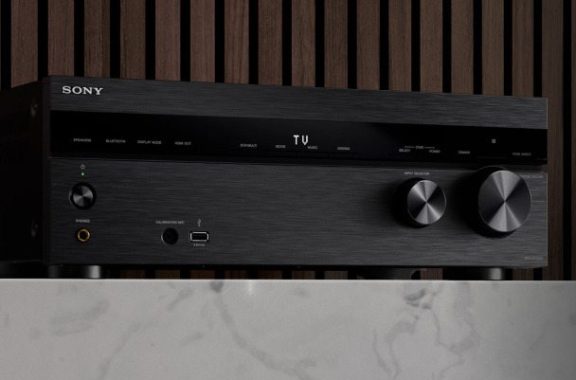
The Sony STR-AN1000 7-channel amplifier is a top-of-the-line audio system that delivers exceptional sound quality and an immersive home theater experience. With 120 watts per channel into 6 ohms (at 1kHz) and 0.09% THD, with 2 channels driven, this amplifier provides powerful and clear audio for all your entertainment needs.

Sony STR-AN1000 7-channel amplifier
Sony STR-AN1000

One of the most impressive features of the Sony STR-AN1000 is its Dolby Atmos and DTS:X® surround sound decoding capabilities. This technology allows you to experience three-dimensional audio that feels like it’s all around you, even without height speakers. Additionally, Dolby Speaker Virtualization and DTS Virtual:X® create stunning audio effects that add depth and richness to your audio experience.

The IMAX® Enhanced feature is another standout feature of the Sony STR-AN1000. It reproduces the full dynamic range of specially encoded IMAX soundtracks from compatible sources, creating an even more immersive audio experience for your favorite movies and shows.

The Sony STR-AN1000 also comes equipped with Digital Cinema Auto Calibration IX and 360 Spatial Sound Mapping. These features calibrate the sound to match your room and speaker configuration, resulting in an expansive, immersive soundstage that fills your entire room.Sony STR-AN1000 7-channel amplifier

Sony STR-AN1000 360 Spatial Sound Mapping

360 Spatial Sound Mapping is a feature of the Sony STR-AN1000 7-channel amplifier that calibrates the sound to match your room and speaker configuration for an expansive, immersive soundstage. The feature utilizes advanced digital signal processing (DSP) technology to analyze the acoustics of your room and optimize the sound for your listening environment.

The process involves placing a microphone at your listening position and running a series of tests to measure the acoustics of your room. Based on these measurements, the amplifier adjusts the sound to optimize the spatial placement of each channel, taking into account the position of your speakers, the size and shape of your room, and other factors that affect the sound quality. The end result is a more immersive listening experience that delivers a more accurate and detailed soundstage. With 360 Spatial Sound Mapping, you can enjoy your favorite music and movies with greater clarity, depth, and dimensionality, bringing you closer to the original recording and enhancing your overall listening pleasure. 360 Spatial Sound Mapping is a powerful and innovative feature that takes the listening experience to the next level, allowing you to experience your favorite music and movies in a way that was previously only possible in a professional recording studio or movie theater.

For music lovers, the Sony STR-AN1000 offers several digital and streaming music options. With Chromecast built-in, you can stream music over Wi-Fi with a wide range of compatible apps on your mobile device. The receiver also works with Google Assistant voice control devices and supports Spotify® Connect and Apple AirPlay 2. You can even control the receiver with your smartphone using the Sony Music Center app.

The Sony Music Center app is a smartphone application that allows you to control the Sony STR-AN1000 7-channel amplifier from your mobile device. The app is available for both Android and iOS devices and can be downloaded from the Google Play Store or the Apple App Store.

Once you have downloaded the app, you can connect your mobile device to the amplifier via Wi-Fi or Bluetooth and use the app to adjust the settings, change inputs, and stream music from your mobile device. The app provides an intuitive interface that allows you to easily navigate through the various settings and options, and it also provides access to advanced features like Digital Cinema Auto Calibration and 360 Spatial Sound Mapping.

With the Sony Music Center app, you can also stream music from a variety of online sources, including Spotify, Pandora, and Tidal. You can also use the app to browse your music library, create playlists, and control playback. One of the standout features of the Sony Music Center app is its support for voice control. If you have a compatible smart speaker or digital assistant like Amazon Alexa or Google Assistant, you can use voice commands to control the amplifier, change inputs, and stream music from your mobile device. The Sony Music Center app is a powerful and convenient tool that allows you to take full control of your Sony STR-AN1000 7-channel amplifier from the palm of your hand. Whether you’re streaming music from your mobile device or adjusting the settings for a home theater setup, the app provides an easy and intuitive way to get the most out of your audio system.Sony STR-AN1000 amplifier

Multi-room audio and video are supported with the Sony STR-AN1000, with three-room/three-source output and HDMI Zone 2 output for watching video content in another room. Additionally, the receiver offers powered stereo output for Zone 3 and analog stereo audio output (variable/fixed) for Zone 3.

Here are some pros and cons of the Sony STR-AN1000 AV receiver:

Pros:

  • The Sony STR-AN1000 offers excellent sound quality with a powerful output of 550 watts.
  • The receiver has a variety of input options, including composite, S-Video, and component video, as well as multiple digital audio inputs and a phono input for turntables.
  • The on-screen menu system makes it easy to configure and adjust settings.
  • The sleek and stylish design of the Sony STR-AN1000 fits well in many home entertainment setups.

Cons:

  • The technology of the Sony STR-AN1000 is outdated since it was released over two decades ago, and it lacks some of the features and capabilities of more modern AV receivers.
  • The Sony STR-AN1000 has limited connectivity options, as it does not have any HDMI ports.
  • The Sony STR-AN1000 does not have built-in support for streaming services like Spotify or Pandora, which may be a drawback for some users.
  • The power output of 550 watts may not be sufficient for larger home theater setups or for those who prefer to play their music at very high volumes.

The Sony STR-AN1000 offers a wide range of connection options, including HDMI 2.1 audio/video switching with 6 in, 2 out. The receiver also supports HDCP 2.3 technology, ensuring compatibility with Ultra HD sources and TVs. The system supports HDR10, Dolby Vision®, HLG, and IMAX Enhanced and gaming-optimized video processing technologies for a smooth, lag-free gaming experience. Additionally, Variable Refresh Rate (VRR) and Auto Low Latency Mode (ALLM) reduce or eliminate lag and frame tearing.  photo: SonySony STR-AN1000 7-channel amplifier

Sony has once again demonstrated its expertise in producing high-quality audio equipment with the STR-AN1000, featuring an array of desirable features. Despite its familiar exterior, the device has undergone a redesign, incorporating the latest connectivity support and enhanced customization options. The result is an AV receiver that delivers excellent sound quality for both movies and music.

In terms of price-to-performance ratio, the Sony STR-AN1000 is slightly more expensive($900) and less powerful than its rivals. However, this is a minor consideration when weighing the device’s impressive features and sound quality against its competitors.

The Sony STR-AN1000 7-channel amplifier is an exceptional audio system that delivers powerful and immersive audio for all your entertainment needs. With its impressive features and wide range of connectivity options, it’s a top choice for anyone looking to take their home theater experience to the next level.

Sony STR-AN1000 specs:

Interface

Input and Output Terminals

Composite Monitor Out: 1 Opt: 1 Coax.: 1 Analog Audio In: 4 Headphone Out: Yes Pre Out (Subwoofer): 2 USB Front(ver) / Rear(ver): 1/0 Ethernet Port (Power over Ethernet): 1(0)

HDMI supporting HDCP2.2 In/Out

HDMI Input supporting HDCP2.2(Front): 6(0) HDMI Output supporting HDCP2.2 : 2

Speaker Output Terminals

Front A: Yes, Front B: Yes(Common with Surround Back), Center: Yes, Surround: Yes, Surround Back: Yes, Height: Yes(Common with Surround Back), Bi-AMP: Yes(Common with Surround Back)

Auto Speaker Calibration

Calibration Features

D.C.A.C. IX, Speaker Relocation: Yes, Phantom Surround Back: Yes, Automatic Phase Matching: Yes, Calibration Mic: Stereo

Decoding Format for HDMI

DSD: Yes (Up to 2.8MHz 5.1ch), LPCM: Yes (Up to 192kHz/24 bit 7.1ch), DTS HD MA / DTS HD HR: Yes/Yes, Dolby TrueHD/Dolby Digital Plus: Yes/Yes, DTS / DTS-ES (Matrix6.1 / Discrete6.1): Yes/Yes, DTS 96/24: Yes, DTS:X: Yes, Dolby Dual Mono: Yes, Dolby Atmos: YesSony STR-AN1000 7-channel amplifier

Decoding Format for USB/Network Client

Hi-Res Format

DSDIFF(DSD), DSF, WAV(LPCM), AIFF(LPCM), FLAC, ALAC

Custom Install & Control Features

Zone2 Audio

2nd A: HDMI(Fixed)

IR Repeat (In/Out)

Yes(1/1)

General Features

Power Consumption

240W

GUI (Graphical User Interface)

Yes

Power Requirement

120V 60Hz

Auto Standby

Yes

Attachment

Calibration microphone, Calibration mic stand, FM wire antenna, Remote control, R03 (size-AAA) batteries

Size & Weight

Dimensions (W x H x D)

430x156x331mm

Weight

9.4kg

Video Features

A/V SYNC

Yes(Variable)

4K 60p 4:4:4 Support

Yes

3D over HDMI

Yes

HDR (High Dynamic Range)

Yes (HDR10, Hybrid Log Gamma, Dolby Vision)

Audio Return Channel

Yes

BRAVIA® SYNC™ (CEC Control)

Yes (System Audio Control, System Power Off, RC Pass Through, Language Follow, One-Touch Play)

4K Output

HDMI Video Output Capability: 8K, 4K, 1080p, 1080/24p, Deep Color (up to 36 bit), Triluminous Color (xvYCC)

HDMITM Pass Through

Yes

Audio Features

Sound Enhancement Technologies

Pure Direct, DSD Native Playback, Center Speaker Lift Up, In-Ceiling Speaker Mode

Network Connectivity

Network features

Bluetooth Receiver, Bluetooth Transmitter, Wi-Fi

Spotify Connect

Yes

Amplifier

Number of Amp. Channels

7 CH

Power Output

Front: 165W(6ohms, 1kHz, 1ch driven THD 0.9%)

Speaker Impedance

6ohms-16ohms

Sound Field

2CH Stereo, Direct, Auto Format Decoding, Multi Stereo, Audio Enhancer, Headphone 2CH

Tuner Features

FM/AM

Yes/No

Preset Channel (Sirius/XM/FM/AM)   –  TTL30 (30/0)                         Video: YouTube/Sony Electronics

DJI RoboMaster TT educational drone – High-Performance!

0

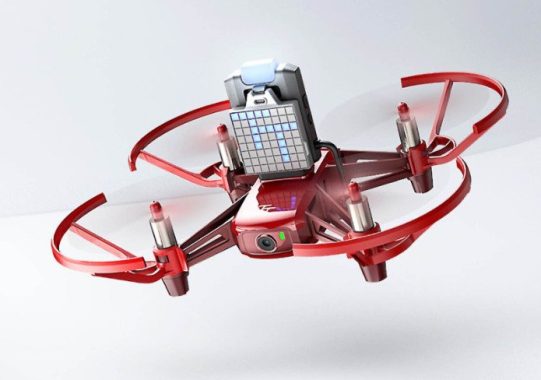
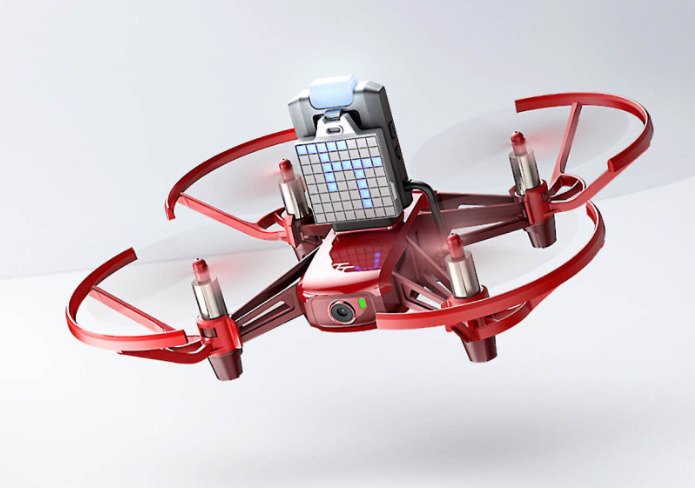
The RoboMaster TT is an updated version of the Tello EDU drone, featuring a programmable LED light and dot-matrix screen. It’s exciting to see a drone follow a sequence of programmed movements and light commands. Even more impressive is watching a group of drones perform a coordinated dance in a swarm. This educational drone is a powerful tool that makes coding simple and accessible, allowing students of all ages to explore the world of drone and AI programming.

To enhance the original EDU’s accessibility, the RoboMaster TT comes with a controller that has a built-in ESP32 chip and a modular extension board. This board enables the integration of third-party sensors into lesson plans, with a power supply for these accessories. The open-source RoboMaster SDK is based on Python 3.0 and supports Arduino, MicroPython, Scratch, graphical programming, and other methods. Students can use these tools to creatively expand and grow their knowledge, experimenting with various sensor types and developing new drone applications.

RoboMaster TT
DJI RoboMaster TT – photo 

The drone comes with a set of colorful mission pads that it can recognize, allowing for custom actions to be designed when the drone passes over the corresponding pad. Safety features include built-in collision detection to prevent crashes, a low battery indicator, and a fail-safe to activate if the drone loses connection. Propeller guards are also included in the box for added protection.

DJI Education supports the RoboMaster TT with a variety of rules for AI competitions, from landing courses and randomized mazes to air-to-ground operations alongside other unmanned vehicles such as the RoboMaster S1. Each competition promotes collaboration, problem-solving, and critical thinking skills. With the increasing importance of drone and AI education, gamification can engage students in the content and help them learn more effectively.

The DJI Robomaster TT is an innovative quadcopter designed for drone and AI education. With its compact size and advanced features, this drone is perfect for students of all ages who are interested in learning more about coding, robotics, and artificial intelligence.

One of the standout features of the Robomaster TT is its open-source controller, which comes equipped with a programmable LED light and dot-matrix screen. This allows for endless possibilities when it comes to programming and controlling the drone. The Robomaster TT is also compatible with Tello and Tello EDU apps, giving students even more options when it comes to programming and control.

Another exciting feature of the Robomaster TT is the ability to program and control multiple drones at the same time, creating a swarm of drones that can fly and move in unison. This is made possible by the stable dual-band Wi-Fi (2.4 GHz/5.8 GHz) and obstacle-sensing technology that helps avoid collisions. If the drone loses connection, it will land safely and automatically, and a low battery indicator lets you know when it’s time to land.DJI Robomaster TT

The Robomaster TT is also equipped with a 5-megapixel camera that takes stills and shoots 720p/30fps video, with electronic image stabilization to ensure clear and sharp footage. The drone can fly up to 17.9 miles per hour and has a maximum flight distance of 328 feet and a maximum flight height of 98 feet. The flight time is 13 minutes for the drone and 8.5 minutes for the controller and screen when installed.

The educational features of the Robomaster TT are equally impressive. The open-source RoboMaster SDK is based on Python 3.0 and supports graphical programming, Arduino, MicroPython, Scratch, and other programming methods. The controller comes with a built-in ESP32 chip and a 14-pin (2×7) extension board, which allows you to connect, debug, and supply power to third-party sensors for additional drone applications. The drone also supports I2C, UART, SPI, GPIO, and PWM sensor interfaces.DJI Robomaster TT

DJI RoboMaster TT specs:

  • Take-off weight  – 87 g (including the propeller blades, propeller blade protector, and batteries)
  • Dimensions  – 98×92.5×41 mm
  • Propeller blade  –  3”
  • Built-in functions – Infrared height determination, barometer, LED indicator, downward vision sensor, Wi-Fi, and HD 750P image transmission
  • Interface  – Micro USB charging port

Flight performance

  • Maximum flight distance
  • 100 m
  • Maximum flight speed
  • 8 m/s
  • Maximum flight time
  • 8 min[1]
  • Maximum flight height
  • 30 m

Battery

  • Removable battery
  • 1.1 Ah/3.8 V

Camera

  • Image
  • 5 MP
  • FoV
  • 82.6°
  • Video
  • HD720P30
  • Format
  • JPG (for images) and MP4 (for videos)
  • Electronic image stabilization
  • Supported

Extension accessory

Open source controller

  • Weight

  • 12.5 g (including the open source controller and ranging dot-matrix screen)
  • Dimensions
  • 49.5×32×15.2 mm
  • Operating mode
  • AP and Station modes
  • Wi-Fi frequency band
  • 2.4 GHz and 5.8 GHz
  • Bluetooth
  • 2.4 GHz
  • MCU
  • ESP32-D2WD, dual-core at 160 MHz, 400 MIPS
  • Open source
  • Supports SDK development, Arduino, graphical programming, and MicroPython programming.
  • Scalability
  • 14-pin extended interface (for I2C, UART, SPI, GPIO, PWM, and power supply)
  • Programmable LED indicator
  • Full-color LED

Ranging dot-matrix screen extension module

  • Dimensions
  • 35.3×31.5×8.6 mm
  • Programmable dot-matrix LED indicator
  • 8×8 red-and-blue indicator
  • Dot matrix driving function
  • IIC interface, automatic dot matrix scanning, 256-level adjustable overall brightness, and 256-level adjustable single-LED brightness
  • Ranging module
  • Infrared distance sensor (ToF)
  • Maximum distance measured
  • 1.2 m (indoor with white targets)

Adapter extension board

  • DIY adaptation

  • 14-pin extended interface to the 2×7-pin 2.54-mm in-line pad, 2 power indicator positions, and 2 debugging indicator positions

Mobile Phone Tools – designed to enhance the performance

0

Mobile phone tools refer to software applications that are designed to enhance the functionality and performance of mobile devices. These tools can be used to manage, secure, backup, and optimize the mobile device’s performance, among other things. Some mobile phone tools are pre-installed on the device, while others can be downloaded and installed from app stores or other sources.

Mobile phone tools are essential for businesses, organizations, and individuals who rely heavily on their mobile devices. For example, mobile device management software is used by businesses to monitor and control the use of mobile devices by their employees. Mobile antivirus software is used to protect mobile devices from malware and other security threats, while mobile data backup software is used to backup important data to prevent data loss.

Mobile Phone Tools
photo: Pixabay

In addition to the above, there are other mobile phone tools such as mobile payment apps, mobile VPN software, mobile device locator software, and many others. These tools provide users with convenient and secure ways to make payments, access blocked websites, locate lost or stolen devices, and perform other functions.

Mobile phone tools play a crucial role in enhancing the functionality and performance of mobile devices, and they are an essential part of modern mobile technology.

Superior 6 Mobile Phone Tools

  1. Mobile Device Management (MDM) software: MDM software allows businesses to manage and control mobile devices used by employees in the workplace. It provides remote management features such as device tracking, app deployment, security policy enforcement, and data wiping.
  2. Mobile Antivirus software: Mobile antivirus software protects your smartphone from malware, spyware, and other malicious threats. It scans for potential security risks and alerts you when there is a problem. Some of the popular mobile antivirus software include Norton Mobile Security, Kaspersky Mobile Security, and Avast Mobile Security.
  3. Mobile Data Backup software: Mobile data backup software helps you to backup and restore your mobile data. It includes contacts, messages, photos, videos, music, and other important files. Some of the popular mobile data backup software include Google Drive, Dropbox, and iCloud.
  4. Mobile Payment Apps: Mobile payment apps allow you to pay for goods and services directly from your mobile device. They are secure and convenient, and they eliminate the need for cash or credit cards. Some of the popular mobile payment apps include PayPal, Venmo, and Square Cash.
  5. Mobile Virtual Private Network (VPN) software: Mobile VPN software encrypts your mobile data and hides your IP address, which protects your privacy and security. It allows you to access blocked websites and content, and it prevents hackers and snoops from stealing your personal information. Some of the popular mobile VPN software include NordVPN, ExpressVPN, and Private Internet Access.
  6. Mobile Device Locator software: Mobile device locator software allows you to locate your lost or stolen mobile device. It uses GPS, Wi-Fi, and other technologies to pinpoint the location of your device. Some of the popular mobile device locator software include Find My iPhone, Find My Device, and Lookout Mobile Security.

Free (VPN) software

There are several free VPN software options available that you can use without paying anything. Here are some of the popular ones:
  • ProtonVPN: ProtonVPN is a free VPN that provides unlimited bandwidth and data usage. It offers strong encryption and allows users to connect to servers in several countries. It also has a strict no-logs policy.
  • Windscribe: Windscribe is a free VPN that offers up to 10GB of data per month. It has servers in several countries, and it allows users to connect to servers in unlimited devices. It also has a built-in ad blocker and malware protection.
  • Hotspot Shield: Hotspot Shield is a free VPN that provides fast speeds and strong encryption. It offers a limited data allowance of 500MB per day, and it has servers in several countries.
  • TunnelBear: TunnelBear is a free VPN that offers up to 500MB of data per month. It has servers in several countries and provides strong encryption. It also has a user-friendly interface.
  • Hide.me: Hide.me is a free VPN that offers up to 2GB of data per month. It has servers in several countries and provides strong encryption. It also has a strict no-logs policy.

It’s important to note that free VPNs may come with limitations such as data usage caps, slower speeds, and limited server options. Additionally, some free VPNs may collect user data and sell it to third-party advertisers, so it’s essential to do your research and choose a trustworthy VPN.

Quick Fix for ‘AirPlay Not Working’

0

Having trouble with AirPlay? Don’t worry! This article provides a quick and easy fix to get your AirPlay working again in no time. Learn how to troubleshoot and solve common AirPlay problems with this step-by-step guide.

If you’re having trouble with AirPlay not working, here are a few quick fixes you can try:

  1. Check your network connection: AirPlay requires a stable Wi-Fi or Ethernet connection to work properly. Make sure that your devices are connected to the same network and that the network is stable.
  2. Restart your devices: Try restarting your Apple devices and your Wi-Fi router or modem. This can sometimes help to resolve connectivity issues.
  3. Update your devices: Make sure that your Apple devices are running the latest version of iOS or macOS. Similarly, check for firmware updates for your AirPlay-enabled devices such as Apple TV or speakers.
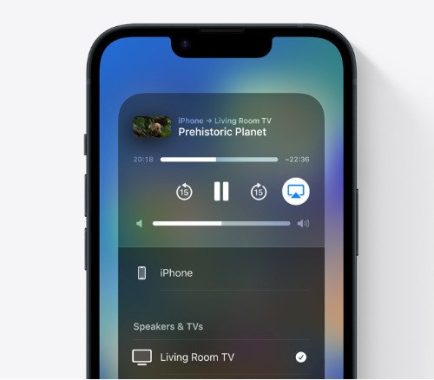
  4. Check AirPlay settings: Make sure that AirPlay is enabled on both your sending and receiving devices. On an iPhone or iPad, swipe down from the top right of the screen to access Control Center and make sure that AirPlay is turned on. On an Apple TV, go to Settings > AirPlay and make sure that AirPlay is turned on.
  5. Reset your network settings: If none of the above solutions work, you may need to reset your network settings. Go to Settings > General > Reset > Reset Network Settings on your iOS device. This will reset all network settings including Wi-Fi passwords, so make sure that you have this information handy before proceeding.
  6. Contact Apple Support: If you’ve tried all of the above solutions and AirPlay still isn’t working, it’s possible that there’s an issue with your hardware or software. Contact Apple Support for further assistance.

    Apple AirPlay
    Apple AirPlay photo

Check for AirPlay Compatibility

To check if your device is AirPlay compatible, you can follow these steps:
  • Check the device specifications: Most newer Apple devices such as iPhones, iPads, and Macs are AirPlay compatible. Additionally, many third-party devices such as speakers, TVs, and streaming boxes also support AirPlay. Check the device specifications to see if it explicitly lists AirPlay compatibility.
  • Look for the AirPlay icon: If you’re not sure whether a device supports AirPlay, look for the AirPlay icon (a rectangle with a triangle pointing up) on the device or in its documentation. This icon indicates that the device supports AirPlay.
  • Check Apple’s website: Apple maintains a list of AirPlay-compatible devices on its website. You can check this list to see if your device is listed. Keep in mind that this list may not be comprehensive and may not include newer devices that are compatible with AirPlay.
  • Try using AirPlay: The easiest way to determine if a device is AirPlay compatible is to simply try using AirPlay with it. If you see the AirPlay icon on your iOS device or in iTunes on your computer, select the device you want to stream to and try streaming audio or video. If it works, the device is AirPlay compatible.

The following devices are compatible with AirPlay for audio streaming:

  • iPhone, iPad, or iPod touch running iOS 11.4 or later
  • Apple TV 4K or Apple TV HD running tvOS 11.4 or later (version 1)
  • HomePod running iOS 11.4 or later
  • Mac running iTunes 12.8 or later, or macOS Catalina
  • PC running iTunes 12.8 or later

For video streaming, the following devices are compatible with AirPlay:

  • iPhone, iPad, or iPod touch running iOS 12.3 or later
  • Mac running macOS Mojave 10.14.5 or later

The following devices are compatible with AirPlay for streaming to:

  • Apple TV 4K or Apple TV HD running tvOS 11.4 or later
  • HomePod running iOS 11.4 or later
  • Speakers connected to the Audio Out port on AirPort Express 802.11n (2nd Generation) with the latest firmware update
  • Smart TVs labeled “Works with Apple AirPlay” and compatible with AirPlay 2 (version 2)
  • Speakers and receivers labeled “Works with Apple AirPlay” (version 3)

Remember that AirPlay compatibility can vary depending on the version of iOS, macOS, or tvOS that you’re using. It’s always a good idea to make sure that your software is up-to-date to ensure the best AirPlay performance.

If AirPlay is not working on your smart TV, there are a few things you can try to troubleshoot the issue:

  • Make sure your smart TV is compatible with AirPlay. Check the manufacturer’s website or documentation to confirm that your smart TV supports AirPlay.
  • Ensure that your smart TV is connected to the same Wi-Fi network as the device you are using to stream with AirPlay.
  • Check that AirPlay is enabled on your smart TV. This can typically be done through the TV’s settings menu.
  • Restart your smart TV and the device you are using to stream with AirPlay.
  • Make sure that both your smart TV and the device you are using to stream with AirPlay are running the latest software updates.
  • Try resetting your smart TV to its default settings. This will erase all data on the TV, so be sure to back up any important information before doing so.
  • If none of the above steps work, contact the manufacturer’s support team for further assistance.