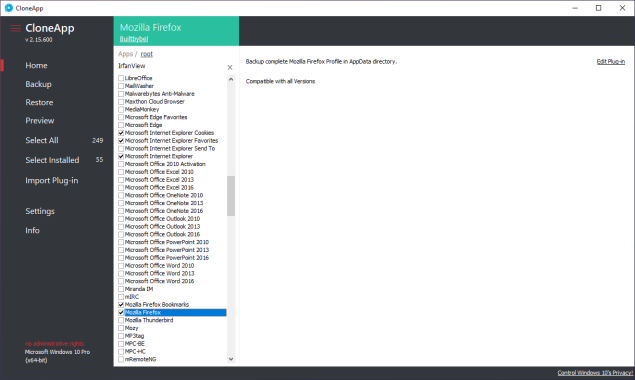
CloneApp tool allows you to backup your important files, edit and save registry entries, as well as custom folders of your choice, individual documents or files and other types of documents that you want to save.
Creating backups can be one of the most important things you can do with your files. If you have a lot of confidential files that you don’t want to lose, you should do it because it will save you the hassle of restoring files or finding them if you tend to lose them or are afraid of losing them.
Clone-App
To help you backup files, folders and registry entries, you can use an free portable and simple application called CloneApp, which could save you a lot of time, when migrating your software or need to re-install Windows.
This application comes with all the tools you need to easily create backups. It is intuitive to use and flexible enough to support a variety of different files and documents.
Works with one or more objects If you are looking for a tool that can help you backup almost everything, CloneApp tool is a perfect option. It will work with almost everything you want to backup, including individual files, folders, registry entries, documents and other programs or files.
CloneApp
Once you open the application, you will see all the currently installed programs and shortcuts to frequently accessed folders that you tend to use often.
A very serious worry in the event of a system collapse is redundancy. CloneApp is a special program that offers this function to enable the recovery of crucial data. Some of its key characteristics include streamlined programming, support for Windows 10 systems, initialization speeds that are 30% efficient than in the past, and an interface that is simple and easy to use.
This will make it much easier for you to start creating backups without having to search the interface for too long. In addition, it is very flexible and intuitive to use.
Personalized activities Most of the work done by the tool is automatic, but you can also customize the tasks by adding various files and features.
By pressing the Custom button, you can customize the task and add new processes, such as adding registry entries, for example, or other functions that you want to use. CloneApp is an intuitive application that you can use to easily create backup copies of individual or multiple files, folders or registry entries. Photo: builtbybel
License: Free Supported OS: Windows 11 / Windows 10 / Windows 8 / Windows 7
Download CloneApp – free portable and easy backup toolHERE
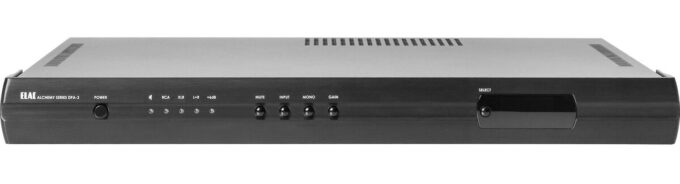
Nice and clean power in a small package The majority of high-powered amplifiers we have used are huge and weighty, and work sizzling. So we was nicely surprised by the Alchemy DPA-2 sleek, light-weight case and cool-running composure. ELAC’s Alchemy Series is setting up a brand new standard for value in top quality audio components. The Alchemy DPA-2 Power Amplifier real analog input stage preserves just about all the detail and nuance of the most sophisticated music phrases, though the Class D output stage along with switching power supply delivers characteristics that will get hold of you. Power output is rated at 210 watts per channel into 8 ohms, and 325 watts into 4 ohms. That is a lot of power for even large, power-hungry floor-standing speaker systems.
Alchemy DPA-2 Amplifier
A multipurpose choice for a wide variety of systems For many audiophiles, the DPA-2’s power output in stereo will be more than adequate. But for all those demanding ultra-high-power amplification, the DPA-2 can offer an outstanding 625 watts in bridged mono mode. Photo: ELAC
The Alchemy DPA-2 Amplifier is a ideal match, both equally, sonically and visually, for the companion ELAC Alchemy Series DDP-2 preamp/DAC. Some other stereo preamps may not supply a powerful enough signal level to generate full use of the DPA-2’s enormous power, but don’t be concerned. For those situations, this amplifier comes with a high/low gain switch for much better system corresponding.
It boasts a completely discrete FET input stage with DC servo-controlled output stage, extra low noise DC voltage regulators, a toroidal transformer and linear power supply for the input stage, and a high-efficiency, low-noise switching power supply for the Class D PWM output stage. The output power can be read out on the LCD info display screen.
Every single component in DPA-2 amplifier comes with appropriate, well-thought-out functions and topology that are essential to critical audience, like discrete inclusion of power supply, preamplifier, and signal processing to get you best-in-class sound. With decades of practical experience in award-winning analog and digital products and solutions, the Alchemy Series creates a completely new standard for value in the world of high-class audio sets. DPA-2 Amplifier price: $1,749.98
Connections:
stereo balanced XLR and unbalanced RCA inputs
5-way binding post speaker terminals accept bare wire, banana plugs, and spade lugs
12V trigger in/out for powering the amp on and off from another device
detachable power cord
Alchemy DPA-2 Amplifier
Alchemy DPA-2 Amplifier Specifications
Power Output/Channel (1% Thd+N, 1 Khz): All max power ratings at 1% THD @ 1KHz Stereo One channel driven into 8 Ohms 225W Both channels driven into 8 Ohms 210W One channel driven into 4 Ohms 390W Both channel driven into 4 Ohms 325W Mono 4 Ohms 420W 8 Ohms 625W Frequency Response: 5hz-20khz +/- 0.2dB Nominal Thd+N (1 Watt Into 8Ω): 0.003% Signal-to-Noise Ratio (1 Khz): 94dB Input Impedance: RCA=12K, XLR=19K Output Impedance: 0.03 Ohms @ 1KHz Channel Separation (1 Khz): 70dB @ 1KHz / n/a Gain: Stereo 24dB/30dB – Mono 18dB/24dB Inputs: Unbalanced RCA, Balanced XLR Outputs: Binding post 5-way Available Finishes: Black Dimensions (HxWxD) In: 02.00 x 17.50 x 15.00 including jacks Net Weight: 14.00 lbs
Bang & Olufsen Beosound A1 2nd generation-now better than ever The second generation of the classic A1 is packed with new features, such as the integration of Alexa and Tencent.
Small speaker-great sound As you would expect from this legendary Danish brand, the 2nd generation Beosound A1 delivers superior audio quality. Packed within the sleek design, you’ll find a two-way speaker for rich, full-bodied sound. Powered by a Class D digital amplifier that ejects no less than 60watts. For such a small speaker, the 2nd generation Beosound A1 sounds anything but small.
Bang & Olufsen Beosound A1 (2nd Gen)
Stereo pairing For even more immersive sound, the 2nd generation A1 can now be paired for stereo. With two A1s, you not only get a bigger and more generous sound, but also a real stereo stage, which means the music sounds like the artist intended by the studio or live recording.
Advanced Bluetooth connectivity The latest Bluetooth 5.1 wireless connection gives enhanced sound quality with more details. Compatible with Apple’s AAC codec as well as aptX Adaptive, the 2nd generation A1 produces the clearest and most accurate sound from music files. Simply connect it to your smartphone, tablet or computer and stream stored music or music from your favorite apps, such as Apple Music, Spotify and Deezer.
Getting straight to the point Connecting to your music device is now faster than ever. With Apple Fast Pair( MFi), Google Fast Pair and Microsoft Swift Pair the Portable Bluetooth speaker is ready to go with your smartphone or PC in next to no time. Voice assistant integration is now more comprehensive than ever. Alexa and Tencent integration with far field (3 to 5 meters) is now standard, making the 2nd generation Beosound A1 ideal for hands-free operation, perfect for when your hands are full in the kitchen. The 3-microphone array offer excellent voice pickup for high-quality hands-free voice calls.
Bang & Olufsen Beosound A1 (2nd Gen)
Improved battery life – With a built-in battery pack (up to 18 hours of play-time), the Bang & Olufsen 2nd generation Beosound A1 is the perfect portable bluetooth speaker to take with you. It is the ideal speaker for music in the garden, camping, festival or anywhere else where power is not readily available. Battery life is up to 46% with an incredible 43 hours of background volume (55dB) and an impressive 18 hours at higher listening levels (70dB).
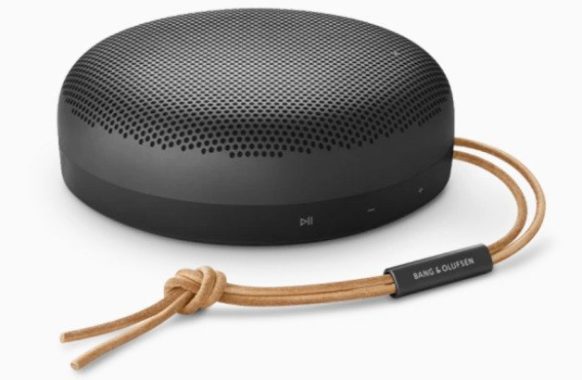
The Beosound A1 boasts a portable design that seamlessly combines elegance with simplicity, resembling a polished pebble. Its aluminum chassis, treated with a pearl-blasting technique, comes in a variety of colors, radiating sophistication and meticulous craftsmanship. Enhancing the premium feel is the USB-C charging cable, featuring tactile rubber that complements the overall design. Notably, the control arrangement has been revamped for user convenience, with larger, clearly labeled buttons placed closer to the leather strap for an intuitive experience. The leather strap now incorporates an updated tubular metal slider, addressing concerns raised by users about the previous design.
Beyond its aesthetic appeal, the Beosound A1 (2nd Gen) excels in build quality, achieving an IP67 rating for water and dust resistance. This enhancement makes it suitable for diverse environments, including outdoor activities, as it can withstand submersion in water up to one meter deep for 30 minutes. While its profile is compact and lightweight enough for easy backpack storage, caution is advised when hanging it externally due to its sturdy metal construction, which may pose some weight-related challenges. Overall, the Beosound A1 (2nd Gen) strikes a harmonious balance between design aesthetics and practical features, presenting itself as a high-end alternative to conventional Bluetooth speakers.
In the audio department, the Beosound A1 2nd Gen delivers a commendable performance. Powered by two 30W Class D amplifiers, its 3.5-inch woofer and 0.6-inch tweeter produce a satisfying output for its size. While not designed for large gatherings, it adequately fills spaces like a lounge or kitchen area with a detailed, balanced sound. The B&O app provides users with four listening modes—optimal, ambient, party, and speech—as well as the option to customize the EQ. Stereo enthusiasts can pair two 2nd Gen A1s for an enhanced stereo experience, although compatibility is restricted to the same generation.
Battery life sees a significant improvement, with up to 43 hours at low volume and 18 hours at moderate levels, surpassing the original’s 24-hour claim. Connectivity is upgraded to Bluetooth 5.1, offering improved energy efficiency and range. The A1 now supports both AAC and aptX Adaptive codecs, addressing a notable limitation of the original model.
The Beosound A1 impresses with its refined design, enhanced controls, and robust construction. Its audio quality, characterized by precision and balance, sets it apart in its category. Bang & Olufsen’s ability to preserve its signature sound profile in a compact form makes the A1 (2nd Gen) an appealing choice for those seeking a premium portable speaker. Overall, it proves to be a worthy investment for audio enthusiasts in its price range.
Unique Bang & Olufsen style The beauty of B & O design has always been in the details, and the Beosound A1 2nd Gen is no different. The rounded, anodized aluminum grille not only looks good, but also forms a strong, protective housing around the speaker. Bang & Olufsen brand leather strap is another premium design feature. At just 46mm deep and 558 grams in weight, the speaker is thinner and lighter than before, making it even easier to take with you. Photo: Bang & Olufsen
Dust and water resistant-IP67 protection rating The final improvement made to this impressive speaker is that it is now IP67 rated. This means that it has passed independent tests to be highly resistant to dust and water. This makes it the perfect speaker to use on the beach or poolside, without worrying if you splash with sand or water, or even fall into the pool. Enjoy premium sound, style and functionality, always and anywhere, with the Bang & Olufsen Beosound A1 (2nd Gen) portable bluetooth speaker. Price: $250
Recommended Room Size
5-30 m² 50-300 ft²
Speaker Configuration
1 x 3.5″ Woofer 1 x 3/5″ Tweeter
Amplifier
2 x 30W Class D For Woofer And Tweeter
Sound Direction
360 degrees
Frequency Range
55-20.000 Hz
Maximum Sound Pressure Level @1m
92 dB SPL
Bass Capability
62 dB SPL
Wireless Codec
AAC, aptX Adaptive
Stereo Pairing
Available between two Beosound A1 2nd Gens
Multipoint
Available with up to two devices
Customizable Sound EQ
Presets available and fully customisable through Bang & Olufsen App
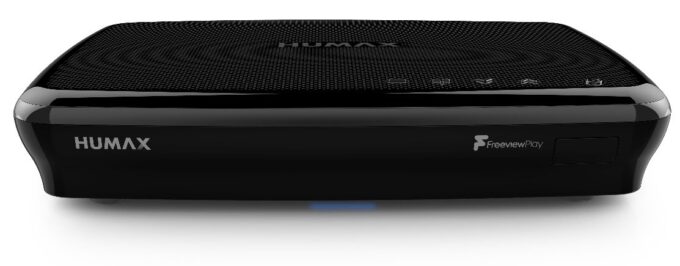
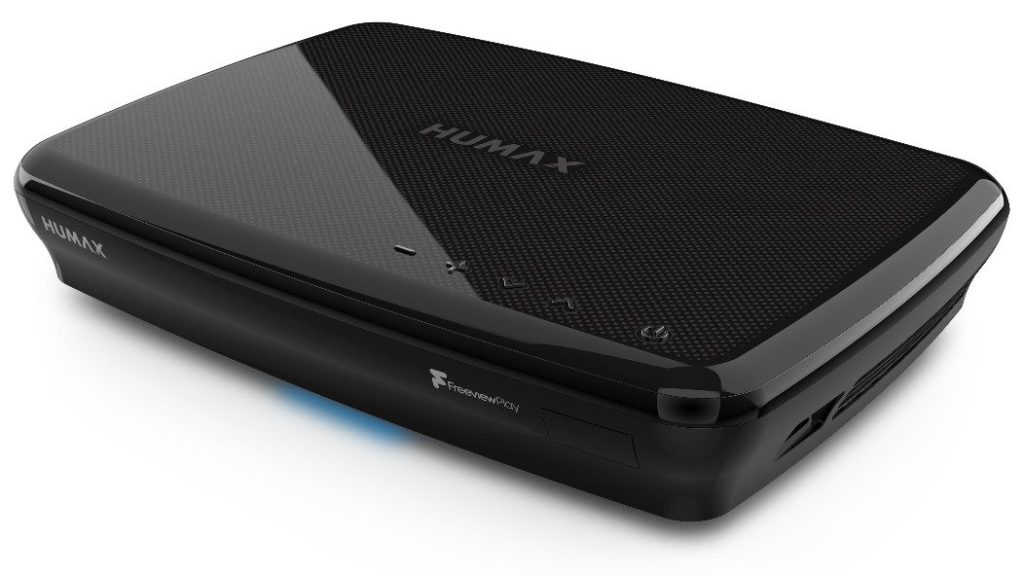
This Humax FVP5000T 2TB TV box continues to be an remarkable solution.
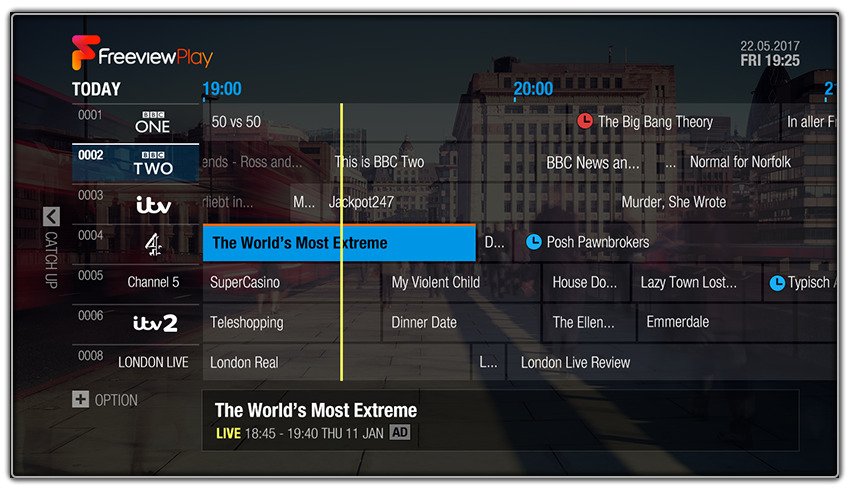
Freeview Play helps make it simple Freeview Play takes Freeview HD to the next stage by providing very easy to access, catch-up TV. You also find all the additional excellent advantages of Freeview. With over 75 subscription-free channels, which includes 15 HD channels available, there is usually something to watch with Freeview TV.
Humax FVP5000T 2TB TV box
The next step – scroll-back TV Link up the Humax to your Internet via Wi-Fi or Ethernet and you can improve your TV enjoying with simple and easy catch-up TV. Catching up on programs you’ve skipped is easy – just use the Electronic Programme Guide (EPG) to ‘scroll’ back on the last 7 days TV shows. With support for BBC iPlayer, ITV Hub, All 4 and Demand 5, the great majority of the last seven days really worth of TV are just a scroll away (needs broadband Internet connection with a minimal speed of 2Mbps). Now together with Netflix and YouTube As well as the standard UK TV channels, the Humax FVP5000T 2TB offers easy access to some other well-known video services. If you may have got a Netflix account then you can get quick, single-key access. YouTube, Freeview Explore and UK TV Play are as well included.
Record, pause and rewind live TV on a powerful 2TB hard drive Having a large 2TB hard drive, it’s easy to record, pause and rewind live TV. The big total capacity storage keeps up to 1000 hours of TV at standard definition. Record HD programmes and you have still got the opportunity for 500 hours of saved TV. With the pause and rewind feature, disturbances from mobile phone calls are no longer an problem – just pause the live TV and resume when you’re free again.
Humax FVP5000T 2TB TV box
Share through USB and UPnP It is easy to play-back stored video or music by simply insert in a USB device. Additionally, UPnP (Universal Plug n’ Play) allows you play content from your personal computer or NAS drive using your home network.
Application control Download and install the free Humax Live TV application (accessible for Apple and Android) and you will get a complete new level of control. With the application you can stream live TV or recordings right from your recorder to smart device. You can also arranged reminders, set up recordings and also access the TV guide from the myHumax portal.
Humax FVP5000T TV box
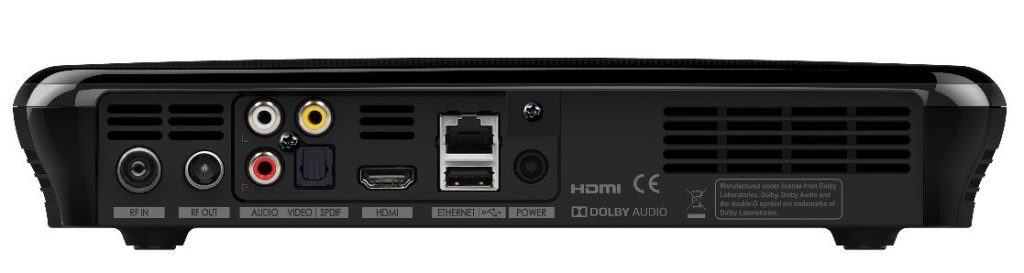
Simple connectivity For an simple, best quality connection to your TV, the Humax FVP5000T 2TB uses HDMI. Humax have not forgotten about about the audio, either. A option of analogue phono or perhaps optical digital audio outputs let you connect up to relatively a lot any kind of soundbar, AV receiver, amplifier or Hi-Fi system. Photo: Humax
Humax FVP5000T 2TB TV box
Play, record and stream, subscription-free, by using the Humax FVP-5000T 2TB.
Humax FVP5000T 2TB TV box specs:
Connections
DVB Connection Aerial
Ethernet Yes, USB Port(s) 2x, USB 2.0, Wi-Fi Yes, HDMI Yes
Audio/Video
Number of Tuners 3, Resolution (HD) Up to 1080p, Dolby Digital Yes, Optical Digital Audio Yes, 4K Compatibility No
Features
Hard Drive Size 500GB, 1TB, 2TB, Record Yes, Series Record Yes, BBC iPlayer Yes, ITV Hub Yes All 4 Yes, Demand 5 Yes, UKTV Player Yes, Netflix Yes, YouTube Yes
Inside The Box
Batteries 2x AAA, Remote Control Yes, User Manual Yes, Quick Start Guide Yes, Ethernet Cable Yes, HDMI Cable Yes
The Garmin dēzl OTR1000 portable truck driver navigator features a 10″ dual-orientation touchscreen that breaks boundaries and keeps user-friendly routes in sight at all times. And it has a number of useful features, including voice commands, built-in
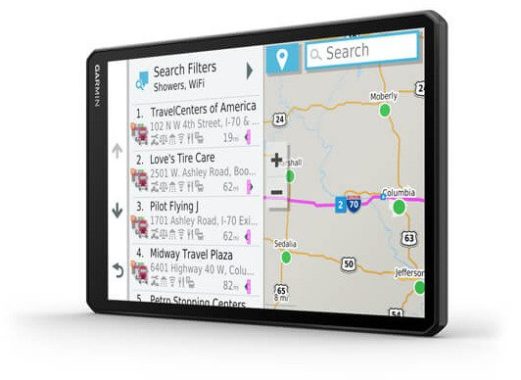
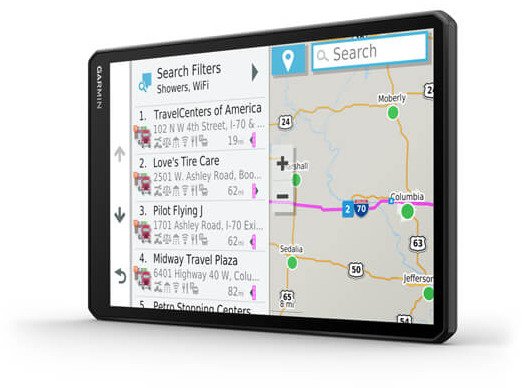
Delight your eyes with the 10″ dual-orientation display This dēzl OTR1000 navigator not only includes maps of the United States, Canada and much of Mexico, as well as Puerto Rico and the U.S. Virgin Islands, but also offers 3D representations of buildings, landmarks and terrain to help you find your way around. And you can choose how to display the maps on the pinch screen for a 10″ zoom, in landscape or portrait mode. Garmin includes several mounting options so that you can choose the one that suits you. The active lane guidance displays colored arrows for the correct lane for an upcoming turn, and you will see realistic representations of some traffic sign exchanges. You can activate the guide using voice: just pronounce one of its recognizable commands and it will start. Hit the road without using your hands to transport more safely. Truck-centric driving Truck-specific points of interest will come in handy when it’s time to find a shower, a weighing station or a connection, you can also find out where to find truck parking along the road. The Garmin Dock Loading dock database finds nearby loading areas and storage lots for unloading or picking up goods. Garmin has also uploaded popular routes through and around the major cities of the dezl in case you are not aware of where you are going. You can also get free map updates to keep up with route changes.
Garmin dēzl OTR1000
View TripAdvisor® traveler ratings for hotels, restaurants and attractions along your route or near your destination.
Preloaded Foursquare® content makes it easy to find millions of new and popular places.
Warnings of possible driving problems Are you worried about possible dangerous road conditions? The dezl OTR1000 provides information about upcoming roads, such as sharp turns, strong winds, weight limits and hazardous materials. You will also receive an alert for steep slopes so that you can reduce the change accordingly. If you are in an area where the speed limit for trucks is lower, this Garmin will warn you on the screen to help you avoid an encounter with smoke. The navigator also provides locations of mileage markers, as well as alerts at the five-mile border before arriving at a new state line or at the border with another country. Create a personalized profile for your team The information about the road restrictions allows this navigator to find the ideal route for your truck. You can create a custom profile with details about height, weight, length, width and hazardous materials, and the Navigator will offer you the best and safest route to your destination on most roads in the contiguous 48 states and Canada. If you are in a hurry, Garmin comes with standard trailer sizes that allow you to change the profile of your vehicle at the touch of a button. In addition, you can plan trips with several stops and easily save routes for future reference. Bluetooth Integration Built-in Bluetooth connectivity allows you to make hands-free calls with your compatible phone. Most of the points of interest in the Garmin database include phone numbers, so you can call in advance with a simple touch of the screen to make hotel reservations or check the availability of parking at truck stops. When combined with the Garmin Drive app, dezl can display text messages and incoming notifications on the screen.
Garmin dēzl OTR1000
Get traffic and more with the Garmin Drive app When you pair the Garmin dēzl OTR1000 navigator with your smartphone, you can use the free Garmin Drive app, which allows both devices to share information such as recently saved and found locations, where you parked and your current destination. The Drive app also gives you a complete view of the congestion along the route and the duration of possible delays. He will also suggest alternative routes to get to your destination faster. And you will not have to pay an extra penny for this service for the duration of your brother brother You can also get weather forecasts, real-time fuel prices and free access to live images from a large group of Photolive traffic cameras.
Director truck The dēzl OTR1000 includes a directory of preloaded trucks so that you can find a truck repair shop near you in case of problems with the platform. It also provides lists of 24/24 roadside services for late night truck emergencies. You can monitor service history, service hours (HOS), as well as mileage by status for Ifta needs. You can also search for available parking spaces at nearby truck stops and rest areas. Indications that will make the difference A powerful built-in speaker overcomes the engine noise so that you can listen to the upcoming maneuvers. The dēzl OTR1000 navigator provides Garmin Real Directions voice prompts, which indicate directions like a friend, using landmarks, buildings and business activities that are easy to see, and traffic lights, rather than streets with small signals that you may not see in time. Photo: Garmin Add-ons that can help The dezl works with Garmin’s eLog electronic recording device for automated accounting. This Garmin is also compatible with the optional Garmin BC 35 wireless rear-view camera.
Garmin dēzl OTR1000
Built-in Wi-Fi® connectivity are displayed when new updates are available.
PHYSICAL DIMENSIONS
9.65″ W x 6.06″ H x 0.83″ D (24.5 x 15.4 x 2.1 cm)
DISPLAY SIZE
8.5″ W x 5.3″ H (21.6 x 13.5 cm); 10.1″ (25.7 cm)
DISPLAY RESOLUTION
1280 x 800 pixels
DISPLAY TYPE
10.1″ wide view IPS, color TFT, with on-cell capacitive touch panel
DUAL-ORIENTATION DISPLAY
WEIGHT
18.8 oz (534 g)
BATTERY TYPE
rechargeable lithium-ion
BATTERY LIFE
up to 2 hours
MAGNETIC MOUNT
1″ BALL ADAPTER WITH AMPS PLATE
Maps & Memory
PRELOADED STREET MAPS
yes
DATA CARDS
microSD™ card (not included)
3-D BUILDINGS AND TERRAIN
yes
3D TERRAIN
yes
INTERNAL STORAGE
16 GB
INCLUDES MAP UPDATES
yes
Camera Features
BACKUP CAMERA COMPATIBLE
yes (BC™ 35) and 3rd party wired backup cameras with accessory mount
Navigation Features
GARMIN REAL DIRECTIONS™ LANDMARK GUIDANCE
yes
MILLIONS OF FOURSQUARE® POINTS OF INTEREST
yes
TRIPADVISOR® TRAVELER RATINGS
yes
ROUTE SHAPING THROUGH PREFERRED CITIES/STREETS
yes
VOICE-ACTIVATED NAVIGATION (OPERATE DEVICE WITH SPOKEN COMMANDS)
yes
INCLUDES TRAFFIC
yes (with Garmin Drive™ app)
LANE ASSIST WITH JUNCTION VIEW (DISPLAYS JUNCTION SIGNS)
yes
SPEED LIMIT INDICATOR (DISPLAYS SPEED LIMIT FOR MOST MAJOR ROADS IN THE U.S. AND EUROPE)
yes
DRIVER ALERTS FOR SHARP CURVES, SCHOOL ZONES, RED LIGHT AND SPEED CAMERA WARNINGS AND MORE
yes
Advanced Features
SMART NOTIFICATIONS VIA APP yes
WI-FI® MAP AND SOFTWARE UPDATES yes
ACCESS TO LIVE SERVICES VIA APP (TRAFFIC, WEATHER, ETC.) yes
Semi Truck Features
PREPASS WEIGH STATION NOTIFICATIONS AND BYPASS DECISIONS
yes
TRUCKING POINTS OF INTEREST
yes
TRUCK-SPECIFIC SPEED LIMITS
yes
TRUCK & TRAILER SERVICES DIRECTORY
yes
SUNRISE/SUNSET TIMES – TRUCKING
yes
STATE & COUNTRY BORDER NOTICES – TRUCKING
yes
SPECIALIZED TRUCK ROUTING
yes, find truck-preferred routes customized to the size and weight of your truck.
Thin, elegant and packing a great twin-bass punch, the Q Acoustics 3070S subwoofer offers a reliable base for both movies and tunes.
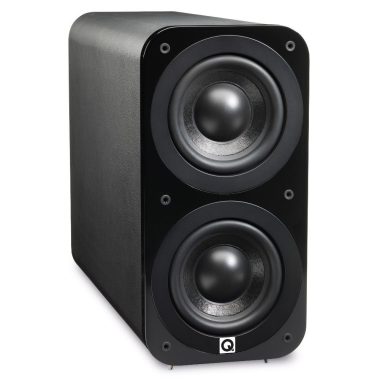
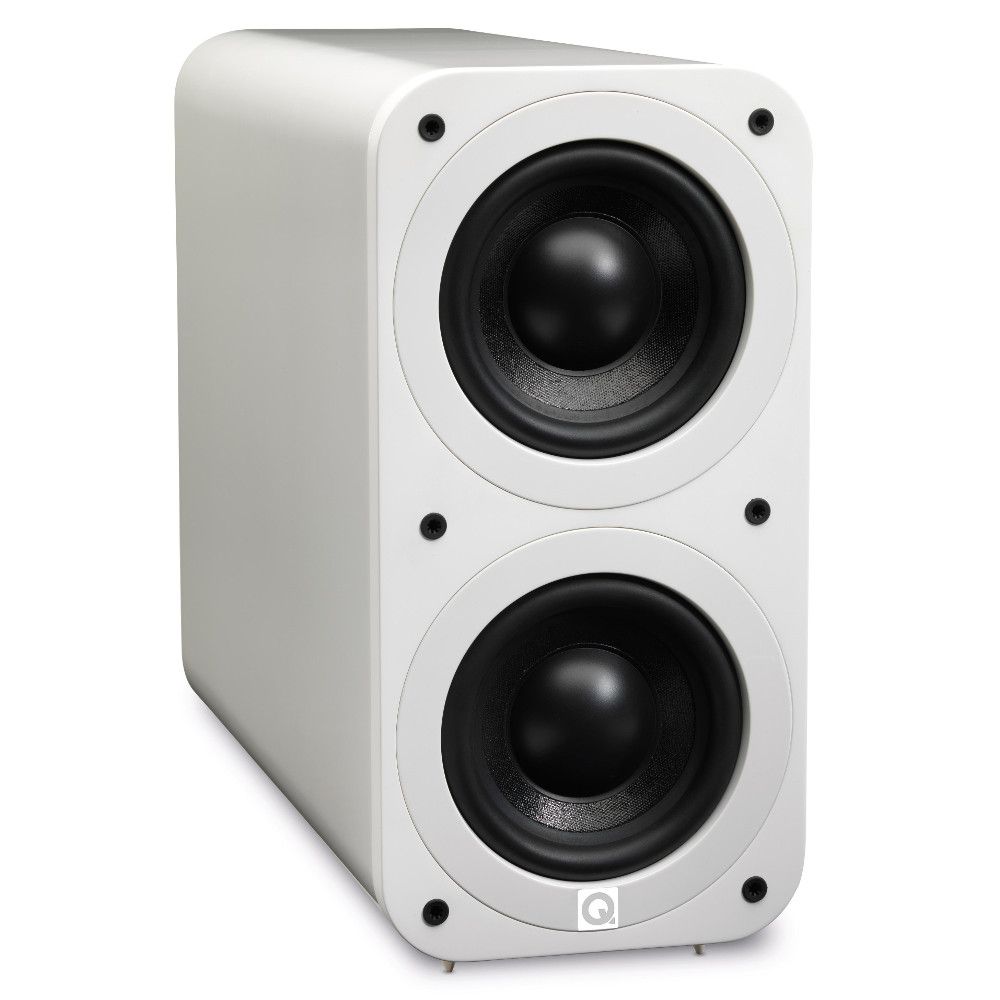
Twin cones for optimum punch Instead than using one big cone, the 3070S subwoofer uses 2 smaller sized cones. This has the benefit of providing the very same surface area as a larger cone, for depth as well as rumble, but much better speed. More compact cones can move quicker and so offer a punchier sound with more precise timing. Regards to the built/in 140W amplifier, power and control are never an problem, either.
Q Acoustics 3070S subwoofer
Top quality construction In addition to sounding considerably better than the majority of subwoofers at this selling price (£179), the 3070S subwoofer is also much better finished. Flush-mounted drive units and curved edges significantly raise the aesthetics, while spiked feet keep the subwoofer firmly planted and help tighten the bass answer.
Simple to accommodate In comparison to competitor subwoofers, the 3070S is simpler to live with. At just 200mm wide, it can suit into areas conventionally-shaped subs will not. Placed versus the older Q Acoustics 2070i, the newer version is also more sleek and stylish, specially in terms of depth.
Q Acoustics 3070S subwoofer
Variety of finishes Still specifically created with signature rounded cabinets, the brand new 3000-Series is accessible in a wider range of finishes than ever. Select between Matte Graphite, Black Leather Effect or Black Lacquer for a technical look to blend well with your some other AUDIO-VIDEO components. Additionally, White Lacquer looks excellent in modern interiors, although American Walnut vinyl finish is the perfect match for both, vintage and traditional furniture. Photo: Q Acoustics
Q Acoustics 3070S
An exceptional subwoofer in its modern excellent looks but one that still punches really hard, the Q Acoustics 3070S subwoofer delights both, the eyesight and the ear.
Q Acoustics 3070S subwooferSpecifications:
Enclosure type: Ported
Bass Unit: 2 x 170mm
Amplified Power: 140W rms
Crossover Frequency: 50Hz – 150Hz (var)
Dimensions: 400 x 200 x 525 mm (15.7 x 7.9 x 20.7 in) overall
The Bose Smart Soundbar 900 is the newest and most powerful entry in Bose’s impressive line of soundbars. It offers the high-quality sound that Bose is famous for and has a clean and elegant look that fits almost any room.
This soundbar has all the useful features that have made its predecessors a hit with our customers, such as built-in voice control and robust music streaming options. But it also supports DOLBY Atmos, an immersive surround sound designed to give you a theatrical experience from the comfort of your couch. Extended cinematic listening The Bose Smart Soundbar 900 has seven built-in speakers, each expertly arranged to direct discrete sounds to different parts of your room. Reflecting the sounds of the ceiling and walls, the soundbar generates effects that seem to come from everything around you.
Bose Smart Soundbar 900
With Bose’s TrueSpace technology, which simulates pitch effects, these sounds even seem to fall from the ceiling. This means that you can hear a plane rising above you and follow the cars as they buzz from one side of the room to the other. Advanced voice control Amazon Alea The soundbar microphone rejects noise, allowing you to pick up commands in noisy environments, even when the bar is playing at full volume!
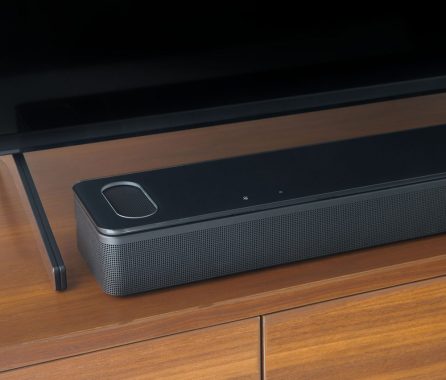
The most immersive Bose voice control soundbar is the Bose Smart Soundbar 900. Two specially designed upfiring dipole speakers use Bose technology to reproduce sound coming from all directions, including an above Dolby Atmos soundbar. Your sound is given an additional height dimension thanks to this wireless Bluetooth soundbar. Bose TrueSpace spatial processing, which is proprietary, analyzes and upmixes sounds to create an immersive listening experience in Dolby, stereo, and other formats. Elegant design Bose paid careful attention to every detail when creating a Bluetooth soundbar speaker to ensure that it looked as amazing as it sounded, from material quality to construction, finishes, and control system.
With Voice4Video ™ , the soundbar allows Alex to leave the remote control on the table and use your voice to directly access your favorite TV show in the blink of an eye.
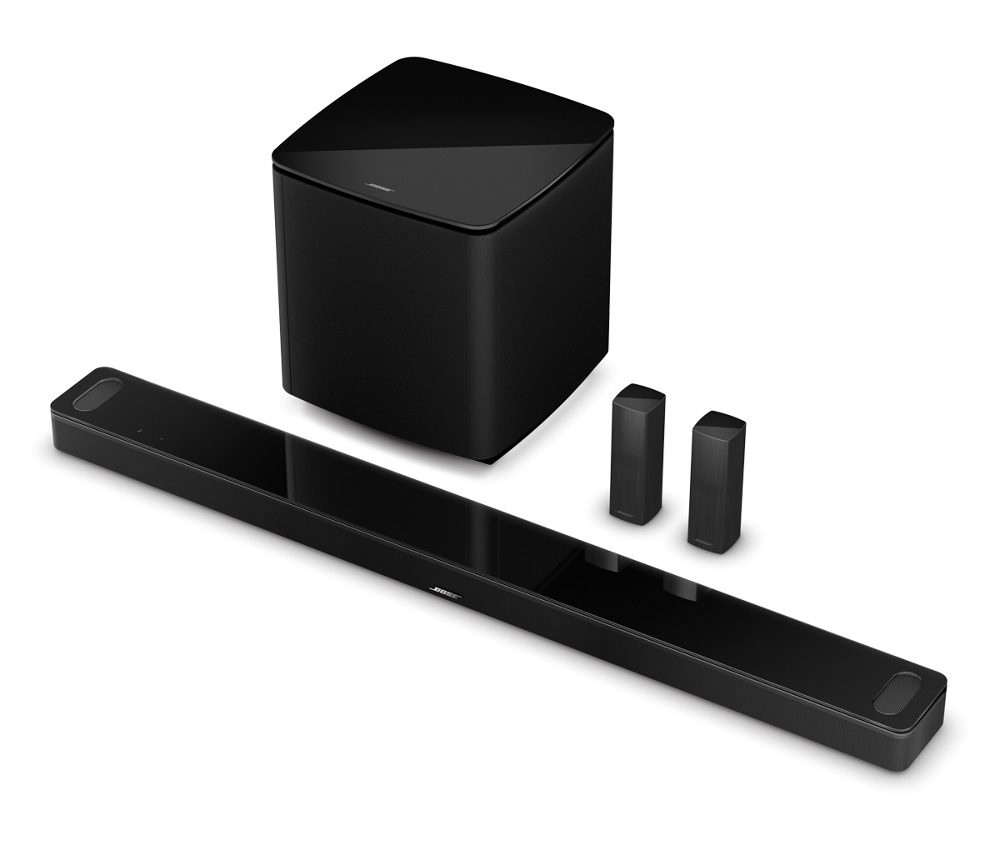
Music throughout the house Part of the Bose Smart family, the soundbar can be bundled with other compatible Bose smart speakers throughout the home. Whether you need something to improvise while preparing dinner or background music while playing a board game in the living room, Bose has you covered. Photo: Bose Sound on request The Bose Smart Soundbar 900 has several options to further enhance the surround sound system. If you are looking to bring low-end noise, you can add the 500 bass module without a Bose module or the 700 bass module. With its compact surround speakers without surround or its 700 Surround speakers, you can wrap yourself in surround sound effects. If you want more of everything, add a sub and surround for a full and rich surround sound experience.Remote Bose Smart Soundbar 900
Flexible The Bose SimpleSync function allows you to pair the soundbar directly with SoundLink-enabled Bluetooth speakers or Bose 700 noise cancelling headphones. Plugging in headphones is a lifesaver if you’re watching TV late at night.
Supported audio format: Dolby Atmos®, Dolby Digital, Dolby TrueHD, Dolby Digital Plus
Video source compatibility: HDMI
ADAPTiQ audio calibration
Voice4Video™ technology
SimpleSync™ connectivity
As you’d expect, you can wirelessly stream all your favorite music services thanks to Wi-Fi®, Bluetooth®, Chromecast built-in, Apple AirPlay 2, and Spotify Connect compatibility. If it’s available on your mobile devices, you can hear it through the Bose Smart Soundbar 900. What’s more, since your smart soundbar can be grouped with any other Bose smart speakers over Wi-Fi, the Chromecast built-in feature can be shared across Bose products for a seamless audio experience throughout your home.
Even when the music is playing loud, noise-rejecting microphones work together to listen for your commands everywhere. Simply turn off the mics when you need some privacy by pressing the mic-off button. Voice-activated soundbar No other smart soundbar can increase your voice capabilities like the unique Bose Voice4Video technology. You may use simply your voice to manage your TV, cable, and more in addition to your Dolby Atmos soundbar. Your choice of wireless soundbar streaming — You can wirelessly stream anything you want, however you want, using Wi-Fi, Bluetooth, Apple AirPlay 2, and Spotify Connect.
Music app by Bose To set up Voice4Video, connect your Bluetooth soundbar speaker, and explore all of your music in one destination, download the Bose Music app. It’s yet another convenient way to organize and arranging compatible Bose devices.
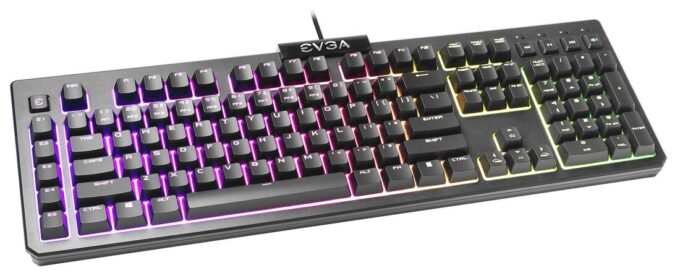
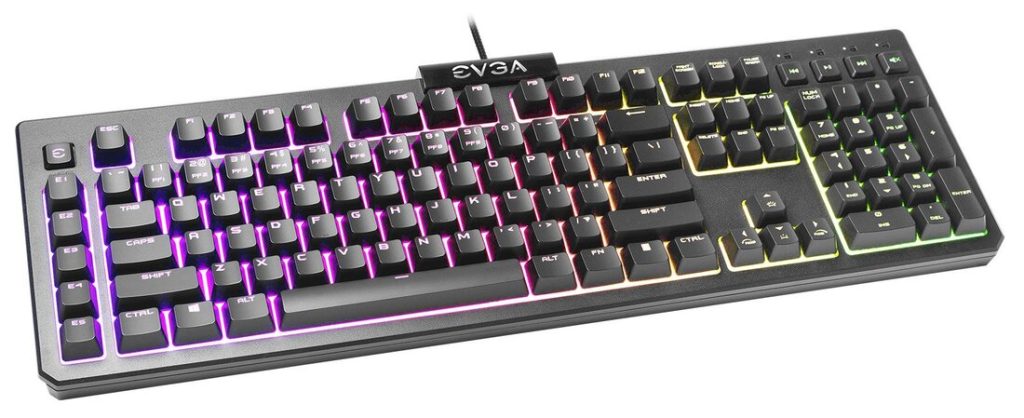
The EVGA Z12 keyboard is fine for programming. It offers additional macro keys, and you can reprogram any specific of its keys. There is RGB backlighting if you do the job in a dark conditions, but it can only zone-lit. Typing feels just alright simply because the keys are soft and very sensitive, which could lead to a lot more typos, but could possibly be light to press overall. The EVGA Z12 is good for home office work with. It’s a full-size solution with very good ergonomics because it has 2 incline controls, and even though it does not come with a wrist relax, you can purchase one separately. The rubberized dome switches are light-weight to press, but typing level of quality can feel basically acceptable because they’re sensitive and may possibly cause an improve in typos, and they don’t offer a ton of tactile responses.
EVGA Z12 keyboard
The EVGA Z12 is a excellent gaming keyboard. You can easily reprogram any of its keys using the specific software, and there are 5 additional macro keys. It has RGB backlighting, but it’s zone-lit and not separately lit up. The rubber dome switches are light to push for a fast gaming experience, but the latency may be too high for many gamers. The build quality of the EVGA Z12 keyboard feels alright. It’s a quite standard keyboard made out of plastic material that flexes a lot. It’s mostly matte plastic with the exception of for the shiny plate on top where the company logo is. The laser-etched ABS keycaps truly feel low-cost because they’re slick and are predisposed to oil shine. Luckily, you can replace the keycaps with any Cherry MX-compatible keycap because the rubber dome switches have appropriate stems. The switches by themselves really feel soft, and the keys not necessarily really stable, particularly the bigger ones such as the Spacebar and Enter keys. 5 rubber pads directly below the keyboard keep it in place, and it’s fixed even with the incline feet fully extended, so it should not move during standard use. It’s also certified to be IP32 ranked, so it should continue doing work even if you spill some water on it.
A well made keyboard with colorful, adjustable lighting, that has a very nice key action with a soft click per keypress noise. The noise is not loud at all and the keystrokes are pleasantly short and easy to press, with a nice typing feel. The media controls are easy to use and functional, and the full size keyboard is a pleasure to type on in contrast to a gaming keyboard with cherry red switches. It seems properly responsive in fast paced games and the self turn off feature kills the lights quickly when away from the keyboard. We haven’t tried the macro recording, but it records directly from the keyboard vs using an app. The application does offer many other optional adjustments. The cushion palm rest is comfortable and attaches snugly with magnets and self centers.
The EVGA Z12 has fine general typing quality. The keycaps and key spacing are relatively typical, so it shouldn’t take long to get used to the feel. You can also replace the keycaps with whichever Cherry MX-compatible keycaps you choose. The switches themselves feel mushy and don’t offer you as much responsive feedback as you would expect to have from rubber dome switches. They’re light to press, so you shouldn’t feel a lot fatigue, but this means that it’s easier to make typos because of the instant actuation. The keyboard can also benefit from a wrist rest, but you can buy one separately straight from EVGA.
EVGA Z12 keyboard
The EVGA Z12 keyboard is inadequate to use as a home theater PC keyboard because it’s not created for this use. It’s wired-only, so you have to attach directly to the TV SET, and it does not have a trackpad, so you’ll require a computer mouse to navigate the on-screen menu.
EVGA Unleash is the name of the specific program fit for EVGA peripherals. The most recent version at the time of testing was offered separately, which was 1.0.8.0, newer from the release version used along with the EVGA Z20 review. The installer downloads as an repository folder that is ~29.5 MB. Setup is very easy and demands just 42.4 MB for the installed version, which is a far cry from the hundreds of megabytes used up by competitive options. Getting far fewer products to assistance does help, but let’s take a look at the user experience before drawing any specific final thoughts. Operating the drivers with the keyboard installed motivated us to update the firmware, which is unusual for a brand-new device that just released. In any case, updating the firmware was simple and required less than a minute.
Therefore, things are relatively specific in terms of managing the EVGA Z12 for value. If you can get it for $25, it’s a really good offer for the feature set. There are competing keyboards featuring comparable approaches of taking functions from higher-end mechanical keyboards and placing them on membrane switch keyboards to target those who want the looks and typical features without the price tag attached to them. Certainly, there are also numerous who prefer membrane switches to start with. Regrettably this is where EVGA’s risk may prove not successful. We don’t really see people purchasing this keyboard and then buying aftermarket keycap sets unless they have one lying around. Those buyers have a tendency to go with mechanical keyboards already, and making an attempt to get a very similar typing practical experience to a tactile switch but not really doing so makes this feel stuck in the center of nowhere.
At $50, the EVGA Z12 keyboard competes with the likes of the CORSAIR K55 RGB PRO with similar 5-zone RGB lighting. The Z12 does much better with onboard profiles, but the K55 RGB PRO is better with the software and specialized controls. We would probably go the K55 route if We had $50 to spend and needed a membrane keyboard. But at $25, probably slightly more depending on what the Z12 settles in at by the moment you read this review, EVGA definitely wins even with the caveats. That said, there are just too many factors at play here to arrive at a precise, singular summary, and thus We leave you with our experiences to decide if this is for you primarily based on its selling price at this time.
The EVGA Z12 keyboard is an entry-level gaming keyboard that’s EVGA’s simply non-mechanical keyboard. It sits right behind their mechanical options, the EVGA Z15 and EVGA Z20 and functions rubber dome switches for those who avoid like the experience of mechanical switches. Simply being a budget friendly choice, it does not have some capabilities the higher-end options have, like individually lit keys and an included wrist rest, but you still get zone-lit RGB back light, and you can buy a wrist rest independently. It uses the EVGA Unleash RGB program, which is standard software that you can use to personalize the backlighting or reprogram every of the keys, including the 5 additional macro keys. Photo: EVGA
Mixxx is an software that gives you a solution of mixing tunes and sounds to make remarkable songs and audio projects of your own.
If you just like mixing songs, you understand that it matters a large amount about what type of tools you’re using for the occupation. Many audio makers choose to use basic tools to use – some others like to have more solutions to do their work, particularly if you are a more innovative user. However , a lot of of them are also pretty expensive.
Mixxx
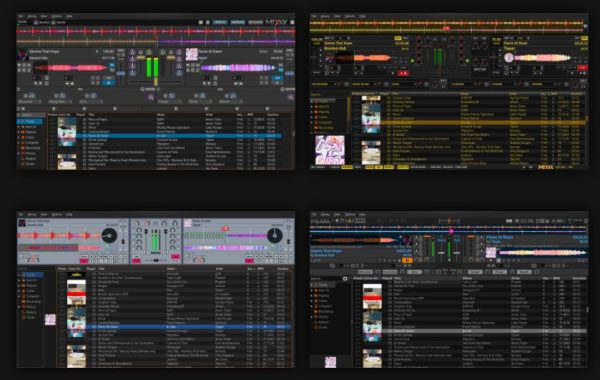
DJ software Mixxx offers users with a fine mixture of all the capabilities described above. It lets you to mix music using the numerous different mixing tools inside the application.
Mixxx is also totally 100 % free to use, and it offers you a way of creating your music very easily. It comes along with dual deck support and additional features suitable for a wide range of users.
Works with Various Controllers and Applications One of the greatest things about Mixxx is that it will offer you with support for various inputs concerning applications.
For example, you will be capable to insert files from iTunes or other directories such as Traktor, Rhythmbox, or some other places.
In addition, you will see that it supports different other controllers such as MIDI controllers, USB soundcards, and others.
Mix Your own Music When you make your music, you will visualize the modifications you make via the soundwave that is noticeable on your screen all through the whole procedure.
Of course, you’ll be able to play back your tracks and preview them, as you’ll have a lot of options to control your inspiring process as well.
DJ software Mixxx
Generally, there are numerous mixing tools to check out inside the Mixxx software – some of them include VU meters, line faders, equalizer, gain buttons, and many others. You will have the liberty that you will need to make awesome sounds.
Summary To finish, Mixxx is an outstanding software to use for mixing your music. It comes with different crucial tools, but it is also free to use, providing you a excellent way to create audio projects. Download Mixxx free (open-source software) HERE
Get ready for a complete new stage of picture realistic look, with the 8K HDR Sony BRAVIA KD-75ZH8BU TV.
8K HDR image resolution for 4x the resolution of 4K UHD Run by the super-powerful X1 Ultimate processor chip, this Sony BRAVIA KD75ZH8BU 8K TV provides the supreme picture top quality – 8K HDR. If you believed 4K was outstanding, 8K will blow your your head! With 4 times the resolution and increased brightness, 8K HDR gives you the picture structure, depth and fine detail that’s the nearest yet to reality.
Sony BRAVIA KD75ZH8BU
X1 Ultimate processor for 8K upscaling Even if you are not really watching native 8K content, the X1 Ultimate processor uses advanced technology to upscale content to as near to real 8K as possible. This implies even standard UHD content looks much better than ever before on this Sony 75 inch TV.
Full array LED backlighting with X-tended Dynamic Range Pro delivers spectacular realism The Sony Bravia KD-75ZH8BU uses a full-array LED backlight with ultra-sense composition for vivid and even backlighting. This greatest level of brightness handle boosts contrast ranges, providing much deeper blacks, amazing whites and truer colour somewhere between. The TRILUMINOS display with X-tended Dynamic Range Pro offers true-to-life colour for a much more all-natural and believable colour harmony. The premium design and style remote in brushed aluminium with hairline finish can feel good in the hand and harmonises with your living space. Regulate your Sony BRAVIA KD75ZH8BU TV even if there are physical objects in the way with Bluetooth wireless connection and use a wide variety of very simple one push buttons to quickly control key features.
The special images with X-Motion Clarity Sony’s X-Motion Clarity is Sony’s flagship motion processor chip and maximises the benefit of 8K resolution. By managing the backlighting with higher precision, this Sony 75” TV offers increased realism, particularly with fast-moving sports and action motion pictures.
IMAX Enhanced makes the cinema home Take the upcoming step-up in picture level of quality by turning to IMAX Enhanced. Used with IMAX authorized 4K HDR content, IMAX Enhanced uses their exclusive digital remastering technology (DMR) to provide ultra-vivid images. If you would like to recreate the look of the video at the cinema, IMAX Enhanced gets you closer than ever before.
Sony BRAVIA KD75ZH8BU
Sony BRAVIA KD75ZH8BU – Get the greatest out of Netflix, with Netflix Calibrated Mode If you are a movie lover and use Netflix, you will love Netflix Calibrated Mode. This arranging bypasses numerous of the TVs processors, giving you a picture that’s a lot closer to exactly how the filmmaker’s originally meant.
Highly accurate, enveloping sound, with Acoustic Multi-Audio Sony’s exceptional Acoustic Multi-Audio speaker system improves the sync among what you look at and what you hear. Mixing a audio vibrating frame tweeter with 2, front side installed speakers, the TV gets the ideal balance of stunning sound and vocal clearness.
Centre Speaker Mode For the finest sound potential, why not integrate the Sony into a individual home cinema system. If you make this improvement, the KD-75ZH8BU offers you the choice of using its speaker system as the centre speaker – saving the additional expense and bulk of an extra speaker.
Smart Android TV Bringing collectively photos, music, movies, Internet and applications, the Sony Android system makes being able to access a big range of entertainment very easy. The Android system gives more applications than any other smart TV platform, which means you have got the largest solution of smart TV possible.
Hands-free voice control your TV Offering Google Assistant built-in, this Sony BRAVIA KD75ZH8BU TV naturally will become part of your Google/Android home network. The integrated mic lets you search, hands-free. If you have a preference for to use a different platform, the Sony is compatible, as well. Apple AirPlay and Homekit compatibility helps make it possible to combine with your Apple system. Support for Amazon Alexa products also implies you can voice control through your existing Alexa device.
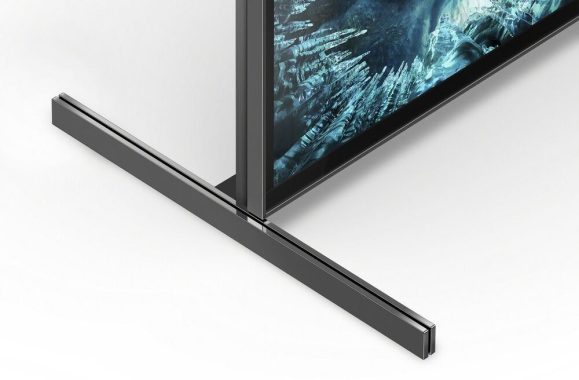
Flexible stand satisfies your support If you are putting your TV on a small cabinet, desk or other support, you may find the stand that arrives with the TV is too wide. Sony have thought of this and supplied the KD-75ZH8BU with adaptable feet to get around this issue. If you are using on a wide support or along with a soundbar, the feet are set at each end of the TV. With a less wide support, easily suit the feet on the way to the TV’s centre for adaptive enough positioning.
Sony BRAVIA KD75ZH8BU
Premium level of quality – right down to the backlit remote control This magnificent Sony 8K HDR KD75ZH8BU TV almost looks as very good when off as it really does on. Blade Architecture gives the TV a impressive design with no distracting from the image. The Premium Blade Stand offers elegant support, or you can mount it on the wall. Each and every detail is properly designed – right down to the premium, backlit remote control with pre-installed mic. Photo: Sony
Discover the near future of TV, right now, with the Sony BRAVIA KD75ZH8BU.
Sony BRAVIA KD75ZH8BU Specs:
SENSOR Light
Colour Enhancement TRILUMINOS™ Display
Contrast Enhancement 8K X-tended Dynamic Range™ PRO
Clarity Enhancement 8K X-Reality™ PRO
Picture Processor Picture Processor X1™ Ultimate
Video Signal Support HDMI™ signal :7680x4320p(24,25,30,50,60Hz), 4096x2160p(24,50,60Hz), 3840x2160p(24,25,30,50,60,100,120Hz), 1080p(30,50,60,100,120Hz), 1080/24p, 1080i(50,60Hz), 720p(30,50,60Hz), 720/24p, 576p, 480p












 Music throughout the house