Home Blog Page 94

Computer restart randomly – solutions

0

Look below to find solutions to the same problem that might help you for your convenience.

1) recover lost files after computer restart randomly

Once the computer randomly restarts Windows 10, all saved files are lost forever. There is no chance that you will ever get them back. If you want to try to find lost files, look in the search bar of the File Explorer and press Enter.

If you can’t find any files, all you have is an option to download Stellar data recovery software for files lost after restarting your computer. Stellar is a DIY Windows data recovery software that can help you find lost files easily. It is efficient and reliable in case of data recovery.

Photo: Pixabay

Stellar recovers data from any type of hard drive or any external device used for storage. It analyzes the data, saves it, recovers it from any 4K hard drive and automatically sorts the files.

To recover files, follow the steps below:

Find the type of data or files that you want to restore. Select “next”.

Choose the location or any drive folder where you want and select the “Scan” option.

Then choose the files you want to recover, and then press the “recover” option.

2) replace the faulty power supply

One factor causing the problem is a faulty power supply that does not provide the right amount of power. The least amount of power supply can be one of the reasons to restart your computer randomly at any time. Try to replace the power supply with a new one.

Turn off and disconnect the computer.

Unscrew the side of the computer or laptop and try to remove the plug cord from the power port.

Remove the power supply and cables from the motherboard.

Look for dust and air blocking paths that increase the chances of the computer overheating.

Clean the space and connect the power cord cables to allow the computer to connect.

If you experience the same problem again, change the power cord.

3) reinstall graphics card drivers

Press the Windows key and press R.

In the search box, type devmgmt.msc and press Enter.

Find the “video cards” option and double-click on it.

Uninstall the graphics card by right-clicking on it.

After uninstalling the graphics card, restart the system. Windows will install the latest drivers compatible with your version.

4) Disable the auto restore function

The auto restart function is active when the user is on the PC. At the moment when you save something for download, the computer is forcibly restarted if new updates have been downloaded. This is a problem and most of the time the data is lost without any error messages during an automatic restart.

So, to solve this problem, there is an option to disable the auto-restore function.

To continue with this solution, follow these steps:

Open the Run window by pressing the Windows and R keys.

Type sysdm.cpl and click the OK button.

The System Properties dialog box appears. Select the Advanced tab in the dialog box.

In the Start and Restore section, click the Settings button.

In the System Error section, uncheck the auto restart option and press OK.

Users can work regularly and check if the same problem persists again. If such a problem occurs, you can try contacting our experts via their phone or chat. They will help you solve the problem.

The computer randomly restarts Windows 10

If the system reboots automatically, then, you have the Blue Screen of Death (BSOD) option. This is usually due to problems with the graphics card, driver software, computer overheating or any hardware problems, viruses and malware are also included.

To try to reduce these problems, try disabling the auto-restore option. This will not allow the PC or computer to randomly restart Windows 10. You can also update or reinstall the graphics card drivers.

The computer randomly restarts Windows 7

Windows 7 is the outdated version nowadays. It is recommended to upgrade to Windows 10. If you have an older computer that supports Windows 7 and not the updated version, this may cause your device to have a problem. Suppose the computer randomly restarts Windows 7 without any errors.

What to do? We will try to find out the cause

This may be due to third-party software or drivers installed on the system. To solve this problem, check if you can update the software drivers. Try restarting the computer in safe mode. Press the F8 key before the Windows logo appears.

If it appears, wait a few more minutes to turn it off and restart it again. This will check if your computer has one or more operating systems. Also check for hardware issues when your PC keeps restarting, which may be part of the problem you are facing.
Hisense H6510G (2020) Review: very good budget-friendly TV

0

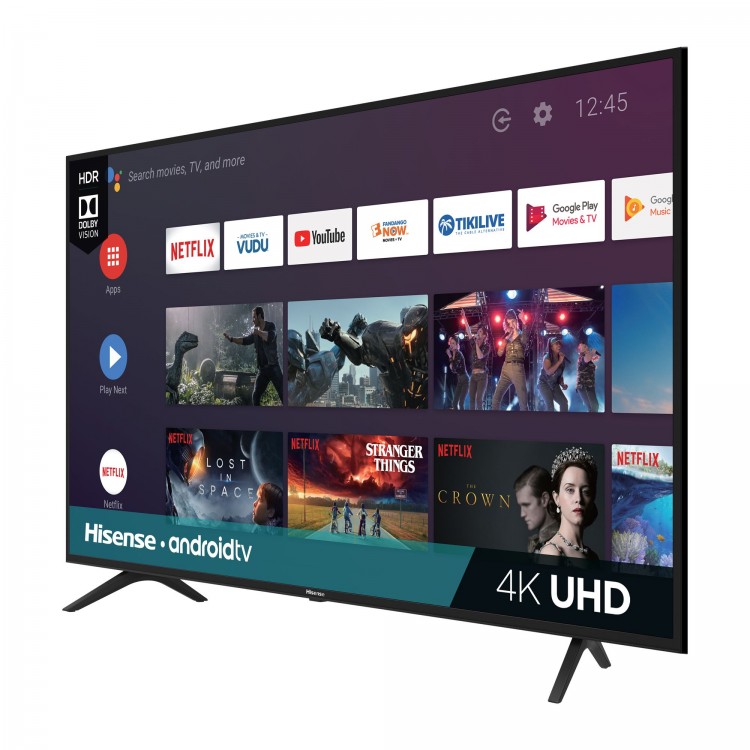
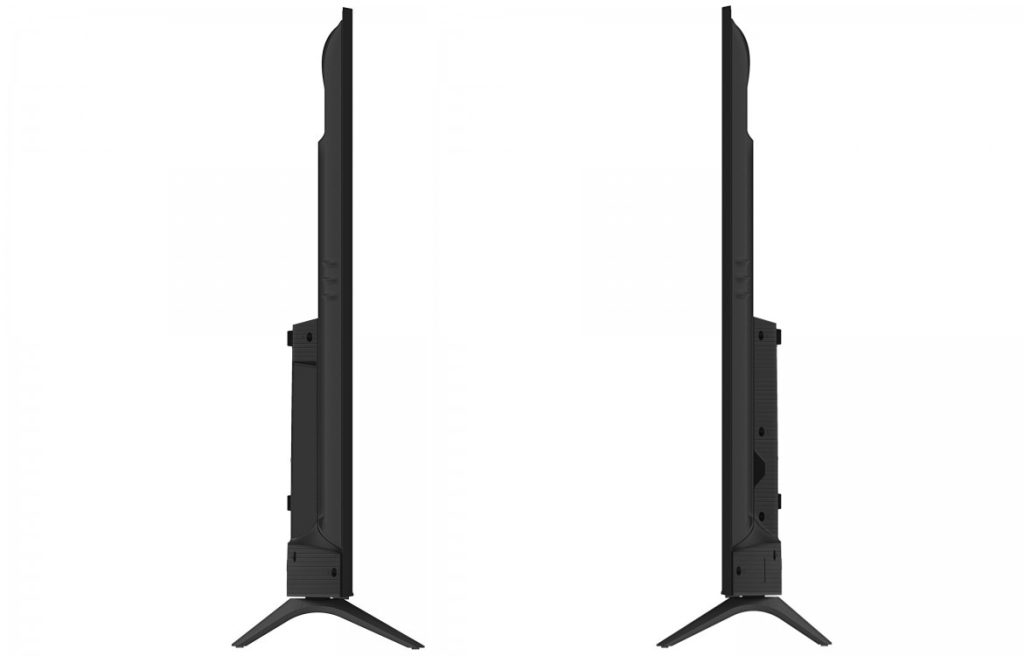
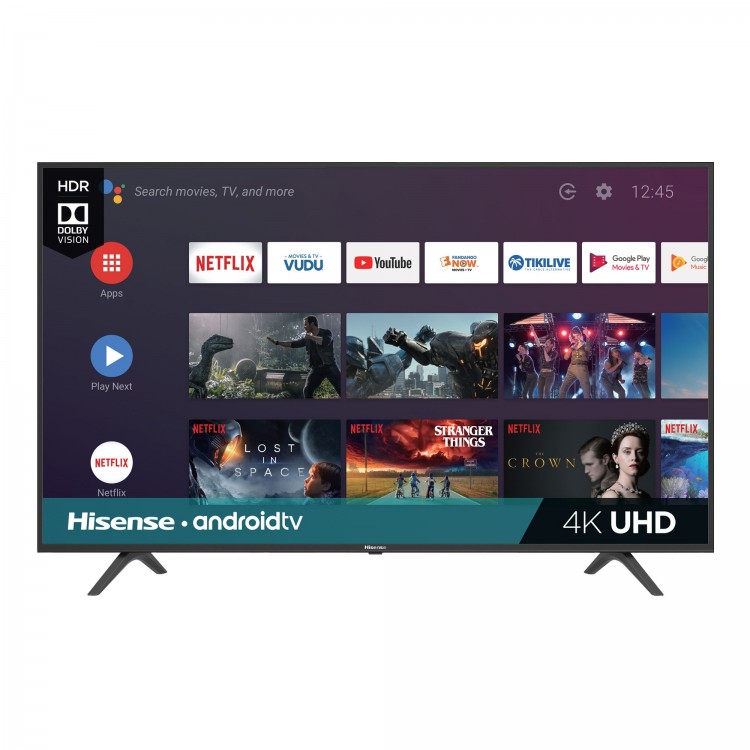
The Hisense H6510G has a decent design and looks almost identical to the Hisense H6570F 2019. It has thicker edges than the Hisense H6570G and the back looks different. Overall, there is nothing premium about its design as it is made from basic plastic and the metal on the back looks cheap.
The Hisense H6510G has an excellent contrast ratio, which is expected from a VA panel. It offers deep blacks when viewed in the dark. Note that the contrast may vary between units.
The Hisense H6510G is a TV for most uses. It works best when watching movies in dark rooms due to its exceptional contrast ratio and incredible black uniformity, but there’s no local darkening. It is not suggested for extensive seating arrangements due to their narrow viewing angles. It’s fine for random games as it has a fairly low input delay, but the fast-moving content looks a bit blurry.Hisense H6510GThe Hisense H6510G is fine for watching movies. It has an excellent native contrast ratio and incredible black uniformity, but lacks a local attenuation feature to further deepen blacks. It also removes the 24p thrill from native apps and blu-rays.
The Hisense H6510G is very good for video games. It have a good response time, but you may still notice the mirroring of the images. It has a fairly low entry delay for random gaming, but it is too high for competitive games. There is also a lack of additional game features, such as variable refresh rate support. However, it is ideal for playing in the dark room due to its exceptional contrast and incredible black uniformity.

Hisense H6510G have just 60 Hz refresh rate. These types of a refresh rate is be found in standard TV’s only. Nevertheless, today you will view 4K TVs with effective refresh rates of 120Hz, 240Hz, or greater. Refresh rate informs you how quite often a TV changes the image or frame onscreen.

Furthermore, Hisense H6510G works on the Android operating system and there is nothing negative about it. You can have fun with all the streaming platforms you really want and have a fairly good picture on the screen, which is significant. Many people agreed that this offer is very decent and it’s really worth it. Some buyers even purchase the second Hisense TV due to the fact of the Black Friday low cost.

The Hisense H6510G 4k TV is truly worth for the offered selling price ($250). But also you need to know that Hisense TV has average quality amongst all TVs that are on the marketplace right now.

The Hisense H6510G is fine for HDR movies. It shows deep blacks thanks to its exceptional contrast ratio and incredible black uniformity. However, it cannot display a wide range of colors and does not become bright enough to make reflections appear in HDR.
The Hisense H6510G is fine for computer use. Displays 4:4:4 chroma, which is important for reading fine text. It also has a pretty low entry delay and a good response time. However, it has narrow viewing angles, so the image might look inaccurate on the sides if you sit too close. In addition, it does not become bright enough to combat glare in well-lit rooms.Hisense H6510GThe Hisense H6510G is a cheap TV. It is a “Black Friday” alternative of the Hisense H6570G with improved performance. Unlike the H6570G, it perfectly displays native 4k content. It has an excellent contrast ratio and incredible black uniformity, making it a great choice to watch movies in dark rooms. However, it is not ideal for large seat arrangements because it has narrow viewing angles and loses image accuracy when displayed outside the center. It’s fine for random matches due to its fairly low entry delay, but there’s too much delay for competitive matches. The built-in Android TV offers a total of apps available for download, and the interface is smooth enough to navigate.Photo:Hisense

DIMENSIONS/WEIGHT
TV Dimensions(without the stand) 57.4×33.1×3.4 inches
(with the stand) 57.4×35.6×10.8 inches
TV Stand Width 48.4×10.8 inches
TV Weight (without the stand) 39.1 lbs
(with the stand) 39.7 lbs
Carton Dimensions (WxHxD) 64.1×39.2×7.3 inches
Shipping Weight 54 lbs
DISPLAY
Actual Screen Size (Diagonal) 64.5 inches
Screen Class 65 inches
Screen Type LCD
TYPE OF TV
Smart TV Yes (Android TV)
App Store Yes (Google Play App Store)
PICTURE QUALITY
Screen Resolution 4K UHD, 3840x2160p
Local Dimming No
4K Upscale Yes
Motion Rate 120
Aspect Ratio 16:9
HDR* Yes
(Dolby Vision/HDR10/HLG)
Backlight Type Source Full Array
AUDIO
Audio Output Power (Watts) 8Wx2
Audio Enhancement DTS Virtual:X
LANGUAGES
On-screen Display English/French/Spanish
POWER

43 Class - H6510G
Power Consumption 160W
Standby Consumption <0.5W
Power Supply (Voltage/Hz) AC 120V / 60Hz
CONNECTIVITY
Wi-Fi Built In Yes (802.11ac 2.4GHz/5GHz)
Bluetooth® Yes
PORTS
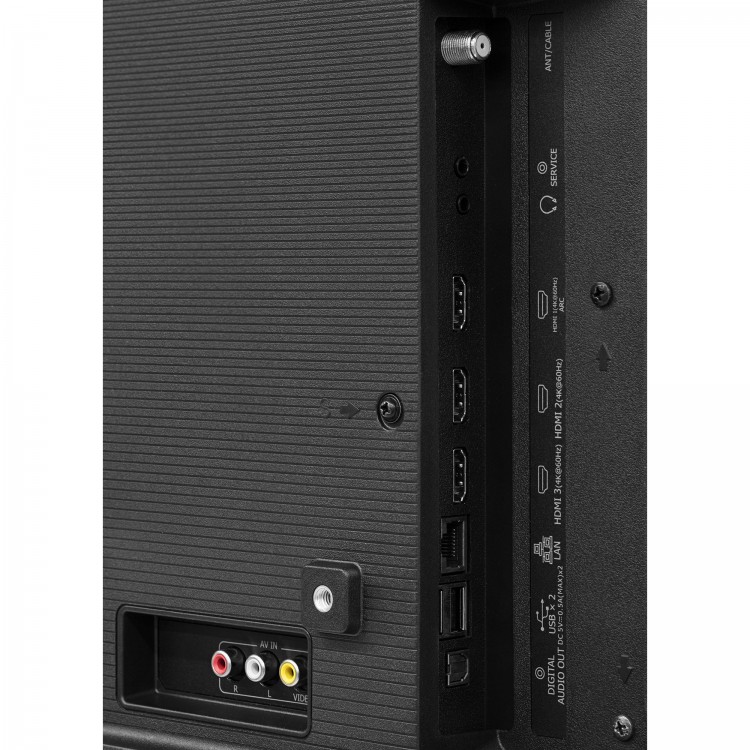
HDMI 3
HDMI CEC, HDMI ARC Yes
Ethernet (LAN) Yes
USB 2.0 2
RF Antenna 1
RCA Composite Video Input 1
L/R Audio Input for Composite 1

43" Class - H6510G

Be Quiet! Pure Loop 280mm – All-in-One water cooling

0

Exploring at most of their entire product offerings, Be Quiet! is a relatively standard PC peripherals manufacturer. The company is maybe best well-known for for their outstanding selection of PSUs, while they furthermore offer cases, fans, and coolers too. And these days, that of course offers into all-in-one (AIO) CPU liquid coolers also, with their valuable Pure Loop family of coolers. Be Quiet! is a German company that primarily manufactures computer cases, power supply units (PSUs), and cooling-related items. As the company’s label indicates, their products are developed with a special focus on quiet operation.
We are currently taking a look at the 280mm model of the Be Quiet! Pure Loop AIO cooler, which is the 2nd biggest that the company provides, and would seem to be the most preferred dimension for AIO coolers right now.

Be Quiet! Pure Loop 280mm

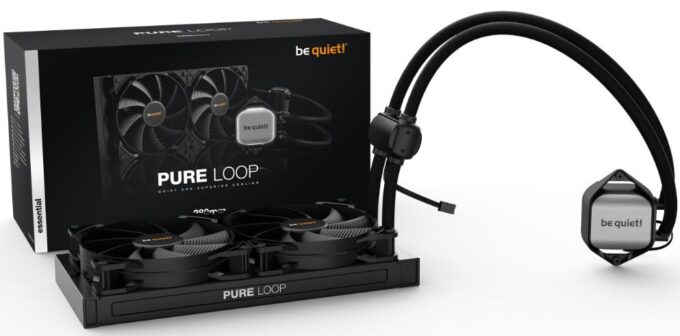
The primary design and style of the Be Quiet! Pure Loop 280mm AIO cooler seems relatively standard at first view. However if you pay a little bit more attention, there is a important abnormality: the liquid pump is independent and not positioned on the primary cooling block by itself. The block simply assists as a heat exchanger in between the CPU and the cooling liquid, with no moving parts in any way. Be Quiet! relocated the liquid pump to up close to the radiator, as an inline unit. Even though this is probably good for the durability of the pump, and it decreases the noise output by dampening its small vibrations, this method also creates 4 more connection areas. Normally, important joints and some other connection points are the weakest links in AIO cooler design, so the extra points here raise the possibility for mechanical harm.
The radiator is a regular dual-pass cross-flow design, with small fins soldered on thin rectangular tubes. At the bottom area of the radiator, there is one fairly huge screw that serves as a filling port. Working with this requires proper care – the placement of the screw forbids users from undoing it while the radiator is mounted inside of the system, or even the cooler may drain into the system itself. The radiator requires to be located such that the filling port is the top point of the system, then undo-options the screw to add coolant. The series logo design is printed on both sides of the radiator’s frame.

Be Quiet! created the Pure Loop series to be a representation of the company’s values – uncomplicated, sophisticated, powerful, and concentrated on working with the minimum possible levels of noise. From what we have noticed during all of our testing the 280 mm model of the Pure Loop cooler, we consider that the cooler has definitely lived up to those concepts, producing for a significant succeed for Be Quiet!.
Be Quiet! is a company that generally goes with refined designs and the Pure Loop series are no exception to this rule. The Pure Loop 280 aesthetically is very really serious and classy, based on nice and clean, standard geometric shapes and sizes. It would most likely look out of place in an luxurious PC with multi-colored RGB lighting all around it however it will absolutely look fantastic when the visual concept needs to be clean and significant.

Be Quiet! Pure Loop 280mm

The thermal overall performance of the Be Quiet! Pure Loop 280 mm cooler is very good, yet as you may perhaps count on for an acoustics-focused cooler, unexcitedly so. It does not do very much better than the majority of some other AIO coolers, and a lot of other products using two 140 mm fans tend to provide better thermal efficiency. As a matter of fact, perhaps even some 240 mm alternatives can thermally do better than the 280 mm version of the Pure Loop.
Nevertheless, when taking noise ranges right into consideration, the tables change significantly. The Pure Loop 280 provided remarkably low noise results, producing for the quietest two-fan cooler ever. And when we plotted that as part of a thermal level of resistance to sound pressure level chart, we could undoubtedly see the Pure Loop 280 going head on with products that cost you twice or 3 times as much. Photo: Be Quiet! video: YouTube/Be Quiet!

In summary, we find that the Be Quiet! Pure Loop 280 cooler is an exceptional product. Possibly even with the focus on always keeping noise levels straight down, Be Quiet! has not left thermal performance behind, so the Pure Loop offers a really great balance between thermal performance and acoustics. And they may capable to do all of this while keeping the price tag of the cooler pretty acceptable with the Pure Loop 280 quickly found for less than $110. Taking in thought both the cooler’s performance and that low selling price tag, we can state that the Pure Loop 280 is a extremely fantastic offer for customers who need superb overall cooler performance joined together with an stylish look.

The Pure Loop series was created by Be Quiet! to represent the company’s principles: simplicity, understatement, efficacy, and a commitment to functioning with the minimum amount of noise. Based on our testing of the 280 mm Pure Loop cooler, we can say that it has definitely lived up to those expectations, which is a significant victory for Be Quiet.
The Pure Loop 280 mm cooler has good thermal performance, although not particularly so, as one might anticipate for a cooler with an acoustics focus. Its thermal performance is not significantly better than that of the majority of other AIO coolers, and many other products that use two 140 mm fans typically perform better.

Be Quiet! Pure Loop 280mm is the brand-new remarkably high-performing and quiet All-in-One water cooling product of be quiet! for price-conscious consumers with overclocked systems.

Remarkably high cooling efficiency
Doubly decoupled pump for quiet operation and minimum vibration
Pure Wings 2 140mm PWM fans mix quiet operation with high air pressure
White LED illumination, all-black design and aluminum-style for unique and trendy look
Easy-to-access refill port and integrated coolant bottle assure a very long lifespan
Adaptable sleeved tubes and a practical installation guarantee easy handling
Nickel-coated coldplate enables ideal use of liquid metal thermal compound
3-year manufacturer’s warranty

Be Quiet! Pure Loop 280mm
ModelPure Loop 280mm
Dimensions radiator, incl. fan (H x W x D), (mm)317 x 140 x 52
Total weight (kg)1.22
Socket compatibilityIntel: 1150 / 1151 / 1155 / 1200 / 2011(-3) square ILM / 2066; AMD: AM3(+) / AM4
Noise level (dB(A)) @ 25 % / 50% /100% rpm22.5 / 26.8 / 38.1
Fan model, number2x Pure Wings 2 140mm PWM high-speed
Pump speed (rpm)5500
Pump adjustable–
Pump connector3-pin
RGB connector–
Tube length (mm)400
Refill port✓

pure loop 280mm

Review- Sennheiser HDV820 headphone Amplifier

0

Maximize the potential of your headphones with the Sennheiser HDV820 headphone amplifier.

The perfect match for Sennheiser and other reference headphones
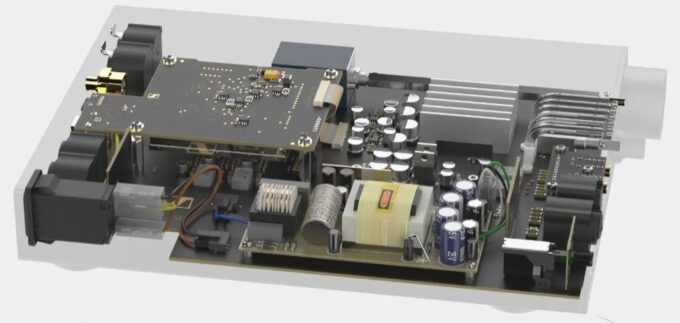
With most hi-fi amplifiers, the built-in headphone amplifier is usually a last-minute thing. Of course, if you have a pair of quality headphones and use your phones often, it’s worth getting a dedicated amplifier, such as the Sennheiser HDV820. Years of specialized experience have produced a headphone amplifier of absolute precision.
Sennheiser HDV820 – Quality components and gain control for perfect sound
With its use of high-quality components, the Sennheiser HDV820 offers a level of detail and staging that standard headphone amplifiers cannot hope to match. Quality volume control provides not only accurate volume, but also ultra-low distortion levels. On the back of the device you will find a five-step gain control. This optimizes playback, regardless of the impedance of the headphones.
Much more than a headphone amplifier, it is also a quality DAC
With a built-in ESS Sabre32 digital-to-analog converter, you can connect digital input sources without the need for a separate DAC. A selection of coaxial, optical and USB inputs ensures connection with a PC, laptop, Blu-ray/DVD/CD player and virtually any source with digital output. The balanced XLR analog output also allows you to connect to a suitable amplifier, such as the Cambridge Audio Azur 851a, and use the HDV820 as a stand-alone DAC.

Sennheiser HDV820

Pro connectivity
With a wide range of different types of plugs, you can connect most headphones to this amplifier. The Pentaconn xlr3, XLR4 and 4.4mm jacks are perfect for the growing number of balanced output headphones. A high-quality 6.35mm jack is also available for standard headphones. On the back, RCA phono and XLR-3 inputs are available for connection to the amplifier or music source. For digital sources, there are optical, coaxial and USB sources. Photo: Sennheiser
Precision construction
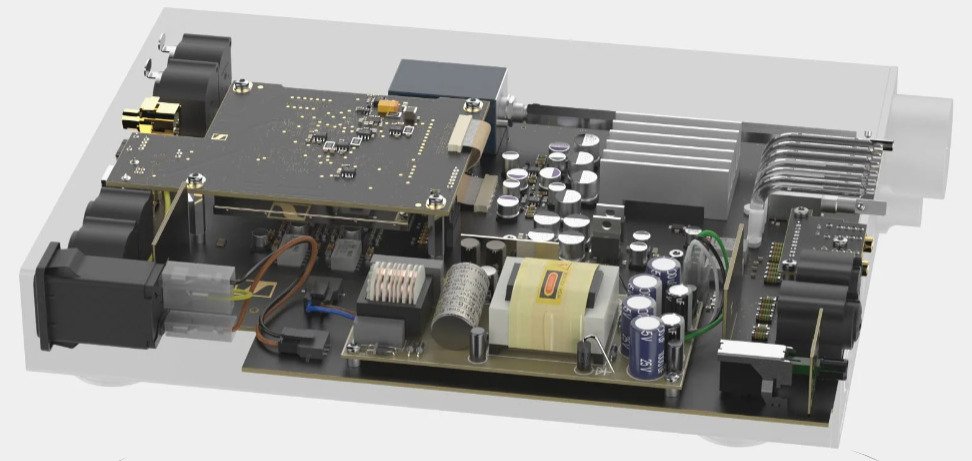
A precision anodized case not only looks and feels great, but also provides protection from electrical and mechanical interference. With its full shielding and dedicated PSU, the Sennheiser HDV820 offers great advantages over built-in headphone amplifiers with much lower distortion and background noise levels.

Sennheiser HDV820

Listen to every drop of performance from your headphones, with the Sennheiser HDV820 headphone amplifier .

  • Dimensions 224 x 44 x 306 mm
  • Frequency response < 10 Hz to > 100 kHz
  • THD, total harmonic distortion < 0.001 %
    • Weight 2.25 kg
    • Power consumption Nominal 12 W (2 x 300 Ω headphones connected to the 4.4 mm outputs)
    • Gain UNBAL input/XLR-4 output: Adjustable 14 dB, 22 dB, 30 dB, 38 dB, 46 dB BAL input/XLR-4 output: 16 dB
    • Operating voltage (mains) 100 – 240 V ~, 50 – 60 Hz
    • Dynamic range > 115 dB @ 600 Ω load (A-weighted)

Greenshot software – use any key to take screenshots

0

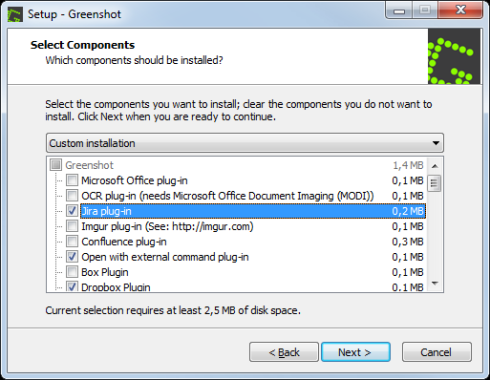
Greenshot allows you to take screenshots of your screen using a key of your choice or using the main interface of the tool, and then save them to disk or share them with other people or on your website.

If you need a simple and effective solution to take screenshots quickly, Greenshot can be a great option.

It is an effective application to take screenshots quickly with a single touch or a combination of keys of your choice. It also comes with a simple interface to set the keys and activate the screenshot process.

Greenshot software

Available in the taskbar
Once you have set up the application for the first time on your computer, you will see that it is a simple and small application. It will not take up much space on the computer, and once installed, it will be minimized in the taskbar.

When you need to take a screenshot, press the selected keys to take screenshots.

If you need to open the application, you need to click on the icon in the status bar. It will customize the screenshot process and specify the keys or key combination that will execute the screenshot process.

Take screenshots and save them
After selecting the keys that will take the screenshot, you can start taking them easily. After that, you will be asked to choose the place where you want to save the screenshot and select the desired format for the saved screenshot.

  1. Quickly create screenshots of a selected region, window or fullscreen; you can even capture complete (scrolling) web pages from Internet Explorer.
  2. Easily annotate, highlight or obfuscate parts of the screenshot.
  3. Export the screenshot in various ways: save to file, send to printer, copy to clipboard, attach to e-mail, send Office programs or upload to photo sites like Flickr or Picasa, and others.
Greenshot software

It is a simple process that also allows you to customize certain parts of the process.

You can also decide on some minor settings, for example, whether to include the mouse cursor in the screenshot or not. You can select have a timestamp at the bottom of the screen if you wish and other settings that come into this clean tool.

To conclude, Greenshot is a simple and effective tool to take screenshots and share them with other people or save them wherever you want. Download free Greenshot software here

Review Philips 65PML9506 4K Smart Mini LED TV

1

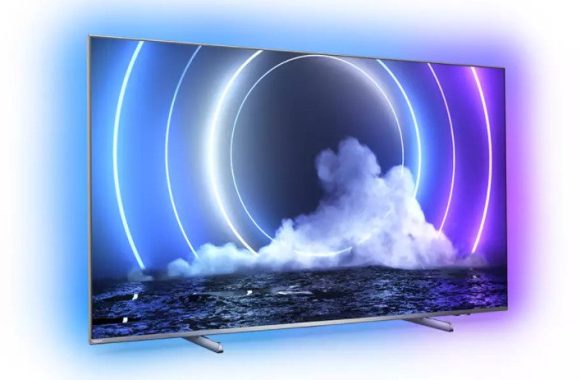
The revolutionary new Mini LED technology makes the Philips 65PML9506 a bright TV in all areas.
A new level of screen brightness – Mini LED TV
Mini LED technology pushes the boundaries of LED TV technology. By significantly reducing the individual LED backlight, you can implement a larger number of them. More individual LED lights mean more independent dimmable areas. The Philips 65PML9506 actually has more than a thousand zones, all independently adjusted for brightness. This gives a great increase in contrast, brightness and details, making the image quality more vivid and realistic than ever.

Philips 65PML9506 TV

Extended view with 4-sided Ambilight
This exclusive Philips technology benefits from its latest incarnation, with 4-sided Ambilight. Using smart LEDs all over the TV, the color of the picture is projected in the room, in real time. Color, vitality and excitement move beyond the screen and into your living room to give you a visual experience beyond the ordinary, with this stunning Philips 65-inch TV.
Perfect image engine P5 AI
The perfect image engine P5 AI is the brain behind the image and even thinks the same way we do. The powerful processor uses deep learning AI algorithms to get the most realistic images possible. Maximizing detail, color realism and smooth movement, the P5 AI engine optimizes the Mini LED and Ambilight for brilliant performance.
Game look better
With HDMI 2.1 connectivity at its core, the Philips 65PML9506 has many features that make it an ideal choice for gaming. Once connected to one of the two HDMI 2.1-compatible jacks, a low-latency mode is automatically selected at the start of the game. VRR (variable refresh rate) and FreeSync are supported, providing the fastest and smoothest response possible. Exclusive to Philips, Ambilight’s gameplay brings another dimension of immersion.
Optimized for HDR, with HDR10+
For optimal image quality, HDR10+ offers scene-by-scene HDR mastering for the most faithful and accurate HDR image technology to date. With HDR10+, every scene is optimized, which means that the maximum detail is displayed, even in the lightest or darkest moments. The Philips 65PML9506 also supports standard HDR10 and HLG formats.

Dolby Vision for dramatic images
In addition to supporting HDR10 +, this 65-inch Philips tvalso supports Dolby Vision, a leading format in Hollywood and theaters around the world. Dolby Vision also adjusts the image to take full advantage of the features of each screen and presents an image optimized for each scene in specially mastered content.
Sound compatible with Dolby Atmos
With Dolby Atmos decoding, the Philips 65pml9506 has the potential to provide a more immersive sound with a truly cinematic feel. Other sound enhancements include clear dialogue for improved voice, night mode for reduced dynamic volume, and enhanced Dolby bass for better sound.

Philips 65PML9506 TV

Android TV to Smart TV
In a serious world of TV catch-up, Android TV has an idea of everything. With a clear and intuitive interface, Android allows you to effortlessly switch between Netflix, Amazon Prime, YouTube, Disney+ and many other services. Android allows you to pick up where you left off in the last series or watch new movies, all without getting lost in complicated menus.
Voice control with built-in Google assistant and works with Alexa
Thanks to the built-in Android system, Google Assistant helps you find content, applications and even control compatible smart home devices, such as the Philips Hue lighting system. All this is available via a simple voice command. You can also connect your Amazon Echo or a similar Alexa device and use voice commands via Alexa (works with Amazon Alexa).

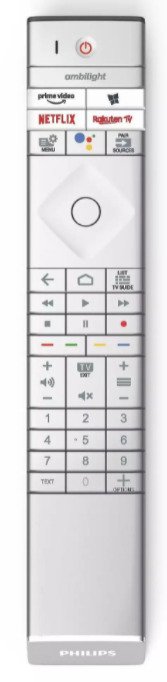
65PML9506 TV remote

Beautiful design, remote control with leather back
Made from high-quality materials and designed to a high-end standard, the Philips 65PML9506 stands out from the crowd. The polished metal edges of the legs contrast beautifully with the brushed metal bezel. The quality of the design also extends to the remote control, which has a tactile finish with a Muirhead leather stand and backlit keys.
Get a bright, high quality image with Philips 65PML9506 TV. Photo: Philips

  • Ambilight Version 4 sided
  • Ambilight Features
    • Built-in Ambilight+hue
    • Ambilight Music
    • Game Mode
    • Wall colour adaptive
    • Lounge mode
    • AmbiWakeup
    • AmbiSleep
    • Philips Wireless Home Speakers 
  • Picture/Display
  • Diagonal screen size (inch) 65″
  • Display4K Ultra HD LED
  • Diagonal screen size (metric)164  cm
  • Panel resolution3840 x 2160
  • Aspect ratio16:9
  • Pixel engine P5 AI Perfect Picture Engine
  • Picture enhancement
    • Ultra Resolution
    • Dolby Vision
    • HDR10+
    • CalMAN Ready
    • ISF Colour Management
    • Micro Dimming Pro
    • Perfect Natural Motion
    • Wide Colour Gamut 95% DCI/P3

Free SoftEther VPN – browse securely, hide your identity online

0

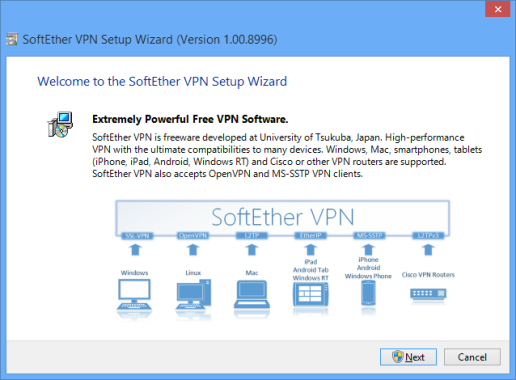
The VPN Gate client plug-in is a plug-in created for SoftEther VPN and can be used to hide your real identity online, browse securely and access certain websites that are not available at home.

If you are a SoftEther VPN user, you will need to download and install the gate VPN client plugin, available here.
The main task of the VPN is to help you hide your identity on the Internet and use another IP address, which can help you save your information and protect your data, so that it is not discovered by other users.
Install the plugin on SoftEther VPN
The plugin will ship with the SoftEther VPN package, which is great because you won’t need to download both separately. To use them, you need to install them quickly and you can go to work.

Free SoftEther VPN

When you open SoftEther VPN, you will see the plugin in the main interface. It should be available with just one click, because you can open a new window to see the list of VPN relay servers to which you can connect.

You need to select the server to which you want to connect and start the connection.

Hide your IP address
The main purpose of this tool is to help you hide your IP address and browse the web safely. You can select the location you want to connect to, which allows you to access content and websites that would otherwise not be available in your location.

In addition, the use of a VPN will be very valuable for users who do not want to show their true identity and want to hide it instead.
You will be invisible with your real IP address, because you will use a different IP address when browsing the Internet.
The VPN Gate client plugin is useful when you don’t want to give up their information and data about you.

The best of SoftEther VPN

  • Free and open-source software.
  • Easy to establish both remote-access and site-to-site VPN.
  • SSL-VPN Tunneling on HTTPS to pass through NATs and firewalls.
  • Revolutionary VPN over ICMP and VPN over DNS features.
  • Resistance to highly-restricted firewall.
  • Ethernet-bridging (L2) and IP-routing (L3) over VPN.
  • Embedded dynamic-DNS and NAT-traversal so that no static nor fixed IP address is required.
  • AES 256-bit and RSA 4096-bit encryptions.
  • Sufficient security features such as logging and firewall inner VPN tunnel.
  • 1Gbps-class high-speed throughput performance with low memory and CPU usage.
  • Windows, Linux, Mac, Android, iPhone, iPad and Windows Mobile are supported.
  • SSL-VPN (HTTPS) and 6 major VPN protocols (OpenVPN, IPsec, L2TP, MS-SSTP, L2TPv3 and EtherIP) are all supported as VPN tunneling underlay protocols.
  • The OpenVPN clone function supports legacy OpenVPN clients.
  • IPv4 / IPv6 dual-stack.
  • The VPN server runs on Windows, Linux, FreeBSD, Solaris and Mac OS X.
  • Configure All settings on GUI.
  • Multi-languages (English, Japanese and Simplified-Chinese).
  • No memory leaks. High quality stable codes, intended for long-term runs. We always verify that there are no memory or resource leaks before releasing the build.
  • RADIUS / NT Domain user authentication function
  • RSA certificate authentication function
  • Deep-inspect packet logging function
  • Source IP address control list function
  • syslog transfer function

Browse the web safely with this VPN plugin that adapts very well to the SoftEther VPN and keeps your connection secure. Download Free and open-source SoftEther VPN software here

Android development: Advantages & Disadvantages

0

This is a brief summary of the pros and cons of iOS and Android applications.
From a marketing point of view, you have to break free on both platforms, unless you have a very impregnable technique that you don’t have.

Android development – Advantages

Faster to release/patch as there is no forced “acceptance” port on you – ideal for a coin-based product, i.e. a minimum viable product or MVP
Larger installation base: it has a larger population of people with androids (especially outside the United States).
Easy to develop using existing PCs and Eclipse, i.e. non-specialized hardware
There are no restrictions on what you develop, so you are open to new ideas
Two key markets to send to: Google and Amazon, which means you can have more chances of success
No restrictions on beta/alpha distribution

Photo: Pixabay

Android development – Disadvantages

Fragmented devices – a lot to support (screen size, performance, sensors)
Fragmented Operating system: Many users will be on a variety of operating system versions (you may choose not to support older operating systems/devices).
Two key markets to send to: Google and Amazon – this potentially means more fragmentation to support any custom API
There is no double checking of the final application – so everyone is with you (it’s also with Apple, but you could just detect a real showstopper)
The emulator is not as good as iOS (it doesn’t matter how to get the application on your device is trival), and Android devices are usually cheaper than iOS

The main problem is that there is still a shortage of good Android developers. You will find enough people who understand the basics well enough, but you start asking them more and more complex questions in the interview and you really start to see the fluff.

Another problem is that most Android developers (even iOS developers) are too attached to the platform. This is just one of the features common to developers. It is a kind of apartheid or untouchability on the technological platform that is practiced. Android people don’t want to do anything other than Android development.

Probably at the beginning of your career for the first 2 years if you do, that’s fine. But the world only sees you as an Android or iOS developer. They see you as mobile developers. The more experience you gain, the more important it is to get rid of this dogma about technologies and frameworks and be more willing to learn and adapt to changing scenarios. The world of technology is very dynamic and continues to change. What was happening in the early 2000s is now applicable to artificial intelligence (machine learning)

If you cling to one thing, you will become irrelevant very soon. I’m not saying this to scare you, but it’s the reality of the times and the industry we work in.

However, if you are an excellent developer – not just an Android developer – you don’t have to worry. Just keep polishing and improving your skills. Be very good at what you do. Just try to go beyond the curve as much as possible. The rest of the things will be solved.

There was a period when targeting only iOS or Android was an option, but I think now there is no option, you have to deal with both.

Tixati – download and receive files and share them

0

You can process and view .torrent and.magnetic files with Tixati, an intuitive BitTorrent client that you can process and view.torrent e.magnetic files with Tixati, an intuitive BitTorrent client that allows you to download these files quickly using the highest download speed.

Peer to Peer transfer is one of the main ways to download and receive files and share them with others. Torrent files are one of the most popular file types that you can use with these transfers, because they can quickly download and use the full power of your Internet connection. NO Spyware, NO Ads, 100% Free, for Windows and Linux

Download Magnet and Torrent files
The basic feature of Tixati tool is to process and download torrent and magnet files. The first time you install it on your PC, you will see that it has a slightly different interface than other torrent clients – it looks a little simpler but also a little dated, although the performance and ease of use are of a high standard.
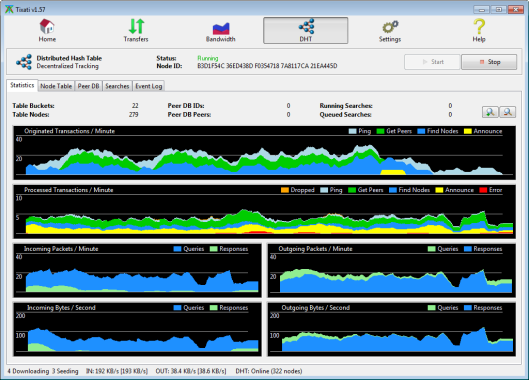
Tixati allows you to download torrent & magnet files and view download speeds at the same time. In addition, you can also track other statistics and data about your transfers, such as download report, download time and download source.
Compared to other BitTorrent clients, it also has more advanced tools in its arsenal.
Customize download settings
You will have full control over how to download the files. You can configure bandwidth throttling, which basically allows you to tell the tool how much bandwidth you can use. You can use trading and seeding limiters and set transfer priorities to allow higher speeds for priority items.
In addition, it also allows you to set the number of available download locations and download locations. You can configure other more advanced settings such as load ratio limits, download location settings and much more.
You will have a lot of settings that you can use with Tixati and configure the downloads.
Tixati is an advanced and intuitive BitTorrent client that allows you to download torrent and magnet files and use certain settings with it.ue allows you to download these files quickly using their maximum download speed.

Peer to Peer transfer is one of the main ways to download and receive files and share them with others. Torrent files are one of the most popular file types that you can use with these transfers, because they can quickly download and use the full power of your Internet connection.
Download Magnet and Torrent files
The main feature of this tool is to process and download torrent and magnet files. When you first install it on your computer, you will see that it has a somewhat different interface from other torrent clients: it seems a little simpler but also a little outdated, although the performance and ease of use are at a high level.
Tixati allows you to download torrent e magnet files and view download speeds at the same time. In addition, you can also track other statistics and data about your transfers, such as download ratio, download time and download source.
Compared to other BitTorrent clients, it also has more advanced tools in its arsenal.

Customize Download Settings
You will have full control over how to download files. You can set the bandwidth limitation, which will basically let you tell the tool how much bandwidth you can use. You can use trading and seeding limiters and set transfer priorities to allow higher speeds for priority items. Photo: Tixati
In addition, it also allows you to set the number of available download locations and download locations. You can configure other more advanced settings such as download ratio limits, download location settings and much more.
You will have a lot of settings that you can use with Tixati and configure your downloads.
Tixati is an advanced and intuitive BitTorrent client that allows you to download torrent and magnet files and use certain settings with it.

Download Tixati Torrent client here

Simplewall tool – configure network activity on your PC

0

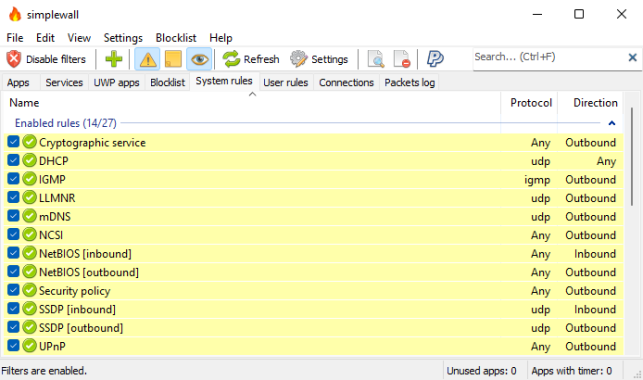
Simplewall tool presents a very easy and effective way to configure the Windows filtering platform and decide which applications and services will run on your computer at launch and which ones you want to block.

With a Windows Filtering Platform (WFP), you will be able to filter network data and decide which applications are allowed on your computer and network. They work to protect you from some malicious programs, which can run on your PC undetected by the firewall.

But with Simplewall tool you will be able to configure the filters for the Windows filtering platform and overwrite the generic rules and filters defined in the WFP during the installation of the Windows operating system.

This gives you a little more control over which programs can run on your computer and network and which ones are blocked.
Change filters, lock protocols and stay safe.
The first time you want to install this application, you will need to configure some filters and prepare them. And the application itself will ask you to disable the Windows firewall in the process, but stay calm and do as they say. Filters are rules that you can apply to your network to block or allow certain processes or services to run on it.

You can use the application from the tray menu, which is easy to do. There are security templates or, rather, presets that you can use with the application.
They are the white list, the black list and no one’s trust list. The latter is the most difficult because it has the strictest filters, but it is also the safest and will allow only the necessary processes and protocols.

At the same time, you can configure, enable and disable certain services such as DHCP, DNS, NTP, SNMP, SSDP, Windows Update and Network Discovery. You can also view outgoing and incoming protocols and connections. You have full control over what is allowed and what is blocked.
Simplewall is a perfect tool that allows you to apply filters to the WFP, which can help control which services and protocols are allowed or blocked. Download free Simplewall tool here

  • Simple interface without annoying pop ups
  • Rules editor (create your own rules)
  • Internal blocklist (block Windows spy / telemetry)
  • Dropped packets information with notification and logging to a file feature (win7+)
  • Allowed packets information with logging to a file feature (win8+)
  • Windows Subsystem for Linux (WSL) support
  • Windows Store support
  • Windows services support
  • Free and open source
  • Localization support
  • IPv6 support