Home Blog Page 95

Linksys Atlas Pro 6 dual-band WiFi 6 router

0

Linksys Atlas Pro 6 is a wireless mesh system designed for home or small office use, providing high-speed Wi-Fi coverage throughout the area. The system comes with a router and one or more satellite units, which can be placed strategically to provide comprehensive coverage without any dead zones.

Some of the key features of the Linksys Atlas Pro 6 include:

  1. Tri-band technology: The system operates on three separate bands, providing a dedicated backhaul to ensure fast and reliable connections.

  2. Seamless roaming: The Atlas Pro 6 uses intelligent mesh technology to provide seamless roaming between the router and satellite units, ensuring that your devices are always connected to the strongest signal.

  3. Easy setup: The system can be set up quickly and easily through the Linksys app, which guides you through the process step-by-step.

  4. Parental controls: The Linksys app also allows you to set up parental controls, limiting access to certain websites or devices for added security and peace of mind.

  5. Compatibility with Amazon Alexa: The system is compatible with Amazon Alexa, allowing you to control the network with voice commands.

Wide mesh network coverage with Wi-Fi 6
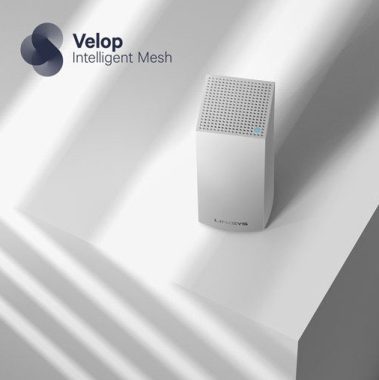
All it takes is two Linksys Atlas Pro 6 with Velop Intelligent Mesh router modules to create a powerful mesh network that covers an incredible 5,400 square feet with powerful and fast Wi-Fi 6. The network can be further expanded by adding more modules, and all modules share a single Wi-Fi name (SSID), so you get seamless connectivity when you move around the house. Orthogonal frequency division multiple access (OFDMA) enables efficient simultaneous data transmission to multiple connected devices, for minimal latency in streaming and gaming.
App and voice control
The free Linksys app connects your smartphone to your router via Bluetooth® and provides easy access to configuration, control and security functions. And the whole network supports voice commands through Amazon Alexa devices (not included).
Excellent security options
This Velop smart mesh offers robust WPA2/WPA3 security with 128-bit encryption. The features of the application allow you to create a separate password-protected guest network to allow visitors to have their own access. And parental controls limit access to inappropriate content and block access to the Internet from specific devices.
The Linksys Atlas Pro 6 dual-band mesh WiFi 6 system is powerful and can handle a large simultaneous capacity for high-speed gaming, video and data. Inside the box are 2 Linksys Atlas Pro 6 mx5500 dual-band WiFi routers (also called “nodes”), a quick start guide, an Ethernet cable, power adapters and documentation (warranty and regulations). This WiFi 6 system is backward compatible with WiFi 5 and earlier devices and should work with all modems and ISPs.
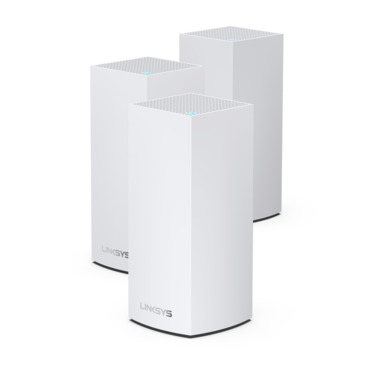
Linksys Atlas Pro

Linksys Atlas Pro 6 highlights:

  • mesh network covers up to 5,400 square feet with strong, fast Wi-Fi 6
  • both modules use a single Wi-Fi name (SSID) for seamless operation with all your devices, anywhere in your home
  • compatible with Amazon Alexa voice controllers (not included)
  • dual-band AX5400 Wi-Fi (600 + 4800 Mbps)
    • up to 600 Mbps on 2.4GHz band
    • up to 4800 Mbps on 5GHz band
    • 160 MHz channel bandwidth for fast connectivity and less congestion
  • powerful 1GHz dual-core processor delivers high-performance connectivity
  • 256MB flash memory and 512MB RAM in each module for improved throughput
  • Linksys app for Apple® and Android™ devices offers app-based setup and monitoring of your router
  • OFDMA allows more devices to connect without slowing down your Wi-Fi
  • secure and easy app-based setup via Bluetooth
Security features:
  • WPA2/WPA3/WPS with 128-bit encryption
  • create a separate, password-protected Wi-Fi network for guests
  • parental controls restrict access to inappropriate content and block specific devices from accessing the internet
Connections (each module):
  • WAN port for connecting to your modem (Ethernet cable included)
  • 3 LAN auto-sensing Gigabit Ethernet ports for wired connections (10/100/1000Mbps Gigabit)
Dimensions and warranty:
  • 3-7/16″W x 7-5/16″H x 3-7/16″D (each module)
  • weight: 1.5 lbs. (each module)
  • warranty: 3 years

This system is modular, which means that it is possible to add more nodes to provide WiFi to more area, allowing future expansion of the network; 1 Atlas Pro 6 node can cover up to 2700 square feet, 2 nodes can cover up to 5400 square feet and 3 can cover up to 8100 square feet! The box I have has 2 nodes for total WiFi coverage up to 5400 square feet. And it can handle up to more than 60 connected devices, which is important because many newer devices are WiFi only.

Linksys Atlas Pro 6

Each node has 4 ports (3 Gigabit LAN ports and 1 Gigabit WAN port) and is powered by Velop Intelligent Mesh allowing continuous optimization for the fastest Internet path through your home. The system is capable of 160 MHz and uses an advanced Qualcomm chipset (1.0GHz dual-core processor) to provide ultra-wide bandwidth, faster data top speed, unlimited connectivity, cable-like stability and ultra-fast performance, all without the bandwidth decrease. Each node also has Ethernet, so you can also connect wired Ethernet devices, providing many location and connectivity options.
The setup is simple and relatively easy. Connect one of the nodes directly to the modem, then download the Linksys app to your phone (Apple or Android) and use the app to help place the nodes throughout the house for the best coverage.
As for speed, this system offers Dual-band AX5400 up to 5.4 Gbps; 1-band 2.4 GHz radio 802.11 ax – 574 Mbps and 2-band 5 GHz radio 802.11 ax -4804 Mbps. One thing I wasn’t particularly interested in is that the bands are a single SSID. If a device has a capacity of 5 MHz, it connects to 5 MHz. If they have only 2.4, they connect to 2.4 MHz. I like to have two separate SSIDs, one for 2.4 and the other for 5, so with my old devices I can choose which one I want to connect to. The Linksys Atlas Pro 6 is a powerful and easy-to-use wireless mesh system that provides fast and reliable Wi-Fi coverage for your home or small office. Photo: Linksys

Linksys Atlas Pro 6 Dual-Band Mesh WiFi 6 specs:

  • Wi-Fi Technology:
    AX5400 Mesh Dual-Band Gigabit 600 + 4800 Mbps
  • Key Features:
    • Dual-Band (2.4GHz + 5 GHz with 160MHz), 2×2 WiFi 6
    • Easily Expandable Mesh WiFi System
    • Seamless WiFi
    • Automatic Firmware Updates
    • Easy App Controls
    • Simultaneous Dual-Band
    • 1 GHz Dual-Core Processor
    • OFDMA Technology
    • Intelligent Mesh Technology
  • Network Standards:
    • WiFi 6 (802.11ax)
    • WiFi 5 (802.11ac)
    • WiFi 4 (802.11n)
    • 802.11g
    • 802.11b
    • 802.11a
  • Wi-Fi Speed:
    AX5400 (600 + 4800)
  • Wi-Fi Bands:
    2.4 and 5GHz (Simultaneous Dual-Band)
  • Wi-Fi Range:
    Up to 5400 sq. ft.
  • Number of Ethernet Ports:
    • x1 Gigabit WAN
    • x3 Gigabit LAN
  • Other Ports:
    Power
  • Antennas:
    5 internal
  • Processor:
    1.0 GHz Dual-Core
  • Memory:
    256 MB Flash, 512MB RAM
  • LEDs:
    Power/Status/Connection
  • Wireless Encryption:
    128-bit
  • Operation Modes:
    • Wireless Router
    • Wireless Bridge
  • Easy Setup:
    • Simple and secured App-based setup
    • Required for setup: (1) Internet connection with Modem. (2) Mobile device with Android 6.0.1 or iOS 11.4 and higher, Bluetooth preferred.
  • Dimensions (LxWxH):
    3.39×3.39×11.22
  • Weight:
    1.5lbs
  • Security Features:
    • WPA2/WPA3 Mixed Personal
    • WPA2 Personal
    • WPA3 Personal
  • Power Supply:
    Input: 100-240V ~ 50-60Hz; Output: 12V, 2A
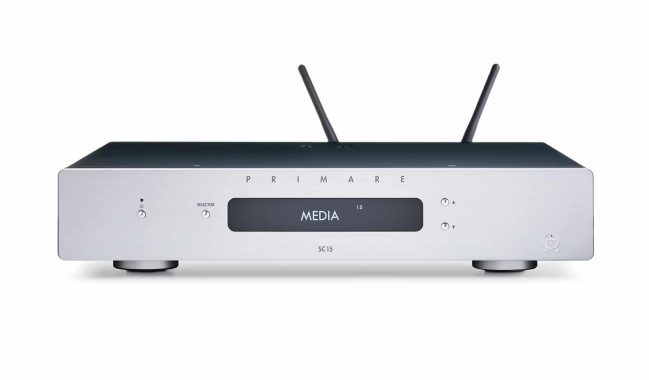
Primare SC15 Prisma – Stereo preamplifier & network player

0

A compact control center for a 2-channel music system
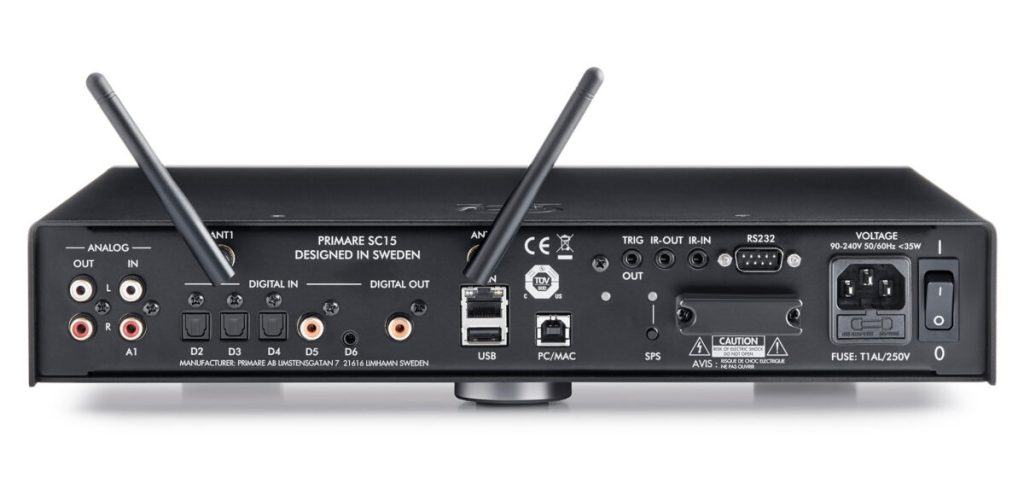
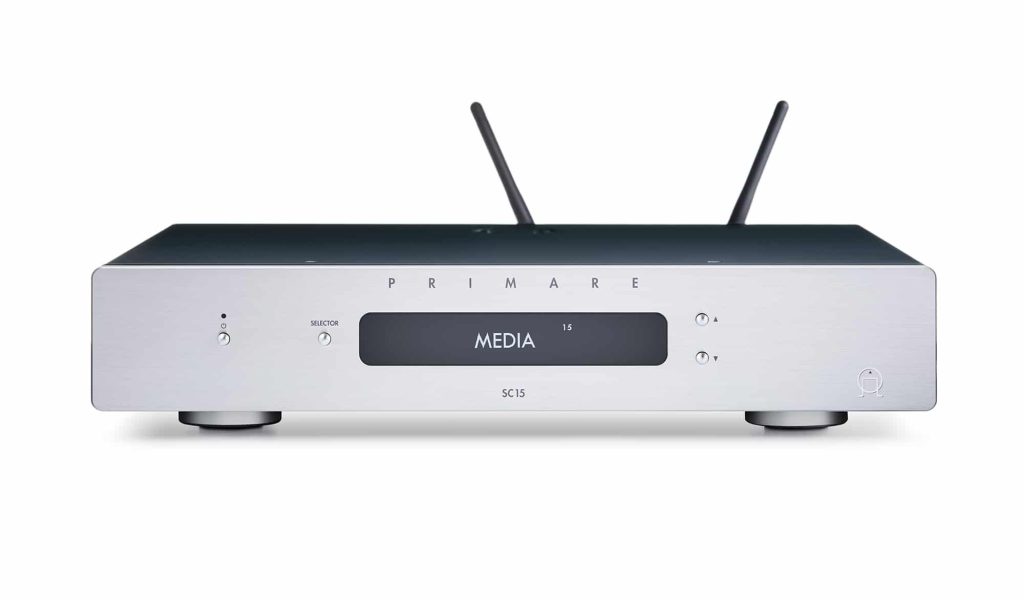
The beautiful Prism SC15 from Primare is a good quality stereo preamplifier designed for the ways we listen today. You can connect an analog music source and multiple digital sources, or enjoy high-quality wireless streaming from mobile devices or the web. The 3/4 footprint of the SC15 Prisma makes it a smart choice to soften the sound in versatile living spaces.

Primare Prism SC15

The built-in high-resolution DAC presents digital sources with extraordinary clarity and detail. If you have a CD collection, a great way to take advantage of it is to combine the DD15 primary CD transport with the DAC section of the SC15 prism. Want to connect a turntable? Just add a pre phono: the R15 from Primare is an excellent combination, both sonically and visually.

The Prism SC15 preamplifier comes with a nice remote control, but the best way to navigate your music options is with the clean and intuitive Prism app, available for free for iOS® and Android™ devices.

The unique Prism network player
Primare Prism SC15 preamplifier a is actually a suite of technologies that provides a wide range of features and functionality of the networked music player. It facilitates the discovery, exploration and sharing of high-performance music playback, whether the source is stored or transmitted, wired or wireless. Whether you are listening to Spotify Connect or files from your NAS drive, the Prisma Control app offers complete system management from your mobile device.

SC15 Prisma 

The Primare Prism SC15 preamplifier also includes Chromecast, a streaming portal that allows you to connect directly to hundreds of streaming applications. Built-in Chromecast streams audio directly from the cloud, so you get the best sound quality. You can also listen to high-resolution music (up to 24-bit / 96 kHz) from services such as TIDAL and Qobuz. Photo: Primare

Primare Prism SC15

Primare Prism SC15 specs:

  • DAC AKM AK4490
  • RCA 1 x stereo analog pair input
  • 3.5 mm 1 x stereo analog/digital input
  • RCA 1 x digital input
  • Toslink x 3 digital inputs
  • USB-B 1 x digital input
  • RCA 1 x stereo variable analog output
  • RCA 1 x digital output
  • C25 remote IR system control
  • IR 3.5 mm in/out
  • RS232 outboard system control port
  • 12V Trigger in/out
  • Prisma connectivity and control
  • USB-A x 1
  • Ethernet x1
  • WiFi
  • AirPlay 2
  • Bluetooth
  • Chromecast built-in
  • Retail Price €1500

Syncios Data Transfer – ideal for transferring files , for iOS or Android

0

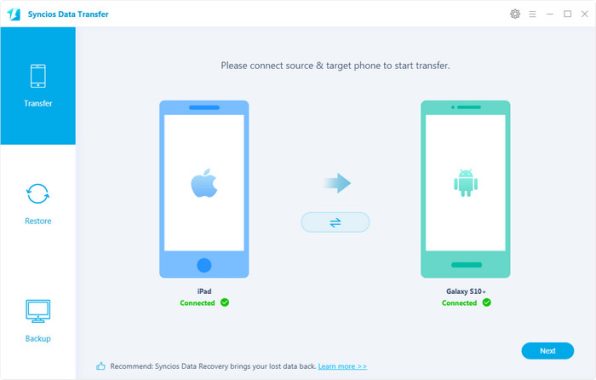
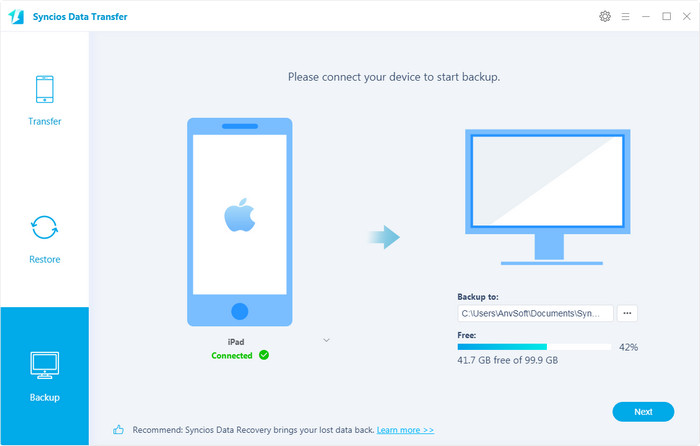
Syncios data transfer software allows you to easily and smoothly transfer applications, photos, videos and e-books between PC and iPod, iPhone, iPad or Android devices. It is fully compatible with iPad, iPhone and iPod and Android devices and to run it you will need iTunes.

Beautiful and easy to use interface
The biggest resource that this app has to offer is simplicity. When you connect your favorite device to your computer, you will have quick access to all the features it has to offer. With the carefully organized structure, it is easy to find what you need.
The main feature of this utility is data transfer, which is the foundation of the application. You can also customize ringtones and SMS ringtones with it. You can also rename the device, view technical details and add, save or delete photos on the connected device.

Syncios data transfer software

Easy file transfer
One of the main features is the easy data transfer system it has to offer. You can import, export and delete media, such as photos and e-books, and create new media playlists and photo albums. In addition, you can edit, backup and access important information about your device such as contacts, notes, bookmarks, call history and messages.
It is ideal for transferring files to and from iOS and Android devices. It allows you to transfer files of any type, be it images, videos, songs, playlists, wallpapers and other types of files.

A wide range of additional tools
Downloading video files is easy with Syncios. You can download video files in batch from sites such as Youtube, Dailymotion, Vimeo, Facebook, Metacafe or Niconico. If you are a person who likes to constantly change wallpapers, you will love this application. You can download wallpapers and ringtones from various websites directly to your phone.
You can access additional tools in the Toolbox section. From there, you will have several additional tools at your disposal, such as iTunes backup, library manager, file system explorer, audio and video converter, device reboot and other shutdown features. In addition, you can clear the cache, and you will also be able to see the crash logs.

Syncios data transfer software

Light package
Another advantage of this tool is that it is a lightweight software. It won’t consume too much of your resources, but will still get the job done quickly and smoothly. The excellent user interface brings all this together and makes Syncios a desirable software. Download Syncios software here

System & Hardware Requirements

  • Operating System:Window 11/10/8.1/8/7 (32&64bits)
  • CPU:750MHz Intel or AMD CPU
  • RAM: 256 MB or above.
  • Disk Space:200 MB or more

Supported Devices OS

  • Android:Android 3.0 – Android 11
  • iOS: iOS 9 – iOS 15

All Devices Supported by Syncios Data Transfer

iOS Devices: iOS 9 – iOS 15
iPhoneiPhone 13, iPhone 13 mini, iPhone 13 Pro, iPhone 13 Pro Max, iPhone 12, iPhone 12 mini, iPhone 12 Pro, iPhone 12 Pro Max, iPhone SE2, iPhone 11, iPhone 11 Pro, iPhone 11 Pro Max, iPhone XR, iPhone XS Max, iPhone XS, iPhone X, iPhone 8 Plus, iPhone 8, iPhone 7 Plus, iPhone 7, iPhone SE, iPhone 6s Plus, iPhone 6s, iPhone 6 Plus, iPhone 6, iPhone 5S, iPhone 5C, iPhone 5, iPhone 4S
iPadiPad 2, The New iPad, iPad mini, iPad with Retina display, iPad mini with Retina display, iPad Air, iPad Air 2, iPad mini 3, iPad mini 4, iPad Pro
iPodiPod touch (5-7 generation )
Android Devices : Android 3.0 – Android 11
SamsungSamsung Galaxy S21/S21+/S21 Ultra, Samsung Galaxy Note 20, Samsung Galaxy Note S20/S20+, Samsung Galaxy Note 10/Note 10+, Samsung Galaxy S10/S10+/S10e, Samsung Galaxy S9/S9 Plus, Samsung Galaxy S8/S8 Plus, Samsung Galaxy S7/S7 Edge, Samsung Galaxy S6/S6 Plus/S6 Edge(+), Galaxy S5, Galaxy Pro, Galaxy Mini 1/2, Samsung Galaxy Note 9/Note 8/Note 7/Note 5, Galaxy Note 1/2/3, Galaxy S Advance, Galaxy S (Plus), Galaxy S Aviator, Galaxy S Blaze 4G, Galaxy S Relay 4G, Galaxy S2, Galaxy S3 (mini), Galaxy S4 (mini), Galaxy S4 Zoom, Galaxy S4 Active, Galaxy Ace Plus, Galaxy Ace 1/2/3, Galaxy Amp, Galaxy Appeal, Galaxy Admire 1/2/4G, Galaxy Axiom, Galaxy Beam, Galaxy Centura, Galaxy Discover, Galaxy Express, Galaxy Exhilarate, Galaxy Exhibit, Galaxy Fit, Galaxy Fame, Galaxy Gio, Galaxy Pocket (Neo), Galaxy Prevail, Galaxy Proclaim, Galaxy Rugby Pro, Galaxy Reverb, Galaxy Rush, Galaxy Ring, Galaxy Stratosphere 2, Galaxy Stellar, Galaxy Mega, Galaxy Music, Galaxy Metrix 4G, Galaxy Legend, Galaxy Nexus, Galaxy Victory 4G LTE, Galaxy W, Galaxy Xcover 1/2, Galaxy Y (Pro), Galaxy Young, and all Android devices
HTCHTC U Ultra/Play, HTC 10, HTC 9, HTC M9, HTC One M8, HTC One e8, HTC One remix, HTC One, HTC One max, HTC One mini, HTC One X/XL, HTC One V/VX, HTC One S/SV, HTC Droid Incredible 4G LTE, HTC Desire (C/X/SV), HTC Droid DNA, HTC EVO 4G LTE, HTC EVO Design 4G, HTC Butterfly (s), HTC Vivid, HTC Rezound, HTC Sensation, HTC Rhyme, HTC Hero S, and all Android devices
GooglePixel 5, Pixel 4, Pixel 4 XL, Pixel 3, Pixel 3 XL, Pixel 2, Pixel 2 XL, Pixel, Pixel XL, Google Nexus 6P, Google Nexus 6, Google Nexus 5, Google Nexus 5X, Google Nexus 4, Google Nexus S, Google Nexus One HTC Nexus, Google Nexus S 4G, Google Glass and all Android devices.
LGLG V40, LG G7, LG V30, LG G6, LG V20, LG G5, LG V10, LG Nexus 4/5, LG G2, LG Optimus 2X/3D/F3/F5/F6/F7/REGARD/G (Pro)/L3/L5/L7/L9/Plus/M+/Me/One/Black, LG Enact, LG Rumor Reflex S, LG Lucid 1/2, LG Spirit 4G, LG Mach, LG Venice, LG Escape, LG Spectrum 1/2, LG Intuition, LG Motion 4G, Elite, Viper, Nitro, Marquee, Connect 4G, and all Android devices
SonySony Xperia XZ Premium, Sony Xperia XZ, Xperia Z5, Xperia Z4, Xperia Z3, Xperia Z2, Xperia acro S/advance/E/J/L/M/U/miro/P/SP/S/SL/tipo/T/TL /TX/Z/Z1 /Zl /ZR/Ultra/go/sola, and all Android devices
HuaweiHuawei P40, Huawei Mate 30/Mate 30 Pro, Huawei P30/P30 Pro, P20/P20 Pro, P10/P10 Plus, Huawei Honor 7/8/9/10, Huawei P9, Huawei P8, Huawei 6P, Huawei Mate 10, Huawei Mate 9, Huawei Mate 8, Huawei Mate 7, Huawei Ascend G6, Huawei Ascend P6, Huawei Ascend Y200/Y300/P1/P2/Mate/D1/D2/G300/G600, Ascend X, Honor, Vision, Sonic, Boulder, IDEOS X3/X5, and all Android devices
OnePlusOnePlus 1, OnePlus2, OnePlus X, OnePlus 3, OnePlus 3T, OnePlus 5, OnePlus 5T, OnePlus 6, OnePlus 6T, OnePlus 7, OnePlus 7T, OnePlus 8, OnePlus 8 Pro, etc.
XiaomiXiaomi Mi 2/2A/3/4/4i/4C/4S/5/5S/5C/6/8/9/10/11, Xioami Mi Mix/Mix 2/Mix 2s, Xiaomi Mi Max/Max 2, Mi Note/Note 2/Note 3, Redmi 2/2A/3/3X/3S Prime/3S/3 Pro/4/4X, Redmi Note 2/3/4/5/6/7/8, Redmi Pro, etc.
OthersAll Android phones and tablets supports Android 3.0 – Android 11

SpyBot Search & Destroy – Remove all kinds of spyware

0

Do you have spyware on your PC? If you are worried, you can scan your computer using SpyBot Search & Destroy, which is an effective solution to detect spyware and remove it.

Spyware is a common type of malware that can be found on the Internet. You can get it when you download files from the Internet or go to certain sites that are trying to exploit it.
These files try to extract as much information as possible from you, and then try to exploit you so that you get damaged.
With SpyBot Search & Destroy, you will be able to remove spyware and detect it on your computer before it hurts you. This is a complete application that will allow you to detect spyware on your computer before it causes damage.

SpyBot Search & Destroy

The spyware will be identified first, and then you can also destroy it.
Find and destroy spyware
The main purpose of the SpyBot Search & Destroy app is to help you find spyware on your computer and then remove it easily.
The application has a relatively simple interface. In the interface, you will be able to configure the scans so that you can find the spyware before it can find information about you.

You can perform a full system scan or customize these scans to suit your needs.
With a full scan, it will scan all the files on your computer, which will take a little longer, but it will also be very effective in removing potential threats that may be on your PC.

Get additional stats and features
The application also includes additional features, such as the ability to help you view spyware statistics that you have, as well as the advanced mode.
You will also have the supporting documentation, such as a manual, which will allow you to use the application with ease.
SpyBot Search & Destroy is a useful software to find and remove spyware from your computer. Download free edition SpyBot Search & Destroy here

Features and Benefits of Spybot Search & Destroy:
Quick removal of keyloggers
Save the elimination of threats by destroying them
Extensible user Database
Back up every deleted issue
Configuration to automate scanning, deleting and updating
Permanent blocking of known tracking cookies and threatening downloads for Internet Explorer
Command line settings to automate tasks
Detailed information about the problems encountered
Strict criteria for setting goals
Built-in update function
Free e-mail and forum support
System reports to detect even unknown threats
Skins to customize the interface according to user needs
Weekly updates

Semi-modular PSU Cooler Master MasterWatt 650

0

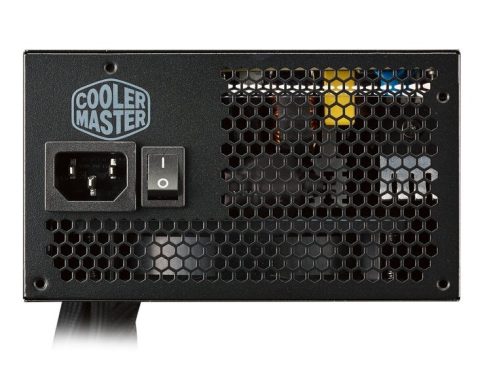
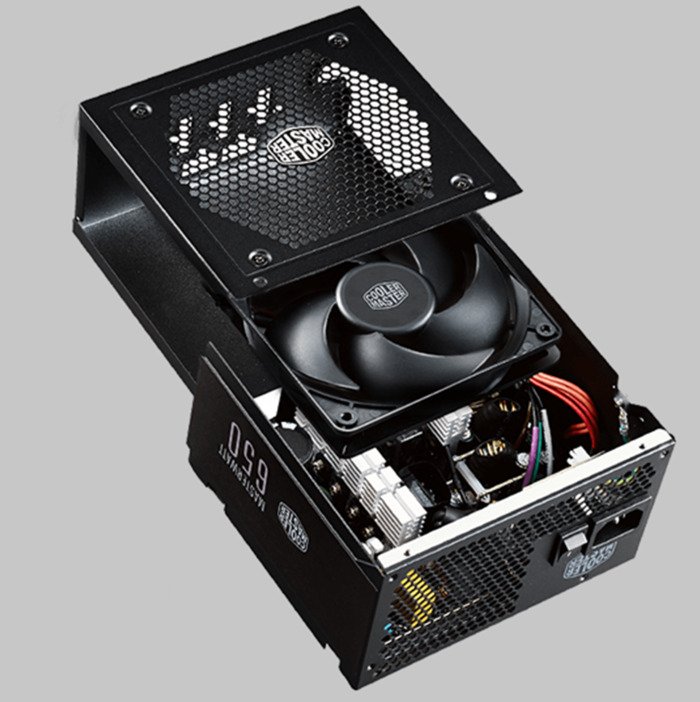
If you would like to game on a budget, search no further than this reliable Cooler Master series. It’s not the most affordable offered, but keeping with a quality brand that’s secure and trustworthy is truly worth it when it comes to PSUs, particularly if you have invested in a mid-range graphics card you plan to overclock. Cooler Master MasterWatt 650 got 80 Plus Bronze effectiveness and is a fairly remarkable 86.6% at full load.

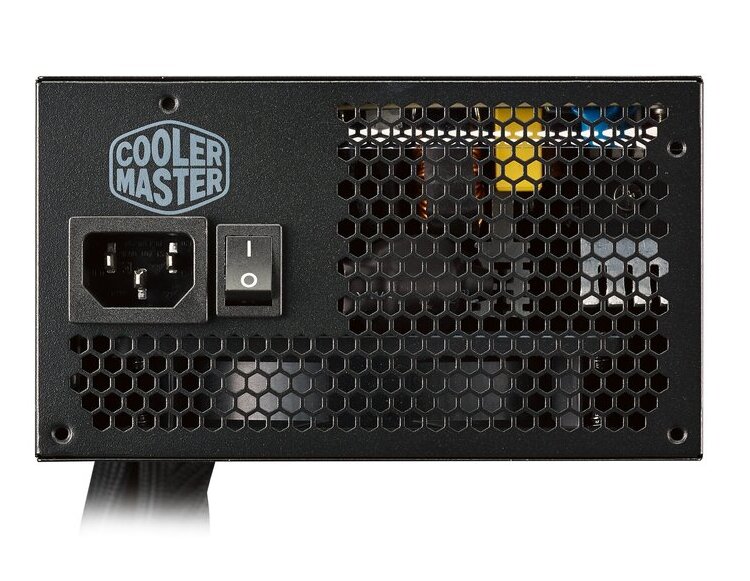
Cooler Master MasterWatt 650 PSU

Compared to opponents, it truly impresses with noise as well, which is a most certain plus when spending long hours gaming.
Up to 15% load, this model is quiet. Up to 270W, it’s just 28dbA, which is simply above a whisper. At 500W it’s around 33dbA. Max dbA is 34.9. So essentially, it’s whisper-noiseless up until close to 500W.
This is thanks to the Silencio FP 120mm fan, which has an LDB (Loop Dynamic Bearing) design with reduced vibrations and an ultra-low current.
The design of Cooler Master MasterWatt 650 is a clean-looking black and the build is really good for the selling price point, with decent soldering quality and 85c capacitors.
MasterWatt 650 PSU is semi-modular, with 2 PCIe connectors and 2 SATAs.
Temperatures are approximately 62°C at full load, which undoubtedly can’t match the premium 750w versions, but you receive what you pay for.
The +12V rail can deliver 54A, which is definitely enough for a gamer’s graphic card. The minor rails can deliver 22A combined.
Ripple reductions is very good, hitting 50mV on the +12V rail at full load.
And lastly, it arrives with a fine 5-year warranty.MasterWatt 650 PSUWhat the Cooler Master MasterWatt series offers is a excellent balance between performance, pricing and stability, shipping with a five-year warranty and numerous upgrades over Cooler Master’s older solutions in this price range.
When compared to the GM-series that it replaces this unit comes with all-black cables, much longer, more conductive PCIe cables and the add-on of a Silencio fan for more silent operation and a semi-passive fan profile that turns the fan off at low loads.
To make a extended story simple, this Cooler Master MasterWatt 650 PSU provides almost everything that a budget PC builder demands, with the only real downside being the unit’s efficiency rating. That being said that is what comes with high wattage units at this selling price point, with higher efficiency scores often coming with significant price increases. Cooler Master MasterWatt 650 price: $66

Cooler Master MasterWatt 650 PSU – The Dual Forward and DC-to-DC circuit design offers reliability and stability.This is especially significant in +3.3V and +5V outputs.

The PSU is the heart of any system, making it essential to purchase the proper product for your needs. The Cooler Master MasterWatt line offers a powerful low-cost offering, although high-end builders should be searching at higher-end products if they value performance, higher-end 0dB fan modes and the enhanced stability that leading tier PSUs can provide. Photo: CM

Cooler Master MasterWatt 650 Specifications:

 Motherboard power connector: 24-pin ATX
– Peripheral (Molex) power connectors (4-pin): 3
– Motherboard power cable length: 55 cm
– Number of SATA power connectors: 9
– SATA power cable length: 620,500,860 mm
– Peripheral (Molex) power cable length: 620,500 mm
– PCI Express power connectors (6+2 pin): 4
– PCI Express power cable length: 67 cm

Total power: 650 W
– AC input voltage: 100 – 240 V
– AC input frequency: 50 – 60 Hz
– Input current: 5 – 10 A
– Power Factor Correction (PFC) type: Active
– Combined power (+3.3V): 120 W
– Combined power (+12V): 650 W
– Combined power (+5V): 120 W
– Combined power (-12V): 3.6 W
– Combined power (+5Vsb): 15 W
– Max output current (+3.3V): 22 A
– Max output current (+12V): 54.1 A
– Max output current (+5V): 22 A
– Max output current (-12V): 0.3 A
– Max output current (+5Vsb): 3 A
– Hold time: 16 ms
– Efficiency: 85%
– Power Good signal delay range: 100 – 500 ms
– Power protection features: Over current,Over power,Over voltage,Short circuit,Under voltage

Cooler Master MasterWatt 650 PSU

 CPU power connector (4+4 pin): Yes
– CPU power cable length: 60 cm
– Floppy drive power connector: 1
– Floppy disk drive connector: Yes

Performance:
– Purpose: PC
– Power supply unit (PSU) form factor: ATX
– 80 PLUS certification: 80 PLUS Bronze
– ATX version: 2.4
– Bearing technology: LDB
– Mean time between failures (MTBF): 100000 h
– Certification: CCC, CE, TUV-RH, RCM, EAC, cTUVus, FCC, BSMI, KC
– Fan diameter: 12 cm
– Number of fans: 1 fan

Corsair RM850x fully modular PSU – very quiet

0

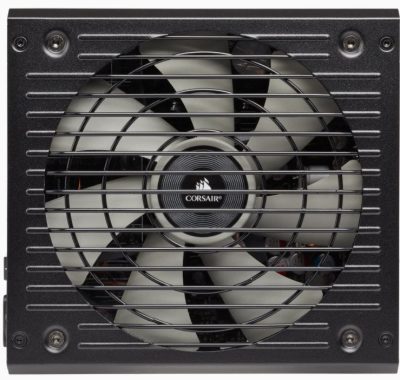
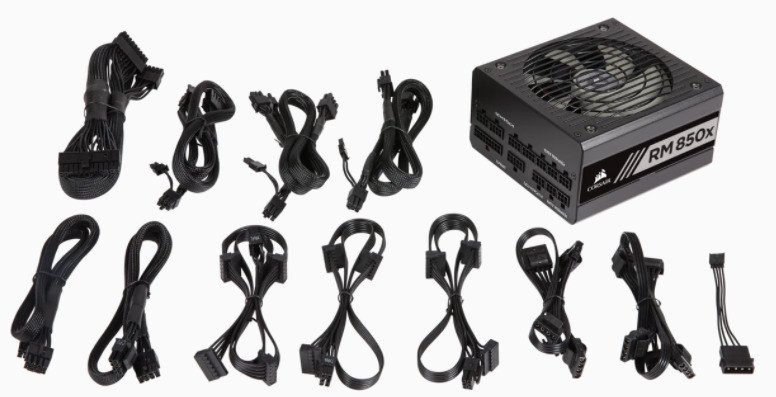
The new revision of the RM series is proportional and aesthetically identical to the unit it replaces, with the sole exception of adhesives. Corsair used the same chassis with beveled edges for almost all of its advanced power supplies. Corsair RM850x fully modular PSU – Satin black paint covers the frame, and the designer also chose neutral colors on the stickers, forming an elegant design. Other aesthetic improvements include raised parallel edges aligned with fan finger protection cables and a small unit pattern badge on the back of the frame. The chassis has been shortened from the previous version and is now 160 mm long, slightly longer than the length of a standard ATX power supply. This is unlikely to be a problem with a modern advanced ATX case, but users should be wary of atypical and inexpensive case projects.

Corsair RM850x PSU


In addition to the typical ac cable plug and the small on/off switch, we can only see a small badge with the unit model printed on it. Moving to the front of the frame we find it full of the many connectors for modular cables. The large 24-pin ATX cable is divided between two connectors. For the rest of the cables, there are basically two groups of connectors: one for 8-pin 12V PCIe/CPU connectors and one for 6-pin SATA/Molex connectors. The 12V PCIe and CPU cables can be inserted into one of the 8-pin connectors. However, the design is a little strange, with one of the 8-pin PCIe/CPU 12V connectors positioned between the 6-pin connectors, because the designer apparently thought that this was the most efficient way to arrange the connectors on the vertical board.

RM850x

Most Corsair mid-range power supplies are produced by Channel Well Technologies (CWT), and RM850x is no exception. Previous versions of the RM850x/RM850 were also manufactured by CWT. This platform is largely based on the previous model, but there are several improvements, many of which are made to improve the efficiency of the unit. However, some modifications improve the long-term reliability of the unit and resistance to damage from external failures (AC).
RM850x heat sinks are suitable for high efficiency power supply with this type of output. Given its hybrid fan mode, it is obvious that the designer wanted the RM850x to have a reasonably wide range before the fan was needed. The input filter stage starts at the back of the AC outlet and continues on the main circuit board, with four Y capacitors, two X capacitors and two filter inductors. There are no surprises here, which is pretty much the standard for consumer-grade high-performance power supplies. CWT added a relay here to prevent the NTC thermistor after starting the power supply, giving the RM850x a slight increase in efficiency.
Corsair engineers designed the RMx series to provide an excellent balance between quiet operation, high-quality electrical performance and a reasonable price. In practice, the series bridges the gap between value and world-class performance products manufactured by Corsair. In this sense, it serves as an upgrade on the relatively simple but very reliable txm series, which offers quieter operation without the high price tag of an AXi series unit. Photo: Corsair

Corsair RM850x PSU

Although the main strength of the Corsair RM850x PSU lies in its quiet operation, we can not help but note that the electrical performance of the particular platform is outstanding. The RM850x far exceeded our initial expectations and provided exceptional power quality in our tests, with figures we typically see on products that sell for twice as much. In addition, we do not complain about the electrical efficiency of the platform, as it easily passed the 80Plus Gold certification requirements regardless of the input AC voltage.
the RM850x rewards its owner with excellent acoustic performance, generates no noise when lightly charged and maintains comfortable noise levels even when the load is high. However, if the load is excessive and the ambient temperature is high, the efficiency of the RM850x will degrade slightly, as the active components will begin to strain. But the only real scenario that meets these requirements is cryptocurrency mining, for which RM850x is clearly not the best option. Corsair RM850x current price: $130

The completely new Corsair RMx PSUs have ASM compatibility and carry out as effectively as their for-runners, while even increasing on them in some crucial areas, such as effectiveness at really light and light loads. The ML fan is a excellent improvement. Not that the riffle-bearing fan on the earlier generation was not fine, on the contrary, but ML fans are far better since they do not have any kind of issues working under high operating temperatures for prolonged intervals. One more main change is the 3rd EPS connector with the 850 W and 1000 W RMx models. We can’t help but wonder which CPU will require this many EPS connectors, but Corsair will have their arguments.

Competitors in the 850 W Gold category is tough. Nevertheless, the Corsair RM850x operates very well, placing third in our relative overall performance graph, with only a little gap to the Seasonic Focus Plus Gold of similar capacity and the EVGA SuperNOVA 850 G3, which the inferior G5 model has substituted. Basically, the RM850x and Focus GX-850 are the frontrunners in the 850 W group. An additional significant mention in this wattage selection is the Thermaltake ToughPower GF1 850, which also uses a CWT base.

Corsair’s RMx series is among the most well known in current day’s market place. The new versions will carry on this tradition if actual selling prices are retained the same since their efficiency is even higher and they are completely compatible with the newest ATX specification (v2.52). The only factor that needs tuning is the fan-speed profile below high loads on the minimal rails. There is simply no need for such a high maximum mixed power limit on the minor rails (150 W), and if Corsair were to lower the limit to 100 or 120 W, the Cybenetics noise score would increase as well. That having been said, ARGB does put a force on the 5 V rail, so lately, there is a requirement for beefier DC-DC converters for that rail.

Power supply get more expensive as their efficiency increases. If you play video games for a few hours each day, you should consider if you really need a Platinum or Titanium power supply because the price premium may be much higher than the additional energy costs. From a different perspective, it seems logical that the less electricity you use, the better. However, such option would cost more.

Since the voltages remained to be drop dead in sync at half load, or roughly 350–400 watts, we have very little—if anything—to complain about in terms of stability. However, we’ll rely on other reviews to provide you with some ripple testing, so you can be confident that the product will pass with best grades. Generally, kick-ass is a viable option for four rails, and the 850W model that was tested has enough power to support two very powerful graphics cards. Realistically, a 650 or 750 model would probably be a better choice as a recommendation for a PC with a single graphics card. If you like to overclock, get the 750W or this 850W model and allow some space for reserve.

Comparing the RMx pricing to more “standard” power supply, it may be a little bit slightly more expensive overall. But here’s why your money was a great investment: it was put toward a gold-rated PSU that flawlessly balanced your efficiency goals. The outstanding 10-year warranty simply further shows how much Corsair believes in this product.

The Corsair RM850x is absolutely unbeatable, at least in terms of what we can test. It checks off all the right boxes in terms of having a dark design, being modular, effective, and remarkably quiet. The RM850x definitely is pure gold, as stated on the box, thanks to that and the incredibly extended guarantee.

Weight -1.659 Adjustable Single/Multi 12V Rail -No ATX Connector- 1ATX12V Version- v2.4 Continuous output rated temperature- C 50°C Continuous power- W 850 Watts Fan bearing technology- Rifle Bearing Fan size mm-  140mm MTBF hours- 100,000 hours Multi-GPU ready- Yes Warranty -10 Years 80 PLUS Efficiency- Gold PSU Form Factor ATXi CUE Compatibility- No Zero RPM Mode- Yes Cable Type Low-Profile- All Black EPS12V Connector- 2 Floppy Connector- 1 Modular Fully PCIe Connector- 6 SATA Connector- 10 Special Technology- OVP (Over Voltage)
UVP (Under Voltage)
SCP (Short Circuit)
OTP (Over Temp)
OPP (Over Power) Protections  Yes

Gigabyte M32U – IPS 32″4k monitor + fast 144Hz refresh rate

0

The Gigabyte M32U is a 32-inch gaming monitor with an IPS panel. It features a 3840 x 2160 resolution, which provides crisp and clear visuals, and a 144Hz refresh rate, which makes for smooth and fluid gameplay. It also supports AMD FreeSync Premium and NVIDIA G-Sync technology, which helps to reduce screen tearing and stuttering.

The M32U is designed with gamers in mind and includes a variety of gaming features, such as Black Equalizer, which enhances dark scenes for better visibility, and Aim Stabilizer, which reduces motion blur for better accuracy during gameplay. It also has a low input lag, which is essential for competitive gaming.

What is Black Equalizer?

Black Equalizer is a feature found on some gaming monitors that adjusts the brightness of dark areas in a scene to make them more visible. It works by increasing the brightness of dark areas while keeping the overall brightness of the scene the same. This can help to reveal hidden details in shadows and improve visibility in dark environments, which can be especially useful in games that have a lot of dark areas or that rely on stealth gameplay.

The Black Equalizer feature can typically be adjusted using a slider in the monitor’s settings menu. By adjusting the slider, users can fine-tune the brightness of dark areas to their liking. It is important to note that using the Black Equalizer feature may affect the overall color accuracy of the monitor, so it is recommended to calibrate the monitor after adjusting this setting.

What is Aim Stabilizer?

Aim Stabilizer is a feature found on some gaming monitors that helps to reduce motion blur and improve the clarity of fast-moving objects on the screen. It works by inserting black frames between each frame of the image, which helps to eliminate motion blur and improve the overall sharpness of the image. This can be especially useful in fast-paced games where quick reflexes are important, as it can help to make objects on the screen easier to track and aim at.

Aim Stabilizer can typically be turned on or off in the monitor’s settings menu, and some monitors allow users to adjust the intensity of the effect. It is important to note that using Aim Stabilizer may increase the input lag of the monitor slightly, so users who prioritize low input lag may prefer to turn this feature off. Additionally, some users may find the effect of Aim Stabilizer to be too strong or unnatural, so it is recommended to experiment with the settings to find the optimal balance between clarity and naturalness.

The monitor comes with a variety of connectivity options, including DisplayPort 1.4, HDMI 2.1, USB 3.0, and a headphone jack. It also has two built-in 3W speakers, which provide decent sound quality.

One potential drawback of the M32U is its size, which may be too large for some users, especially those with limited desk space. Additionally, some users have reported issues with backlight bleeding and color accuracy, although these issues are relatively minor and do not affect the overall performance of the monitor.

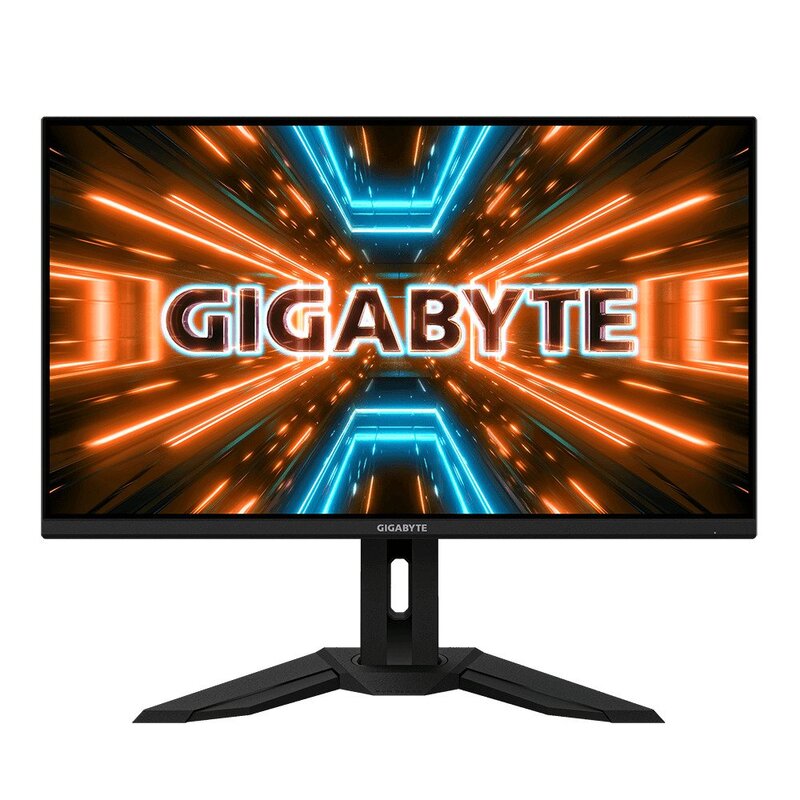
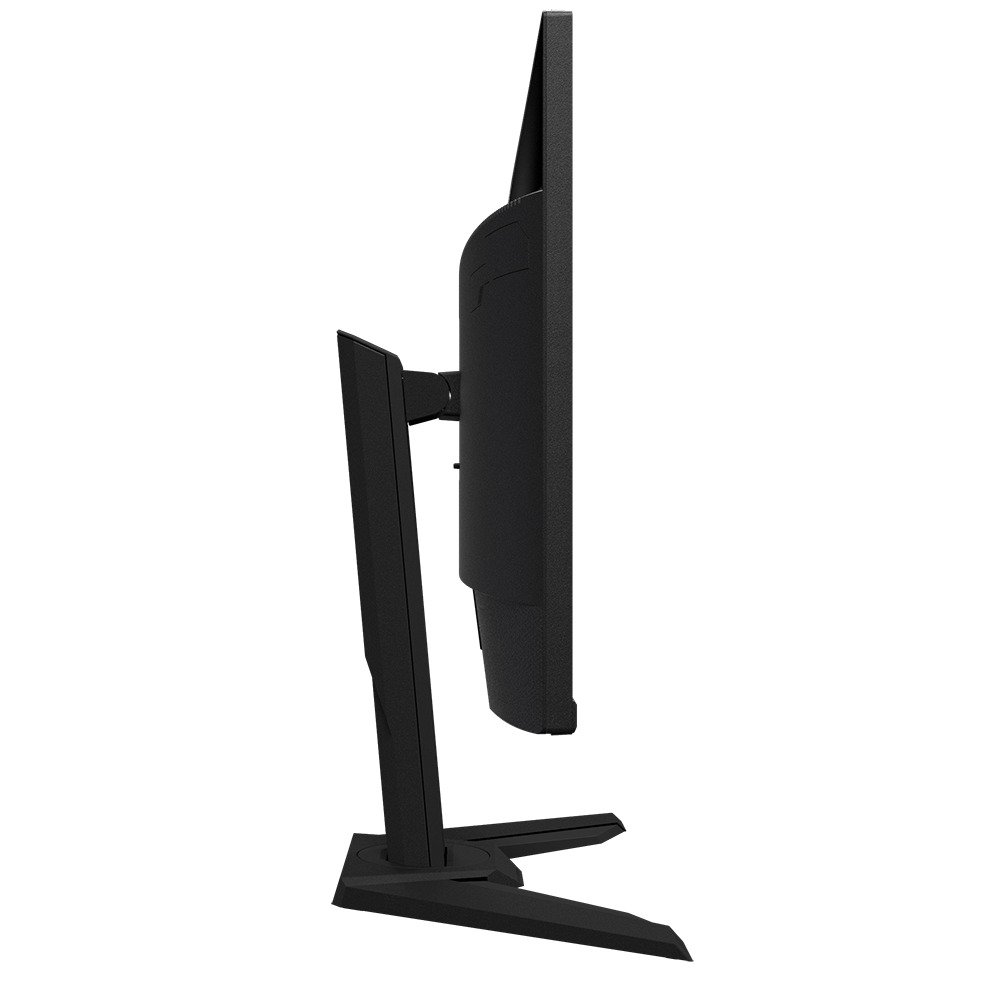
The Gigabyte M32U is identical to the smaller Gigabyte M28U.il has a slightly discreet design, with thin frames on three sides and a flat base that supports the monitor well but overall takes up a little more space. The back of the monitor has a bit more flash, with a bright section near the top, but no RGB lighting or other player aesthetics.
The Gigabyte M32U has good build quality overall, almost identical to the Gigabyte M28U and other Gigabyte monitors we tested. It is made entirely of plastic, without metal components, which is a bit disappointing, but the plastic seems to be of decent quality. There’s a bit of flex on the back panel, but otherwise it’s pretty solid. We sometimes notice a strange click noise when the black frame insert function is activated at the same time as the variable refresh rate function and frame rate changes. We have not seen any other reports on this issue, so it could be our unit.

                                                                                                                                                                     Gigabyte M32U


As you would expect for an IPS monitor, the Gigabyte M32U has poor contrast, so blacks look gray in a dark room. Contrast may vary from unit to unit, but it is close to the upper limits of what we expect from an IPS panel. Unfortunately, the local dimming function can not improve the contrast ratio at all.
The Gigabyte M32U has maximum brightness in HDR. It’s bright enough that most games look good, but it’s not bright enough for a real cinematic experience. The small lights in some scenes are not bright enough to stand out. On the other hand, there is very little difference in maximum brightness with different scenes, which is great.
Gigabyte M32U is a great gaming monitor, especially for Xbox s|X series or Sony PS5 players. It has an exceptionally low input delay, which results in a very responsive gaming experience. It also has an amazing response time, so there is very little blur behind fast moving objects. It supports VRR (FreeSync Variable Refresh rate) technology, and although it is not officially supported, it also works with NVIDIA’s G-SYNC compatible functionality.
The Gigabyte M32U is a great monitor for HDR gaming! It features incredible response time(1ms), exceptional input delay, and a huge selection of additional game features, including FreeSync support. Unfortunately, its HDR performance is limited, because it has a low contrast ratio, maximum brightness appropriate in HDR and a terrible local dimming function. It has fantastic gradient management, suitable maximum brightness in HDR and can display a wide range of colors.
The Gigabyte M32U is a great monitor for desktop users. The large, high-resolution display provides excellent text clarity and is ideal for multitasking. It has wide viewing angles, excellent gray uniformity and good ergonomics. It also has great maximum brightness in SDR and decent reflection management, so glare should not be a problem. Finally, it has additional productivity features, including a built-in video and mouse switch (KVM) allowing you to control two devices with a single keyboard and mouse. Photo: Gigabyte

Gigabyte M32U

The Gigabyte M32U is a 32-inch 4K monitor with a fast refresh rate of 144 Hz. It is very similar to the smallest Gigabyte M28U, but there are small differences between them. This is one of the few monitors with HDMI 2.1 ports, making it a great choice for console gamers, as you can take full advantage of most of what the Sony PS5 and Xbox s|X series have to offer, including 4K@120Hz gaming. It also has additional features designed for productivity, including a video and mouse switch (KVM) built into the keyboard, allowing you to control two sources with a single keyboard and mouse. The large, high-resolution display is ideal for multitasking and provides excellent text clarity. Unfortunately, it has a low contrast ratio, and although there is a local dimming function, it is terrible, so it is not a good choice for a dark room, and the sRGB mode, which is most accurate from the very beginning, blocks almost all parameters.

Gigabyte M32U

M32U Gaming Monitor Specs:

  • Panel Size (diagonal) 31.5” SS IPS
  • Display Viewing Area (HxV) 697.3056 x 392.2344 (mm)
  • Panel Backlight/ Type Edge type
  • Display Surface(non-glare/ glare) Non-glare
  • Color Saturation 90% DCI-P3/ 123% sRGB
  • True Resolution 3840 x 2160 (UHD)
  • Pixel Pitch 0.181 (H) x 0.181(V)
  • Brightness 350 cd/m2 (TYP)
  • Contrast Ratio 1000:1
  • Viewing Angle 178°(H)/178°(V)
  • Display Colors 10-bit (8-bit + FRC)
  • Response Time 1ms MPRT
  • Refresh Rate 144Hz
    120Hz for Console Game*
  • HDR VESA Display HDR400
  • Flicker-free Yes
  • HBR3 Yes
  • Signal Input HDMI 2.1 x2
    Display port 1.4 (DSC) x1
    USB Type-C x1
  • Earphone Jack Yes
  • Speaker 3W x2
  • Unique FeaturesOSD Sidekick
    Aim Stabilizer Sync
    Black Equalizer
    Dashboard
    Crosshair
    Timer
    Counter
    PiP/PbP
    Auto-Update
    KVM
    6 axis Color Control
    Smart OD
  • USB port(s)USB 3.0 x3
  • Power TypeBuilt-in
  • AC Input Max140W
  • Power Saving Mode0.5W
  • Power Off Mode0.3W
  • VoltageAC 100V~240V /50~60Hz
  • Tilt(angle)-5°~+20°
  • Swivel(angle)-30°~+30°
  • Pivot(angle/direction)N/A
  • Height Adjustment (mm)130mm
  • VESA Wall Mounting(mm)100*100mm
  • Kensington lockYes
  • Phys. Dimension with Stand(WxHxD)715.3*585.3*244.3 mm
  • Phys. Dimension w/o stand  (WxHxD)715.8*423.8*68.2 mm
  • Box Dimension (WxHxD)990*536*192 mm
  • Net Weight with stand (Esti.)10.35 kg
  • Net Weight without stand (Esti.)7.25 kg
  • Gross Weight (Esti.)13.75 kg
  • AccessoriesPower cable/HDMI cable/DP cable/USB Cable/QSG/Warranty card

Cloud provider Migration : different types

0

Consider migrating from home to a remote location to get better prospects. You will plan your move, choose a great place to stay, and then move your belongings and furniture to a new place. Once moved, it will be installed and examined if you have everything that has been transferred. This is the same case when migrating to the cloud. Now let’s look at the different stages involved during migration and also the different types of migrations.

What is cloud migration?
Cloud migration is a plan or process in which data and applications are moved to the cloud. You migrate your digital business operations through this.

What are all the steps in the migration process?
Migration is not a one-step process. Migration can be a complex process depending on the size and complexity of your applications. Here we mention some of the fundamental steps of the migration process.

Migration planning: Before you plan your migration, you need to have a clear goal about the reason for the migration and the strategies to use. You need to calculate your cloud server requirements based on the current resource requirements of your application. This is because you do not have to pay extra for what you do not need. You can turn to migration specialists at this stage to determine all dependencies and requirements.
Choose your cloud provider: Once you plan to migrate, you can decide which cloud environment to adopt. It can be a public cloud, hybrid cloud, private cloud, or multi-cloud (or services such as Google, Azure, or AWS). Depending on future requirements and needs, you can decide.
Application and data migration: With the help of experts and a tailored plan, you can migrate your data and applications with ease. Just take into account all security, data and backup issues when migrating.
Migration validation: We can only call the migration a success if it delivers the desired performance. You can compare performance before and after migration from a technical and business perspective.
What are all types of migration processes?

Photo: Pixabay

Rehosting: The rehosting strategy is also called lifting and moving because it involves lifting servers or applications from the current hosting environment and transferring them to the cloud infrastructure. While rehost carries exact copies of your current environment without making any changes. This saves money for retraining staff on a new system. This strategy usually starts when companies initially think about migration
Replatforming: Replatforming is nothing but rehosting. With this strategy, we migrate applications and their components to a cloud-managed platform without having to change the core application architecture. You can increase or decrease your company’s resources and capabilities at any time by adopting this strategy.
Buyback: By adopting this strategy, you abandon the old app platform and buy new platforms. It has such disadvantages as loss of familiarity with the existing code and retraining of employees.
Refactoring: Refactoring is also called redesign where you rebuild applications from scratch. Although this is the most expensive method, it is the best option when you want to improve services. Companies often adopt it when their current environment is difficult to improve.

Retreat: As the company plans to migrate applications to the cloud, it lists its applications. They check that everything needs to be migrated and also understand the use and cost to the business. If the company believes that the application is not quite worthy of migrating, you can simply reduce its size and remove it from the list. This not only simplifies costs, but also allows an organization to promote scalability and efficiency

Realme GT Master Edition- specs & review

0

The Realme GT Master Edition retains many of the features of the standard model: a large display, a large battery, robust software and high charging speeds. The unique design of the case and the inclusion of a headphone jack also make it very desirable for a low-priced mid-range phone.
Realme generally offers products when it comes to smartphone design and build quality, and this is still the case with the Realme GT Masters Edition – is a well-made, thin and beautiful phone that feels more compact in the hand than you would expect from its 6.43-inch screen size – perhaps this is due to the frames with a thin and high aspect ratio of 20:9 and lightweight construction.
There’s a Voyager Grey version of this phone that has a grooved vegan leather back, apparently inspired by the look of hard cases – it looks pretty cool, but our Luna White review model has a more ordinary flat back. The other color option you have is Cosmos black, which still only has a standard plan.

Realme GT Master Edition


Realme GT Master Edition phone measures 159.2 x 73.5 x 8 mm (or 6.27 x 2.89 x 0.31 inches) and weighs 174 grams (0.38 pounds). As you can see, the power button is on the right, the volume controls are on the left, and you have a single speaker, a USB-C, and a headphone jack at the bottom: there is no need to go for a dongle if you want to connect the wired headphones.
The rear camera setup is exactly the same as the standard Realme GT, so it has a 64MP wide + 8MP ultra wide + 2MP triple lens macro setup – there’s no optical zoom here, and to be honest, we haven’t used macro mode much, as the standard mode is suitable for any close-up you need. Photo: Realme
Photos are captured quickly, with accurate autofocus, lots of liveliness and sharpness, and decent HDR processing that prevents the darkest and brightest parts of an image from losing detail. The colors may be a little too vivid in some places and the images may be too sharp, but these are not significant problems and can be easily fixed in the photo editing software of your choice.
The 4,300 mAh battery capacity inside the Realme GT Master Edition isn’t huge, but it seems to hold its charge well whether you’re playing games or streaming video on the web.
Wireless charging is a feature that often boils down to this price in the smartphone market, and while it can be perfectly handled without it, if you like having the option, you might consider the idea of a more expensive phone.

Realme GT Master Edition
NETWORKTechnologyGSM / CDMA / HSPA / EVDO / LTE / 5G
LAUNCHAnnounced2021, July 21
StatusAvailable. Released 2021, July 30
BODYDimensions159.2 mm x 73.5 mm x 8.0/8.7 mm (depending on color)
Weight174/180 g (depending on color) (6.14 oz)
SIMDual SIM (Nano-SIM, dual stand-by)
DISPLAYTypeSuper AMOLED, 120Hz, 1000 nits (peak)
Size6.43 inches, 99.8 cm2 (~85.3% screen-to-body ratio)
Resolution1080 x 2400 pixels, 20:9 ratio (~409 ppi density)
PLATFORMOSAndroid 11, Realme UI 2.0
ChipsetQualcomm SM7325 Snapdragon 778G 5G (6 nm)
CPUOcta-core (4×2.4 GHz Kryo 670 & 4×1.9 GHz Kryo 670)
GPUAdreno 642L
MEMORYCard slotNo
Internal128GB 6GB RAM, 128GB 8GB RAM, 256GB 8GB RAM
 UFS
MAIN CAMERATriple64 MP, f/1.8, 25mm (wide), 1/2″, 0.7µm, PDAF
8 MP, f/2.2, 16mm, 119˚ (ultrawide), 1/4.0″, 1.12µm
2 MP, f/2.4, (macro)
FeaturesLED flash, HDR, panorama
Video4K@30fps, 1080p@30/60fps, gyro-EIS
SELFIE CAMERASingle32 MP, f/2.5, 26mm (wide), 1/2.74″, 0.8µm
FeaturesHDR, panorama
Video1080p@30fps
SOUNDLoudspeakerYes
3.5mm jackYes
 24-bit/192kHz audio
COMMSWLANWi-Fi 802.11 a/b/g/n/ac/6, dual-band, Wi-Fi Direct, hotspot
Bluetooth5.2, A2DP, LE
GPSYes, with A-GPS, GLONASS, GALILEO, BDS, QZSS
NFCYes
RadioNo
USBUSB Type-C 2.0, USB On-The-Go
FEATURESSensorsFingerprint (under display, optical), accelerometer, gyro, proximity, compass
BATTERYTypeLi-Po 4300 mAh, non-removable
ChargingFast charging 65W, 100% in 33 min (advertised)
MISCColorsBlack, Gray, White, Aurora
ModelsRMX3363, RMX3360
Price$ 307.65 / € 349.99
TESTSPerformanceAnTuTu: 529263 (v9)
GeekBench: 2917 (v5.1)
GFXBench: 27fps (ES 3.1 onscreen)
DisplayContrast ratio: Infinite (nominal)
CameraPhoto / Video
Loudspeaker-29.2 LUFS (Average)
Battery lifeEndurance rating 114h

Traditional Phones or VOIP Phone Handsets

0

The world has seen extravagant transformations and advances in VoIP technology over the past decade and a half. These advances are beyond doubt, this technology as well as VoIP phones are moving to the next level and in place, which is impossible to achieve for normal phones. However, there are people who think that a comparison can be made between the two, but experts say that there is no comparison at all because the technological gap between them is really large.
Phones that work with VoIP technology are very advanced and much safer than traditional phones. Here in this article we will take a look at some of the main factors that distinguish these two types.

VoIP Phone photo: Photo by Devin Pickell on Unsplash


The cost of communication
The first important difference between the two is the cost of communication which is very low in VoIP technology and completely opposite in traditional telephone systems.
According to those who deal with dect phones, sip phones, etc., using VoIP technology on the VoIP phone saves users a lot of money that would have been wasted by paying bills against using the traditional phone system.
The reason is that this technology allows users to make phone calls using a high-speed Internet connection, which significantly reduces the cost of calls.
On the contrary, there is no such service available on traditional phones yet, which means that the cost of calls is even higher and this fact puts this version on the contrary.
On top of that, with no installation, no monthly costs, and no expensive hardware to install, VoIP phone systems will significantly reduce monthly phone bills.
The technical capabilities are really high
This is another section where phones and VoIP technology have the advantage as they are superior to traditional phones and technology in all terms.
VoIP is the latest and cutting-edge technology and for that you will find it supported and compatible with a wide range of advanced features.
All these things combine to make this technology more convenient, complete and economical.
For example, you can take advantage of features such as auto-receive, voicemail, call waiting, call forwarding, conference call, and more.
All of them allow users to be comfortable while effectively organizing all incoming and outgoing calls and tasks that can be performed on VoIP phones.
Mobility
Another point is the mobility that is missing in traditional phones so far.
The availability of a high-speed Internet connection on mobiles has given this opportunity to use this technology on the go and it has completely revolutionized the world of communication.
This means that with this technology there is no dependence on the physical location of the phone device and the phone number.

Completely unlike traditional phones, VoIP phones and VoIP technology are portable and accessible via any Internet-enabled device. It is quite simple for the VoIP phone system to transfer analog voice data over the Internet and to do this, it requires nothing more than an Internet connection.