By cleaning or formatting the HP laptop hard drive, it will remove the OS and all data from the device, allowing you to sell the PC without the risk of data being collected or reinstall the OS and software without worrying about residual viruses or infections. After backing up all the laptop data you want to keep such as photos, documents and music, you can format the hard drive using a Windows installation disk, which includes a tool to format the hard drives. 1. Insert the Windows Installation CD that came with your HP laptop into your HP laptop’s optical drive. If you did not receive a Windows installation disc with your laptop or no longer have the CD, purchase one that matches the Windows label located at the bottom of the laptop or inside the battery compartment. For example, if the windows sticker on the laptop is for Windows 7 Home Premium, you need to purchase a Windows 7 Home Premium Disc if you plan to reinstall the operating system after formatting. 2. Click Start, then click the arrow next to ” disable.”Select” Restart ” from the menu that appears. 3. Press the button to access the start screen when prompted. The exact button depends on the HP laptop model you own. For example, the startup screen may read ” press ESC to enter the startup menu.”When the Start menu appears, use the arrow keys to highlight “CD / DVD drive”, and then press”Enter”.”If you do not press the indicated key fast enough and the computer proceeds to boot Windows, turn off the laptop and start again. 4. Follow the on-screen instructions once the Windows installation disc is loaded. After accepting the license agreement, click ” Custom (advanced)”.”Select the main partition of your hard drive, and then click” Format.”Wait for the hard drive to be formatted. 5. Click “Next” after the drive has been formatted if you want to install a new copy of Windows. If not, remove the installation disk, and then press and hold the “Power” button to turn off the laptop.
Currently, everyone wants to make more and more money from the Internet. Is that possible? Yes, you can earn a lot of money as you think doing some jobs. Today in this article I would like to share with you some golden tips for earning from affiliate marketing. Follow the following tips to earn money from marketing commission without having any website. Sometimes few ask to think that without a website We cannot promote any product or service to generate revenue. But it is not so. For the promotion of any product and service of the company to materialized. Everyone can not manage the affiliate website. To implement in your behavior with such ideas. Start with YouTube: nowadays customers consume video content over text. And people prefer to buy any product online shopping after checking the visual video reviews. For example, if someone wants to buy a mobile phone under $100. Search mobile review and features. Then start the Product Reviews YouTube channel and add the affiliate link in your description and broadcast to viewers to buy from your link. So anyone can generate adequate sales and make more affiliate commission. Today this method is booming and growing day by day. To do this kind of work you don’t need to have many blogs and websites. Email Marketing: Email marketing is the most effective and powerful method to promote business instantly without any additional expense. Just follow some steps of email marketing and send the emails to the interested customers. But it creates a problem with e-marketing like email collection. Collecting more and more email contacts is a very difficult task. For the creation of a large list of customers persuade them on social networks to provide free services related to products. In order to use the customer service give the email ID and contact. Make the list and start sending affiliate links to the customer. This is another better way to sell each other’s products using email marketing. You do not need to have any website to get the affiliation. Pay per click: for the immediate benefits of the company Commission, use the Google service’s PPC ads. Pay per click is the most valuable method to promote staff and services immediately. Using this method of ads you can generate millions of traffic in a few days, but this is very expensive. It’s out of everyone’s reach. To create a solid AdWords campaign, add money to your wallet and then create quality ads and targeting. But there is a good chance to achieve positive results from this means. To create this ad you do not need to have any website. Just create any landing page where your products and services are displayed correctly. Just try this ad and sell your stuff more and more.
Photo: Pixabay
Facebook Instagram Facebook Instagram Facebook Instagram: currently, most people spend their precious time on social media like Facebook, Linkedin, Twitter, Instagram, etc.to generate sales, increase your followers and engage with friends and solve the purchase query. People always check product reviews and features before taking anything or gadgets. Here you need to create the pages and make the post every day with the latest features and newly arrived products. Share photos of your affiliate products on Instagram. Make the video reel or short videos and try to tell all the features in less time. Keep your affiliate product links in the descriptions and convert them to buy from there.
Quora: to generate good sales and revenues solve customer questions about quora. This is the largest question and answer web place in the world. People post doubts, and experts give answers to these questions. So join Quora today and solve the problem of customers in their related products and services. This means that you review your products on quora that you want to sell. Try this method to immediately sell your things by driving customers.
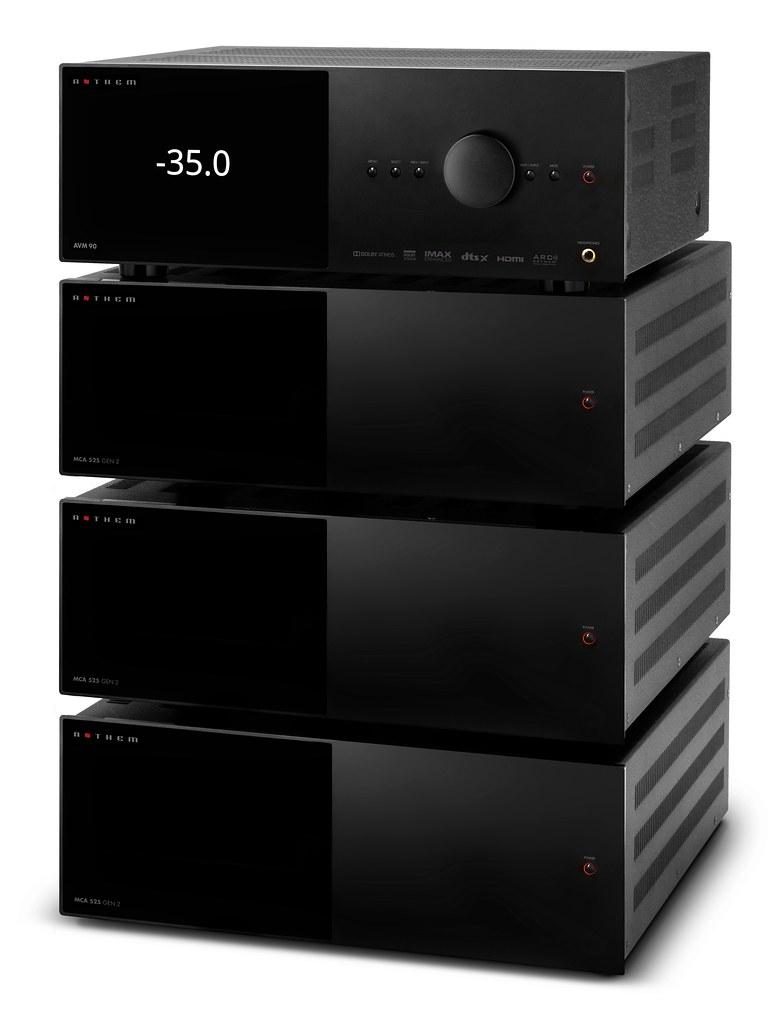
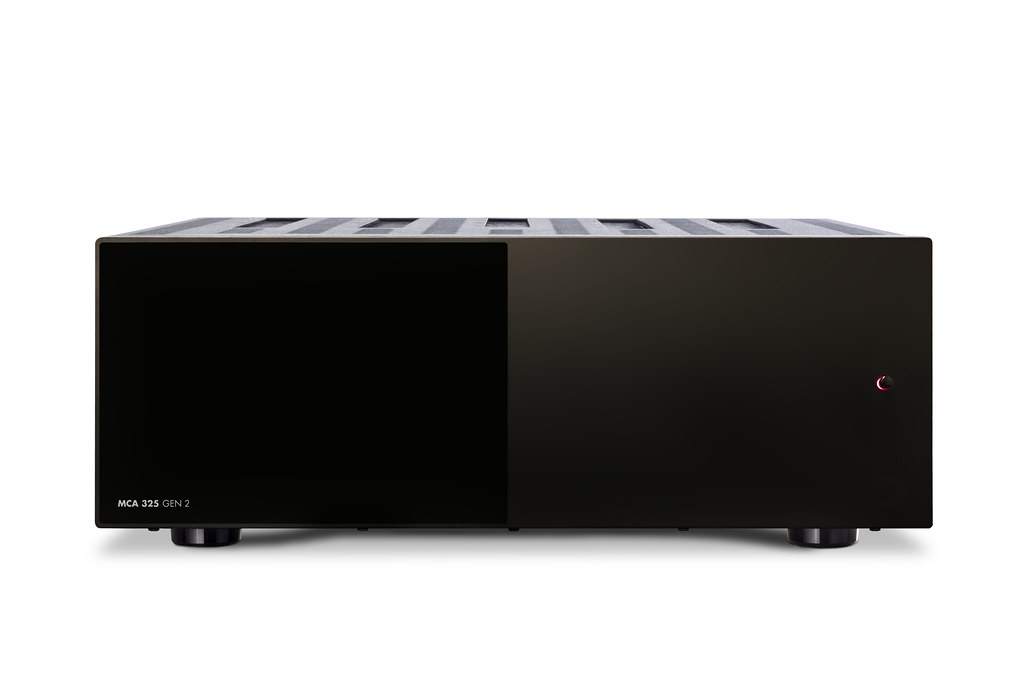
Meet the most demanding standards, the Anthem MCA 325 GEN 2, masters home cinema 3-channel power amplifier.
3 channel amplifier Anthem MCA 325 GEN 2 is a 3-channel power amplifier ideal for high-end home theater. Use it with an AV processor and power the front and center speakers on a basic three-channel system or use it to power the effect speakers on a more complex system. MCA 325 GEN 2 grows with your system.
The perfect combination for AVM-70 and AVM-90 processors Powered by Anthem’S AVM-70 and AVM-90 processors, this is the ideal power amplifier to combine. Connect via professional-quality balanced XLR and enjoy powerful and harmonious surround sound. Unsurprisingly, the MCA 325 GEN 2 also matches the style of AV processors, with the eye-catching glossy / matte front panel that is so distinctive of this Anthem range.
Scalable for unlimited possibilities Today’s premium AV systems can easily include up to 15 speakers and four subwoofers. This is the ideal combination for a Dolby Atmos 9.4.6 system with nine surround speakers, four subwoofers and six ceiling speakers. Use the Anthem 325 GEN2 and 525 GEN 2 amplifiers (5 channels) to create exactly the right number of channels for your AV system.
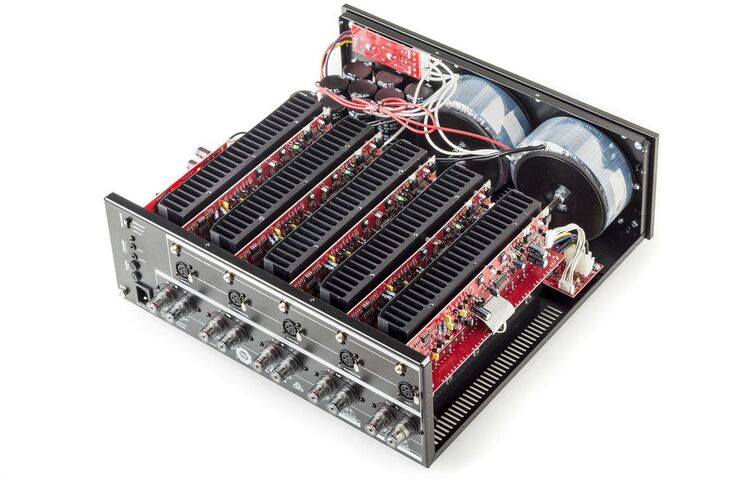
Toroidal transformers for massive power With huge toroidal transformers in the center, cooled by oversized aluminum heatsinks and high-power current output transistors, MCA 325 GEN 2 has all the power you need. At no less than 225 watts per channel (at 8 ohms), there’s enough to drive speakers to multiplex levels, in larger home theaters. This effortless power also provides crisp dynamics, the kind of sound that keeps you on the edge of your seat during tense movie scenes.
Clean sound More than powerful, the MCA 325 GEN 2 also has clarity and resolution covered. Advanced power regulators, high-quality filter capacitors and precision construction help give this amplifier an excellent signal-to-noise ratio of 120dB. This means that there is almost no existing background noise, allowing you to hear every subtle nuance of the sound. If a pin falls on the soundtrack, you will hear it.
Better protected Anthem Advanced Load Monitoring (ALM) monitors the temperature, current and output voltage of the receiver, protecting circuits when needed. Unlike other protection systems, ALM is not evasive, which means it operates out of the signal path and therefore does not affect the sound quality. photo: Anthem
Professional XLR, balanced inputs XLR balanced sockets offer excellent noise resistance and a “locked” connection for the lowest distortion and safest connection. The MCA 325 GEN 2 power amplifier offers a choice of these along with standard single-ended RCA phono inputs.
Completely Redesigned
The new MCA GEN 2 series greatly reduces the use of internal cabling for a much smoother circuit path for pure, unobstructed audio performance. The use of low-flux toroidal transformers and improved input transistors provide a greater sense of transparency, even with dynamically complex material.
We’ve also improved other performance benchmarks including power bandwidth and slew rate. With a signal-to-noise ratio of 120 dB, background noise is practically nonexistent, leaving you with just pure natural sound reproduction.
Get perfect home theater power with Anthem MCA 325 GEN 2 amplifier .
With over 35 years of in-house, functional design and cutting-edge audio engineering expert knowledge, Anthem products offer an unmatched degree of dependability and utility while offering one of the highest performance/price ratios in the market. This is only one of the many reasons that experienced audiophiles, active musicians, and engineering technicians from all around the world use Anthem electronics.
In countries where the line voltage is 120 V, this product operates from a single phase AC power source that supplies between 108 V and 132 V at a frequency of 60 Hz.
220-240 V version:
In countries where the line voltage is 220, 230, or 240 V, this product operates from a single phase AC power source that supplies between 198 V and 264 V at a frequency of 50 Hz.
Like most operating systems that are used on mobiles and desktops, the performance of the Android operating system starts to decrease after some time. If you use a phone under $100 or a high-end smartphone, the problem will be the same.
Mobile operating systems are typically faster and lighter, as they should meet our needs on the go. But since most Android-based phones tend to be slower after a while, it is common for users to search online or seek advice from others on how to improve the speed of their smartphones. A simple tip is to go for a phone with 8GB of RAM or the one with a higher variant. Going for a phone that has 2GB or 4GB will not be enough in the modern world.
Photo: Pixabay
Here are some 7 useful tips that can help improve the speed of your smartphone: 1. Remove or disable unwanted applications All applications installed on the phone take up storage space. In addition, these applications run background processes and this can consume data. It does not matter if you are buying a phone under 20000 or a flagship device, when a large amount of storage space is occupied, or when a large number of background processes occur, the device begins to reduce its performance. If you do not use an app, you need to delete it. It is recommended to keep only those applications that you use.
2. Use a high-speed memory card It’s okay to use an 8GB RAM phone, but if your memory card is slower, it doesn’t help to improve the speed of your device. Remember, the memory card of the smartphone is where all the storage space of the phone takes place. If the phone is limited with little internal memory, a high-speed memory card will not only increase the storage space, but also greatly improve the speed of the device. This is a trick that you can use even if you decide to buy a phone under $100 . It is best if you opt for Class 10 or Class 6 memory cards for your phone, especially if you are trying to increase its performance.
3. Reduce or disable animations Consider reducing animations if you want to speed up your smartphone. An easy way to do this is to enable Developer Options. After enabling this option, you can reduce or disable animations. This hack is useful to improve the speed, even if you have a mobile 8 GB of RAM. When you make this change, you can adjust the animator duration scale, the transition animation scale, and the Window animation scale. The advantage will be seen in the form of reduced time needed to make visual effects on the device.
4. Install applications from known sources Many Android apps look good and look useful, but they are unreal and want to take control of your device and collect as much information about you as possible. Therefore, even if you have a phone under $100, it is better to download and install apps only from trusted and well-known sources such as the Google Play Store. You will have this option on your device.
5. Keep your home screen clean Your phone will definitely look good when you have attractive widgets and live wallpapers. But, these characteristics can negatively affect the performance of the device by putting additional load on it. Then, if possible, select static background and consider removing unused widgets and icons. You will notice improved speed and performance of your device once the Home screen is clean and tidy.
6. Resetting the device If you are using an 8GB RAM phone or a low-end one, you can consider running a factory reset if nothing works for you. You can reset your smartphone by visiting the Settings and clicking on the factory reset option or the hard reset option. In the first case, all data from the phone including applications, videos, caches and photos will be deleted. In the latter case, a deeper cleaning is performed. Even a phone under $100 has a reset option that can be used at any time.
7. Stop syncing Sync is the process of synchronizing your phone’s data with Google servers. Using this feature, you will receive new notifications every time an app is updated, a message arrives in your inbox, or a new email arrives. A simple synchronization process, even on an 8GB RAM phone, can only be achieved after the phone is updated to a preset interval. This process will consume on the performance of the device, making it slow or slow. Then, if possible, keep the Sync option disabled.
Virtual DJ is a complete mixing tool for creating and editing audio files, which comes with an accurate set of tools such as tone control, karaoke support and other features that will appeal to amateurs and professionals alike.
If you want to get into DJ-ing, you’re probably looking for the best possible tool to get started. There may not be a better way to get started quickly and easily than using Virtual DJ.
First of all, it is relatively easy to use and has a clean interface. Secondly, it gives you a lot of room to grow as it also has some advanced editing tools.
A good variety of tools It is designed to carry as many tools as possible so you can start editing right now. First of all, we must keep in mind that this is not a composition application, although it can also be used to edit music that already exists on the market. You can edit the songs your way so as to add some of your styles.
At first, DJ’s virtual interface will seem a bit confusing and complex if you are a beginner. But do not worry, spend some time with him, and soon you will see that it should make sense to you.
You can work on multiple tracks at the same time, as well as use the variety of tools within the interface, which tends to make things a little more difficult at first.
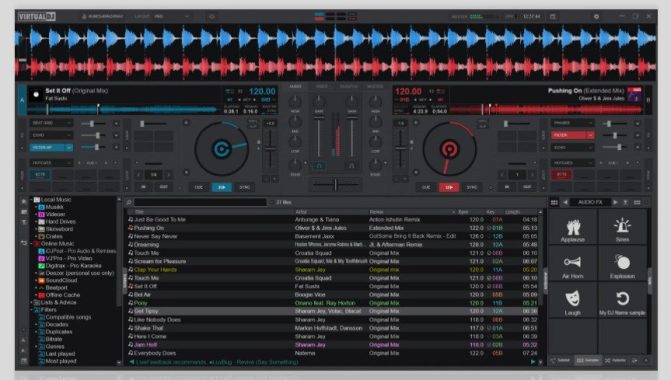
INDEPENDENT DJ MIXER Virtual DJ lets you start DJ-ing right away, just with your computer. To practice and learn, or prepare sets and playlists. VirtualDJ works for all types of DJs, with or without hardware.
LIBRARY MANAGEMENT Superior song library management with quick search, Smart Folders, playlists and more. And with AI: suggestions, requests and online catalogs.
VIDEO AND AUDIO MIXING VirtualDJ supports a multitude of audio, video and karaoke formats. Entertain your guests with stunning images, mix videos or host karaoke events.
EFFECTS AND SAMPLES Built-in professional audio and video effects to enhance sound and mixing. And unlimited sampler with easy control of sound and / or video loops.
Editing functions In addition to the basic tools, Virtual DJ mixing software comes with powerful editing tools that will help you get the most out of your money. It has three-band eq, then real scratch animation, karaoke support, tempo master tone algorithm, BeatLock engine, seamless auto loop and much more.
This means that the Virtual DJ mixing software is ideal for both beginners and advanced users as it has a good mix of everything.
More advanced users can take advantage of master tempo, beat-match features, smart loops and several additional plugins, especially useful when a special sound effect is needed. Videos and karaoke are also available in the free version.
Conclusion Virtual DJ is a mixing software that you can use to create and edit songs and learn to DJ. Photo: Virtual DJ
Features and benefits of Virtual DJ software :
DJ players with controls and pitch Maximum number of decks 99 Internal mixer with gain and equalizers Key lock / Tempo Master Instant BPM detection Automatic Beatmatch Automatic gain Smart loops Play Music Video and Karaoke Master + headphone output
The iPad a great way to cut the cable and get rid of cable TV, but what about watching on the TV? If you prefer to watch on your widescreen TV, connect your iPad to your TV with a wired or wireless connection. You can also connect your headphones to any TV for a private viewing experience. Here are five ways to achieve your iPad TV goals. Connect your iPad and TV with Apple TV and AirPlay Apple TV is a great way to connect your iPad to your TV. Because it uses AirPlay, it is wireless. This means that you can keep your iPad on your knees and send the screen to your TV. This is the best solution for games, where having a cable connecting the iPad to a TV is limiting. Apps installed on Apple TV offer a bonus. If you love Netflix, Hulu Plus and Crackle, you don’t need to connect your iPad to enjoy streaming video from these services. Applications run directly on Apple TV.
Photo: Pixabay
Photo: Apple
Apple TV also works great with your iPhone and iPod touch, allowing you to stream video via AirPlay or use your entertainment system’s speakers to play music. The Apple TV 2017 model has a powerful processor, has access to the full version of the App Store and can stream 4K video. Apple TV connects to a TV using standard HDMI cables and uses AirPlay to communicate wirelessly with an iPad. Apps that don’t support AirPlay also work with screen mirroring, which replicates the iPad screen on a TV. Connect iPad wirelessly without using Chromecast If you don’t want to follow the path of Apple TV, but want to connect your iPad to your TV wirelessly, Google Chromecast is a workaround. Instead of connecting your Apple TV to a TV, you’ll connect a Chromecast to a TV. It has a relatively easy installation process that uses the iPad to set up the Chromecast and connect it to a Wi-Fi network. When everything is set up and working, you can stream the iPad screen to your TV, as long as the app supports Chromecast. This is the significant limiting factor compared to Apple TV AirPlay, which works with almost all iPad apps. Connect iPad to your HDTV via HDMI Apple’s Lightning Digital AV Adapter is the easiest and most straightforward way to connect an iPad to an HDTV. It works via an HDMI cable to send the iPad screen to the TV, so it works with any app running on an iPad. You can also stream your movie collection from a PC to an iPad to an HDTV using home sharing. This is a great way to switch from DVD and Blu-ray to digital video without losing the ability to watch it on the big screen TV.
Connect your iPad with a VGA adapter With an Apple Lightning-to-VGA adapter, you can connect an iPad to a TV with VGA input, computer monitor, projector, or other display device that supports VGA. This solution is excellent for monitors. Many newer monitors support multiple display sources. You can switch from using your monitor to your desktop and using it to your iPad. VGA adapter supports screen mirroring mode. However, it does not transfer sound, so you should listen through the iPad’s built-in speakers or external speakers.
If you look through your TV, the HDMI adapter or component cables are the best solutions. If you are using a computer monitor or want to use your iPad for large presentations with a projector, the VGA adapter may be the best solution.
This solution is best when using a monitor to project a large screen to an audience, for example for presentations at work or school.
The fast-growing Japanese drone maker has developed its own autonomous flight control and SLAM technologies that allow its drones to be used in places beyond the reaches of GPS/GNSS-based competitors.
Japan’s reputation for inovation, technology and high-quality has long been underpinned by corporate behemoths like Sony, Toyota, Mitsubishi Electric, tech giant Softbank and robotics manufacturer FANUC.
While innovation in the U.S is synonymous with the fertile landscape of Silicon Valley and the start-ups that have gone on to become major tech players, Japan does not have a global image as a teeming start-up hub. However, with many new companies involved in deep technology and engineering innovation, the nation’s once-neglected start-up scene has begun to garner greater attention from venture capitalists and investors both at home and abroad.
Take, for example, drone manufacturer ACSL (Autonomous Control Systems Laboratory Ltd.), one of the few university-born startups that have managed to go public in Japan. Established in 2013 by a Chiba University professor with more than 20 years of experience in R&D of autonomous flying objects, ACSL manufactures autonomous drones based on the latest control system technologies.
ACSL pursues robotics technology, including autonomous control technology, and is always at the forefront of technology development. Through the social implementation of these technologies, we will increase the productivity of human economic activities in the social infrastructure that is the foundation of human activities, replace as many low value-added and dangerous operations as possible, and promote the evolution of society for the next generation.
Having secured multi-million-dollar investments from high profile sponsors, such as e-commerce giant Rakuten and The University of Tokyo Edge Capital, this exciting new company went public in December, 2018. “That made us the only publically listed specialized drone manufacturer in the world back then,” recalls Representative director, President and COO, Satoshi Washiya.
Photo: ACSL
Firstly, the projected growth of the global drone market, which is expected to surge to $43.1bn in 2024 (up from $14.4 in 2016) on the back of increasing demand from both business and hobbyist consumers. Growth of the market will also be supported by the rollout of 5G, which will significantly enhance the capabilities of drones and their utilization in industries across the board, from farming and construction to security and online shopping deliveries. Second is ACSL’s competitive advantage over many other drone makers, namely its propriety control technologies and SLAM (Simultaneous Localization and Mapping) technology, which eliminates a dependence on GPS, thus, increasing the drone’s autonomy.
“There is a limited amount of companies that have their own control technology and can tailor to individual customer needs,” says Mr. Washiya. “What we did at ACSL is build high-end-level autonomous drones without relying on external communication through SLAM technologies. We developed this proprietary visual SLAM system using cutting-edge machine-vision technology. With this system, ACSL’s PF2-Vision drone, for example, can operate autonomously in a variety of settings that are not feasible using traditional GPS-based position sensing.”
Hence, with SLAM builtin technology, ACSL’s new PF2-Vision drone, which can fly at speeds of up to 70m/h and up to 50 minutes on auto-pilot, and the ACSL-Mini can navigate autonomously even in environments without any GPS/ GNSS signals.
With the ACSL-Mini, SLAM provides precise measurements of the drone’s position relative to recognizable features that it discovers in the environment, while its on-board 20MP, 30x optical zoom, gimbal-stabilized camera allows for the collection of high-quality images from hard-to-reach places.
“We’ve collaborated with Tohoku Electric Power and Nihon Unisys to do automated patrol inside a power generation facility. The reason we could do so is thanks to our SLAM technologies,” says Mr. Washiya, adding that ACSL sees ample potential for its drones in three main areas: infrastructure inspection, deliveries and disaster reconnaissance.
Capital investment in ACSL has, in turn, empowered the company to invest in other devel- opers of the latest autonomous flight control technologies. The Chiba-based company has already injected $3 million in U.S. firm, AutoModality, which has developed autonomous flight control software called ‘Perceptive Navigation’ that has gained global recognition.
“The integration of AutoModality’s ‘Perceptive Navigation’ technology into ACSL’s integrated drone controls will enable autonomous flight in more complex and technically difficult GPS-denied environments. This integration will empower ACSL to capture further projects in such environments,” explains Mr. Washiya, who also sees other potential investments in the pipeline, both in Japan and overseas, that would enable enhancement of the quality and reliability o f ACSL’s drones.
Further M&A opportunities will form a vital part of ASCL’s international growth strategy moving forward – as will a familiarization of the respective regulatory environments in target markets and finding other successful partnerships to boost its network.
“We are very open to strategic investment opportunities in any countries as long as it is beneficial,” adds Mr. Washiya. “Ten years from now, I would like to tell you that ACSL drones have contributed to enhancing the quality of life for future generations.”
The Apple brand and logo are named the most valuable brand in the world, according to Interbrand’s annual Best Global Brands report, reported by The Guardian.
The Silicon Valley company, already the largest company in the world-with a stock valuation of $ 591b-has seen its brand value increase by 21% over the past 12 months, outpacing Google, Coca-Cola and IBM.
Google’s brand value rise 15% to USD 107b in second place, followed by Coca-Cola up 3% to USD 81.5 B, IBM (USD 72.2 b) and Microsoft (USD 45.5 B).
Facebook is the biggest boost on the chart, boosting its brand value by 86% to billion 14.3 billion and ranking 29th on the chart ahead of long-standing global corporate names such as Volkswagen, Kellogg and Ford.
Photo: Pixabay
Jez Frampton, CEO of Interbrand, which is part of the group advertising the global Omnicom, said to the Guardian: “Profiting immensely from the growth of digital technology, and then to mobile, brands smart as Apple has become stronger. New assassins-category, such as Google, Amazon and Facebook have restored the expectations of our customers and significantly increased the level of brand experiences.”
Top 10 Most Valuable Brands:
1. Apple – USD 118 B 2. Google – USD 107 B 3. Coca-Cola – USD 81 B 4. IBM – USD 72 B 5. Microsoft – USD 61 B 6. GE – USD 45 B 7. Samsung – USD 45 B 8. Toyota – USD 42 B 9. McDonald’s – USD 42 B 10. Mercedes-Benz – USD 34 B
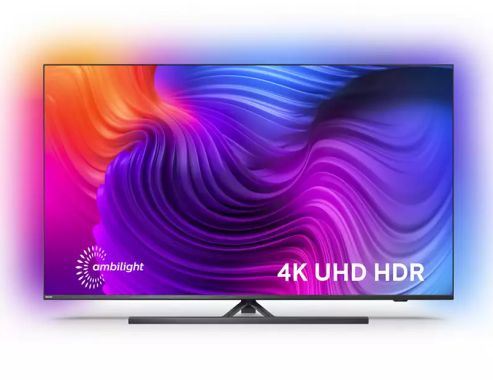
The exclusive Ambilight optimizes the impressive Philips 65PUS8556 TV.
Ambilight vision – only by Philips Exclusive to Philips, Ambilight technology expands the presence of the image, delivering a more immersive and engaging experience. With smart LEDs around three sides of this 65-inch Philips 65PUS8556 TV, the color of the image is projected into the room, in real time. Color, razor sharp picture and emotion move beyond the screen and into your living room to give you a visual experience beyond the ordinary.
Philips P5 Perfect Picture Engine delivers impressive image quality With enormous processing power, the Philips P5 engine delivers the best possible image, whatever the source. Enjoy the deepest blacks and brightest whites, the brightest and vivid colors and natural and realistic skin tones. Get even the brightest and sharpest Philips pictures with incredible detail and depth, in sports, movies or any other genre, anytime, from any source.
Game done better With HDMI 2.1 connectivity at its core, the Philips 65pus8556 has many features that make it an ideal choice for gaming. Once connected to one of the two HDMI 2.1 compatible sockets, a low latency mode is automatically selected at the start of the game. VRR (variable refresh rate) and FreeSync are supported, giving the fastest and smoothest response possible. Exclusive to Philips, Ambilight’s gameplay brings another dimension of immersion.
Optimized for HDR, with HDR10+ For the highest image quality, HDR10 + offers scene-by-scene HDR mastering for the truest and most accurate HDR image technology to date. With HDR10 + each scene is optimized, which means that the maximum amount of detail is displayed, even in the brightest or darkest moments. The 65pus8556 also supports standard HDR10 and HLG formats.
Dolby Vision for dramatic images In addition to supporting HDR10+, this 65 ” Philips TV also supports Dolby Vision, a leading format in Hollywood and theaters around the world. Dolby Vision also adjusts the image to take full advantage of the features of each screen and presents an image optimized for each scene in specially mastered content.
Sound compatible with Dolby Atmos With Dolby Atmos decoding, Philips 65pus8556 has the potential to deliver a more immersive sound with a truly cinematic feel. Other sound improvements include clear dialogue for improved voice, night mode for reduced dynamic volume, and improved Dolby bass for richer sound.
Android TV to Smart TV In a complicated world of TV catching up, Android TV has a sense of everything. With a clear and intuitive interface, Android allows you to effortlessly switch between Netflix, Amazon Prime, YouTube, Disney+ and many other services. Android allows you to pick up where you left off in the last series or watch new movie releases, all without getting lost in complicated menus.
Voice control with built-in Google Assistant and works with Alexa Working through the built-in Android system, Google Assistant helps you find content, apps, and even control compatible smart home devices like the Philips Hue lighting system. All this is available via a simple voice command. Alternatively, connect your Amazon Echo or similar Alexa device and use voice commands via Alexa (works with Amazon Alexa). Photo: Philips
Get a new perspective on TV with Philips 65pus8556 enhanced with Ambilight.
Aseprite is an easy-to-use image editing tool that will help you edit your images and add a variety of effects, and allow you to create pixel art and add sprites. If you are looking to improve your media files, you will need an intuitive software with a wide variety of tools. That’s where Aseprite comes in. It is designed to help edit media files, especially images, using a wide range of tools. You can edit them, create short animations and add additional effects to make things fun. Easy to use A Aseprite tool like this should be accessible to almost all types of user. The good news is that this utility has a simple interface that will not be so difficult to master. It is completely designed to help you create sprites and pixel art. It looks like an old video game interface, but we assure you that it has all the features you will need from such a tool.
It supports many formats and has many editing tools First of all, we must remember that this tool has support for many different file formats. You will be able to import a wide range of formats, including JPG, PCX, GIF, BMP, FLC, ASE, and some others. All these formats are also available for export. To get started, you need to select the images and then you can start editing them. In the toolbar, you will be able to access all editing tools within this application. Although it may seem like a simple application, you will be happy to know that it has many editing tools that you want.
It includes brushes and some effects, which help you create the pixelated look and sprites. You can also add different shapes and sprays and colors. Create animations You can also edit and create animations. You can do this with a variety of tools inside to make them, and you will also be able to edit them. Conclusion Aseprite is a complete editing tool for creating sprites and pixel art. Video: YouTube/Aseprite