Home Blog Page 74

Apple’s Lost Mode: What is it?

0

Even if you lose your iPhone or someone else takes it out of your hands, this function can help you keep it safe from everyone. For more info about Apple’s Lost Mode, keep reading.

Apple’s Lost Mode: What is it?
Many people believe that Apple smartphones are more safe than Android ones due to security features like Lost Mode. On all significant Apple products, including the iPhone, iPad, Apple Watch, Mac, and even the iPod touch, Lost Mode is a characteristic.
This function can assist you secure your Apple device so that no one can access your information if you don’t have your iPhone with you, either because you lost it or someone stole it.
As implied by the mode’s name, Lost Mode is used if your Apple device is lost. Here is what happens when Lost Mode is activated.
Apple will prompt you for a phone number and a message when you activate Lost Mode. Then, along with the phone number, that message will appear on your Apple device. In this situation, the finder will know how to get in touch with you.

Apple's Lost Mode What is it
photo: Pixabay

No one will be able to access your information, as was previously mentioned. Your iPhone, iPad, Apple Watch, iPod touch, or Mac won’t display any alerts or notifications for new messages or updates if it is lost. Also muted will be any alerts. Only conventional phone calls and FaceTime calls continue to work normally.

It is important to note that the owner of your Apple iPhone will be able to unlock it normally if they know the passcode. They will have access to all of your information because one way to disable Lost Mode is by using your passcode. Additionally, all of your Apple devices, save your Mac, will display their current location in real time on iCloud. Additionally, you’ll be able to follow your iPhone even when it’s off and check if the location has changed.
Some services on your Apple device will also be disabled, including access to your student and credit cards.

How to activate on Lost Mode on Apple devices
Here’s how to activate Lost Mode if you’ve ever lost an Apple device, even an iPhone.

1. Use any device to access iCloud.com.

2. Open your Apple ID account and log in. Verify that it is the Apple ID that is associated with your missing Apple device.

3. Click iPhone Find. Your password might need to be entered again.

4. All of your Apple devices and their locations will be shown. The device you want to place in lost mode should be found.

Click All Devices at the top of the page and choose the device you want to see if you only want to see one.
7. If you wish, enter the phone number. then press Next.
8. You may also enter a message if you’d like.
9. In the top right corner, click Done.
You must keep a few things in mind when utilizing Lost Mode.
You must first keep in mind the device’s passcode if you used Lost Mode on your iPhone, iPod touch, Apple Watch, or iPad. You’ll need a passcode to unlock your Apple devices and switch off Lost Mode if you find your iPhone again.
If you lost your Mac, iCloud will prompt you to create a numeric passcode that differs from your standard password. If and when you locate the Mac, you’ll need to know the passcode to unlock it. After that, you can continue using your standard password.
Additionally, you should be aware that iCloud can ask for your phone number and message. Please keep in mind that you must provide a contact phone number.
Additionally, you can add a notification that your smartphone will display. This message can be used to inform people that you’ve lost your iPhone. Please avoid from including any private information in this letter, such as your home or workplace address or complete name. Keep in mind that this message is visible to anybody using your device, so be concise and safe.

How to deactivate Lost Mode?
I hope you quickly locate your Apple device. In that case, you can instantly disable Lost Mode by doing the following:

  1. Visit iCloud.com first.

2. Click iPhone Find.

3. Pick the device that is set to Lost Mode.

4. Tap Lost Mode on.

5. Set Stop Lost Mode

6. Click Stop Lost Mode once more to confirm.
Similar to before, you can turn off Lost Mode by entering your passcode if your device is located.
One thing to keep in mind is that when you switch off Lost Mode, your Apple device can prompt you for your Apple ID password.
To protect your data and devices, use Lost Mode, a superior feature. The good news is that you can quickly turn this on or off, allowing you to use it in a range of circumstances.

When you can’t find your Apple phone and don’t know where it might be, try using the Lost Mode option. Of course, before using this feature, try searching your Apple device. You might try pinging your iPhone with your Apple Watch, for instance.

You should also think about using Lost Mode if you leave your iPhone at a friend’s residence, place of business, or any other location where you know you’ll receive it back but are concerned that someone might try to access your information.
Of course, you should utilize Lost Mode as soon as you can if someone steals your smartphone and you know you won’t get it back. Your data will be safer thanks to this. Don’t share any information that crooks might use against you, just to be safe.

Any Apple device may be found with the help of the incredibly helpful Lost Mode function, which also protects your data when you do. The good news is that you can locate your iPhone or any other Apple device in a variety of methods.

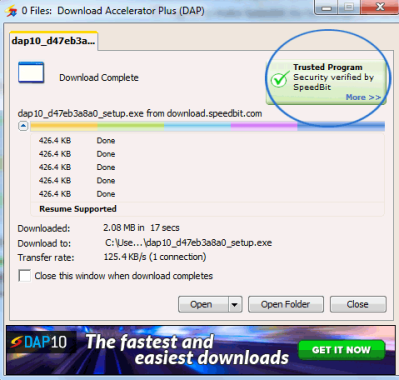
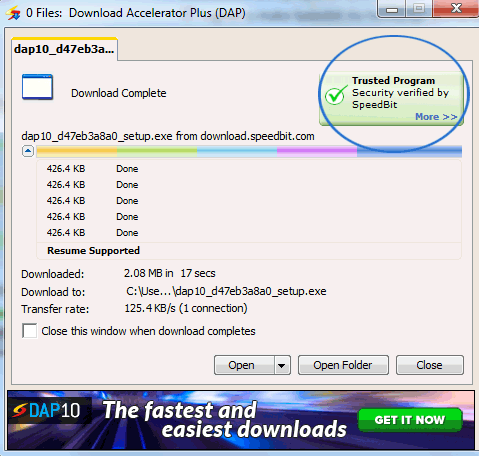
Fastest Free Download Accelerator Plus DAP10

0

Speedbit is a leader in accelerating data delivery and the creator of the most well-known download manager, Download Accelerator Plus. To overcome latency and other delaying factors of the internet infrastructure, Speedbit uses strong, patented multi-channel technology. The devices from Speedbit increase bandwidth usage and data delivery speeds, saving you time and money while making the best use of your current internet connection.

Preview Videos while Downloading
Save time by starting to watch your videos right away instead of waiting for the download to complete. Your video and audio files can be played as soon as they begin to download using the DAP’s Video Preview feature. Make sure the content you are downloading is actually the content you want to download by clicking the Video Preview link during the download and playing the video.
As part of the Download Accelerator Plus 10 add-on system, Video Preview is already preloaded when DAP is installed.
You may completely personalize your DAP using the DAP 10 add-on system.
To see the add-ons you’ve installed:
Click the Get Add-ons button in the toolbar at the top of DAP’s main window after starting it up.
A dialog window to manage add-ons appears.
To check your installed add-ons, click the Installed Add-ons button at the top of the dialog box.
Click the Get Add-ons button at the top of the Manage Add-ons dialog box to install the Video Preview add-on.
Next to Video Preview, select Install.
To finish the installation, click the Restart DAP button. The add-on is installed after a restart of DAP.

Videos Convert
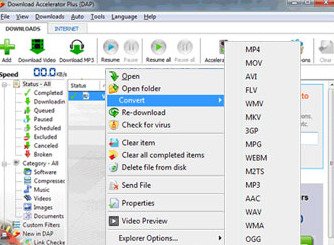
Online videos can be converted quickly with DAP 10. You may quickly convert your videos to any format with only one click. It’s simple!Free Download Accelerator Plus By either clicking the Download Video button at the top of DAP’s main window or by copying and pasting the video URL, you can download a video. Next, choose Convert from the context menu by right-clicking the video’s name in DAP and selecting your preferred format.
You can easily download your video clips as MP3 music files using the Convert to MP3 add-on. DAP will download and convert the video to MP3 after you click the Download MP3 button at the top of the program’s main window. The MP3 file will even be added to your iTunes collection.

Free Download Accelerator Plus
Photo: Speedbit

Download Accelerator Plus Features – Link Checker
The one-of-a-kind Link Checker browser extension for DAP 10 scans websites for faulty download links. You won’t waste time on incomplete downloads, never-ending countdowns, or obtrusive advertisements if you use DAP Link Checker. Download Accelerator Plus Link Checker can inform you if a file has expired, being removed, or is still live before you begin downloading it. Next to each download link is a Speedbit DAP Link Checker status icon that indicates that the file is available.

With the most recent improvements in download technology, Download Accelerator Plus offers one of the simplest and quickest methods for transferring data from the internet. You can utilise the bandwidth extensively thanks to multichannel access and latency/idle overcoming. Additionally, it offers a video preview feature that enables users to view or play downloaded content.

The link checker ensures that there will be no time wasted on incomplete downloads. A multi antivirus protection add-on is stated to serve as a preventative tool for safe downloading by alerting you to any potential dangers hiding within a file.
A large developer community has also produced a number of additional add-ons, including an FTP browser, a ZIP preview, a DAPsters Manager, and more.

Advantages and features of Download Accelerator Plus include:
Simply click to download, and DAP will quickly send the file to you! Download files quickly and easily!
See what popular antivirus software has to say about your file.
Before opening any downloaded files, be sure they are secure.
Verify the validity of the files you download.
View the file’s information before downloading it.
Watch your videos as they download
As soon as the download begins, check your content.

Fastest Free Download Manager Download Accelerator Plus DAP10 download HERE

The ideal way to backup data – Is there a safest method?

0

Regardless of whether you use a computer or a smartphone, you undoubtedly have files on your device that are too valuable to lose. But how do you protect them? Permanent data loss can result from a variety of circumstances. such as natural disasters, theft, gadget damage, and cyberattacks, to name a few. To avoid negative outcomes, it’s crucial to make a backup of your data files before any of these unexpected events occur.

Data loss may be incredibly frustrating, especially if you lose important data from your business or priceless photos from special moments. Here are some suggestions for safely backing up your data to assist you avoid the harmful effects of data loss.

There are various methods for data backup. External hard drives, Network Attached Storage (NAS), USB flash drives, and the cloud are the options.
External hard drives are similar to USB flash drives, however they have a little more space on board. They have storage capacities ranging from 1TB to 18TB and are 5–10 times larger than pen drives. Additionally, they are lightweight, simple to use, and compatible with desktops and laptops. Compared to flash drives, external hard drives copy data more quickly and are more robust. There are two different kinds of external drives: HDD (Hard Disk Drive) and SSD (Solid State Drive). HDDs offer more storage capacity and are less expensive than SSDs, but SSDs are less likely to sustain damage. Despite being more durable than USB flash drives, external hard drives can nevertheless heavy damage and failure. especially if they are wet or dropped on a hard surface.

Network attached storage (NAS) devices are excellent for corporations since they enable automatic backup of many machines. They have a large amount of storage because they can fit four hard drives or even more. Multiple users may access NAS, and it can be accessed remotely over the internet.
When it comes to backing up files, NAS devices are more stable than flash drives and hard drives. Furthermore, they are significantly harder. To utilize them effectively, you must have some understanding of computer networks, though. Furthermore, data loss with NAS is still a possibility in the event of natural disasters or human mistake (unintentionally reformatting the system).

Similar to NAS, cloud storage enables automatic backup and provides online access. Even for mobile devices, this is fantastic, enabling users of smartphones to quickly upload and distribute backup files without the need for a computer or a browser assuming they have a device with a cloud storage app installed. Since the data is not kept on a physical device, storing crucial information in the cloud keeps them secure from natural disasters and device failure. Additionally, the majority of well-known cloud storage services, including iCloud, Dropbox, and Google Drive, provide a “restore file” feature that enables users to recover data that were unintentionally deleted.
You can choose a storage capacity for your needs using cloud storage, which makes them versatile. Additionally, if you require extra space, you can upgrade. Additionally, the majority of cloud storages provide 5GB of free storage, so you can backup your stuff without having to pay for additional space.

cloud storage enables automatic backup
Photo: Pixabay

Cloud storage has disadvantages, just like other backup strategies. They ask you a monthly or yearly cost if your files take up more space than what they can store for free. Cybercriminals may also try to access cloud storage, deleting or overwriting files in the process. Although cloud storage companies have high security standards, it is still unclear how well our data is protected. Since hackers are still finding ways to access computer systems, even cloud servers.

The oldest way of backing up files among the four mentioned above is USB flash devices, commonly known as USB sticks or pen drives. They may be connected to any device with a USB connection and are simple to use and perfectly portable. These thumb-sized gadgets come in a wide range of storage capacities, from 1GB to 2TB. letting you select the option that best meets your needs.USB sticksThe capacity of USB flash drives is a disadvantage. Because of their small size, which makes them simple to fit and conceal anywhere, even though many people find them useful, the devices are also simple to lose. Additionally, compared to other storage devices, they are more vulnerable to device failure.

As of right now, there isn’t a single method of backup data that is 100% secure. Hard drives, NAS, and USB drives can all suffer harm or disappear. Cybercriminals may try to access cloud storage. Human mistake will always be a possibility, leading to accidental file deletion or overwriting. Therefore, having several backup copies of your vital data is the best method to protect it. It’s preferable to increase the number to three or even more.

Keep backup copies of your data in different locations. An example would be to store one on your most reliable cloud storage, one on an external disk, and one in a flash drive. Additionally, one can be saved on a hard disk and the other two on separate clouds. By doing this, you’ll have multiple copies in case a disaster strikes where you are or a virus infects your computer.

Clownfish Voice Changer – application for changing your voice

0

An software called Clownfish Voice Changer allows you to change your voice. Since it is installed at the system level, it will have an impact on all programs that employ microphones or other audio capture devices. Your voice will generally be changed in Steam, Skype, Hangouts, Viber, Ventrilo, Discord, etc.
Do you want to play around with your voice? Or do you need to change your voice when you’re speaking to someone on the phone? Then specialized software is required to assist you in achieving that. Whether it be to make fun of your pals, have a good time with strangers, or mask your voice when speaking to others.
It is a flexible application that you may use to have fun or complete some serious work because it also has a music player.

Utilize presets that are already installed or modify the voice
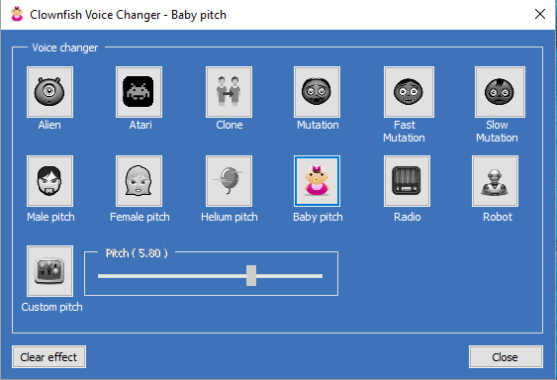
The finest feature of this program is the amazing presets you can use to change your voice. You can start enjoying the advantages right now with no labor on your side. You have access to a wide range of presets, including radio effects, robot effects, robot voices, and alien voices.

However, you can also change the voices on your own, which is an additional bonus. If you don’t want to, you don’t have to use the presets. You can take a recording of your voice and make changes to things like voice pitch, speech speed, and more.

After that, you can save it, record it, and send it to your friends.

Clownfish Voice Changer - application
Clownfish Voice Changer – application – photo: Clownfish

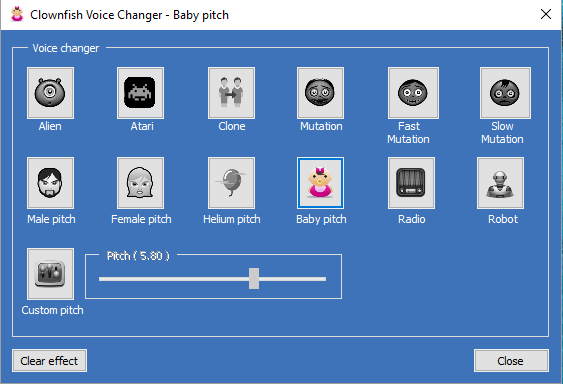
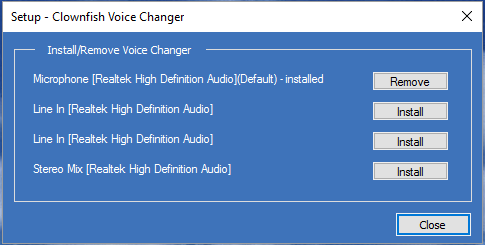
Here, you choose the active voice effect in the main voice changer window. The icon changes color when it is enabled. Press the Clear effect button to stop all effects. The Set Voice Changer option on the main menu open up this window.Clownfish Voice Changer  applicationInstall Clownfish app on the capture device you would like to change in order to use it as a voice changer. On the default audio capture device, Clownfish is installed as a default. You can do this here if you wish to install it on other devices. Clownfish installation and removal require administrative access. From the Setup menu item in the main menu, this window is launched.

Options for Sharing and Playing Music
However, this tool is more than just an audio mixing. Additionally, a music player will be available to you. It enables you to create playlists and play a variety of music and sounds as you travel.
Supported operating system: Windows Vista / 7 / 8 / 8.1 / 10 / 11

Furthermore, you can send or share the sounds you generate with friends and complete strangers by saving them.
With the help of some fun audio effects and a free tool called Clownfish Voice Changer, you can quickly and easily change the sound of your voice.

Clownfish Voice Changer application free download HERE

IPS 1ms LG 32GQ950-B 32” UltraGear UHD 4K Nano monitor

0

Overall, the LG 32GQ950 monitor offers a highly respected HDR experience. The color volume and HDR color gamut are good, making for brilliant, realistic colors. The majority of the content is shown at the brightness level that the content author intended, and it also has an amazing peak brightness in HDR. Unfortunately, it has a poor local dimming feature and a low contrast ratio, which makes it difficult for brilliant highlights to stand out and causes substantial blooming in low-light conditions.

From the front, the LG 32GQ950 monitor has a slightly basic shape and size. It occupies a lot of room despite being narrow and wide. Although it has thin bezels on 3 sides, the top and side bezels have a lot of dead space between them and the first pixels, which is somewhat distracting.LG 32GQ950-B 4K monitorOverall, the LG 32GQ950 has good construction. Compared to earlier LG UltraGear monitors like the LG 27GP950-B, it feels a little more solidly constructed. It looks heavy and is far thicker than the majority of LG monitors. Even though the back is made of plastic, it feels strong and the base is durable.
Peak brightness in HDR is outstanding for the LG 32GQ950-B. It’s bright enough to give a compelling HDR gaming experience, and even most video content appears quite faithful to the creator’s intentions. Nevertheless, it fails to keep brightness levels high in huge, bright settings, and brightness gradually decreases over time. The PQ EOTF completely matches the target curve up until the peak brightness, after which there is a progressive roll-off that makes sure bright highlights are not at all crushed.

It’s hard to beat the LG 32GQ950 as a gaming monitor. Because of its fast refresh rate and exceptionally low input lag, it offers a responsive gaming experience with nearly no distracting blur behind moving objects. Additionally, it has a wide range of gaming features, such as FreeSync and G-SYNC Compatible variable refresh rates. Because it has two HDMI connections that offer HDMI 2.1 bandwidth, the PS5 and Xbox Series X may be used to their maximum potential.LG 32GQ950-B 4K monitor

For office users, the LG 32GQ950 is a good option. The big, high-resolution screen is excellent for multitasking because it allows you to work comfortably with several windows open at once and produces text that is incredibly clear. Thanks to its good ergonomics, you can easily put it in an optimal viewing position without needing to purchase a mounting arm. Although it has inadequate reflection handling, most rooms don’t have a problem because it becomes bright enough to block out glare.
The LG 32GQ950-B has an excellent response time at 144Hz on devices that don’t support the optional overclock as well as at 160Hz when it is enabled. The ‘Normal’ overdrive mode, which has a very fast response time and no obvious overshoot, produces the greatest performance in both scenarios. The ‘Fast’ setting has a more pronounced overshoot but a somewhat faster rise/fall time. The fastest speed, “Faster,” has substantially higher overshoot than the lower settings, like most displays, however with real content, the overshoot is nearly invisible. It is also one of the first monitors to receive a ClearMR 6000 tier certification under VESA’s new ClearMR certification program.LG 32GQ950-B MonitorAt all backlight levels, the backlight is almost flicker-free. The backlight is not dimmed using pulse width modulation (PWM), however there is a high-frequency flicker pattern when the brightness is set to “29” or below. It flickers at a frequency of roughly 1282 Hz below that setting, but it is barely audible and probably won’t annoy those who are sensitive to flicker.
The PS5 and this display are totally compatible. Because the firmware update that makes the PS5 capable of 1440p is currently in a closed beta test, it is not yet officially supported.LG 32GQ950-B 4K monitor

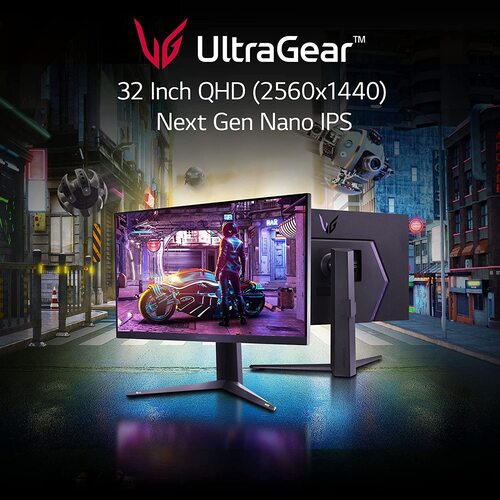
Watching videos is enjoyable on the LG 32GQ950 monitor. When watching videos with a small group of people, the huge, high-resolution screen and wide viewing angles provide a more immersive viewing experience. Due to its excellent peak brightness, glare isn’t a problem in a bright room despite its inadequate reflection treatment. Unfortunately, it’s not a good option for a dark room because of its poor local dimming function, low contrast ratio, and average black uniformity. When local dimming is turned on, there is a lot of blooming around bright objects. Photo: LG
Having a fast refresh rate of 160 Hz, the 32-inch LG 32GQ950-B 4K monitor is 32 inches in size. It is a product of LG’s UltraGear gaming monitor series, which includes a wide range of gaming characteristics. It is an updated model of the LG 27GP950-B with several enhancements, such as a new Advanced True Wide Polarizer, although it is not a direct replacement because of its larger screen. The fact that it is one of the few monitors on the market that handle HDMI 2.1’s full bandwidth makes it a fantastic option for PS5 or Xbox Series X gamers. LG 32GQ950-B 4K monitor price: $899.99

LG 32GQ950 monitor specs:LG 32GQ950-B 4K

    • Screen Size  31.5″
    • Display Type   IPS
    • Color Depth(Number of Colors):   1.07B
    • Response Time (GTG)   1ms (GtG at Faster)
    • Aspect Ratio   16:9
    • Resolution   3840 x 2160
    • Contrast Ratio    1000:1 (Typ.), 700:1 (Min.)
      • HDMI   Yes
      • DisplayPort   Yes
      • Headphone Out    Yes
      • USB Up-stream   YES(1ea/ver3.0)
      • USB Down-stream    YES(2ea/ver3.0)
      • NVIDIA G-Sync™    G-SYNC Compatible
      • Adaptive Sync   AMD FreeSyncâ„¢ Premium Pro
      • Black Stabilizer:    Yes
      • Dynamic Action Sync:    Yes
      • Crosshair:    Yes
      • Flicker Safe   Yes
      • Smart Energy Saving   Yes
      • Reader Mode    Yes
      • H/W Calibration (True Color Pro)    Yes
      • Color Calibrated     Yes
      • On Screen Control (OSC):    Yes
      • HDR (High Dynamic Range)    HDR 10
      • Nano IPSâ„¢ Technology    Yes
      • VESA DisplayHDR™    DisplayHDRâ„¢ 1000
      • HDR Effect    Yes
      • FPS Counter    Yes
      • FreeSync (Low Frame Compensation)   Yes
      • User Define Key    Yes
      • Advanced True Wide Pol.:   Yes
      • VRR:   Yes
      • Overclocking:   Yes
      • RGB LED Lighting:   Yes
      • Others (Feature)    Hexagon Lighting , 4-pole HP out

Seagate Nytro 5550 and 5350 NVMe SSDs – New Enterprise-Class Nytro SSDs

0

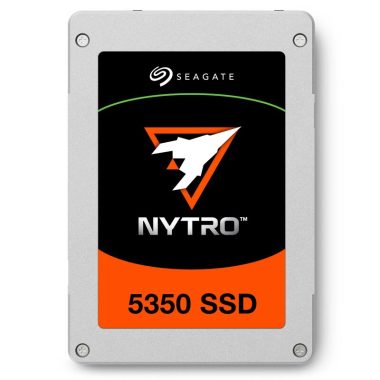
Seagate Technology Holdings plc (NASDAQ: STX), a world leader in mass-data storage infrastructure solutions, announced two additions to its Nytro® portfolio, the Nytro 5550 SSD and Nytro 5350 SSD. Engineered with Phison technology for high performance, efficiency, and increased storage density in data centres, the new products comprise the Seagate® Nytro 5050 NVMe™ SSD series. Designed to offer more computing with less energy consumption, they provide a cost-effective solution that eliminates bottlenecks, improves quality of service (QoS), and delivers the highest levels of data integrity and security for business applications.

Nytro 5350
Nytro 5350

The Seagate Nytro 5350 PCIe Gen4 NVMe SSD doubles the read throughput of the latest SAS SSDs, achieving over ten times the bandwidth of SATA to significantly improve QoS. Designed to give data centres more computing power while reducing total cost of ownership (TCO), the drive removes data bottlenecks with blistering up to 7.4 GB/s bandwidth and up to 195K IOPS random write speeds and up to 1.7M IOPS random read speeds to provide consistent response times. Perfectly tuned to increase density and boost capacity in ultra-dense environments, Nytro 5350 brings up to 15.36 TB in a 15 mm form factor and up to 7.68 TB in a 7 mm form factor with dual ports, supporting both U.2 and U.3 interfaces for active-active high availability. Designed to take on enterprise workloads, Seagate Nytro 5350 delivers 1 DWPD at 2.5M MTBF for enhanced endurance.

With best-in-class performance, the Seagate Nytro 5550 PCIe Gen4 NVMe SSD builds on Nytro 5350 specifications with a design for mixed workloads, and random write speeds up to 470K IOPS and random read speeds up to 1.7M IOPS. Designed with high durability to move enterprise data for the long haul, Nytro 5550 delivers 3 DWPD at 2.5M MTBF for endurance and reliability. Modelling the small form factor and supporting interfaces as the Nytro 5350, this drive brings up to 12.80 TB in a 15 mm form factor and up to 6.40 TB in a 7 mm form factor to boost capacity in ultra-dense environments.

Nytro 5550 PCIe Gen4 NVMe SSD

To help ensure data integrity and help prevent data loss in the event of unexpected power failure, the Nytro 5050 series of drives include power loss data protection, SED TCG security and a 5-year limited warranty. Compatible with Linux and Microsoft OS, the drives are also packed with end-to-end data protection and low-density parity-check codes for enterprise reliability and data protection from undetected, unintentional corruption. The Seagate Nytro 5050 series features NVMe Management Interface, SMBus Sideband Management, and Life Management for seamless drive monitoring and management without burdening the operating system. Photo: Seagate

Both available this month, the Seagate Nytro 5350 and Nytro 5550 NVMe SSDs are data centre ready with a full set of enterprise features to keep your business strategic for the future.

A useful apps for tracking and keeping your children safe

0

Are your children going to risky locations without your knowledge? Do your family members seem out of the ordinary to you? It’s best to make effective use of mobile phone locator to learn the truth. You’ll be able to find out where your family is and feel at ease.

Find My Kids

You can remotely track a child’s smartphone with modern phones. Newer phones have capabilities that might aid parents in finding lost or stolen phones. However, many parents continue to use specialized web apps to monitor a child’s phone. The top applications work by monitoring the phone’s GPS coordinates and Wi-Fi location. iPhones, Android smartphones, and PCs can all use these programs. Both shareware and paid versions of these apps are offered.

Find My Kids app
Photo: Find My Kids app

If your child has a GPS-enabled cell phone, you can use Find My Kids app to find out where it is. Parents may use the software to follow their kids everywhere they go and track their location in real time. The app has an easy-to-use user interface and is compatible with both iOS and Android smartphones. You can also get notifications and speed alerts from it.
Parents of younger kids must monitor their locations. Geotracking can be used to do this. Parents can choose a “safe zone” for their child to remain in using the app. A parent can receive immediate notifications if their child outside the safe zone so they can take the appropriate action.

uMobix

User-friendly mobile phone app called uMobix is quite effective. To use uMobix, users do not need to root their Android device. Users of the application can use Skype, the camera, microphone, and several social networking services. Additionally, users can limit who has access to particular features of the gadget, like the camera. Additionally, they have access to erased data on the targeted device.

For keeping an eye on text messages and phone logs, use uMobix. You can easily browse through the list of contacts on its user interface, allowing you to check the accuracy of the contact information. The app provides security against threats, and uMobix’s SMS monitoring tool enables you to check up on the target’s social life. You can use this function, for instance, to keep an eye on your child’s screen time while they are at school.
You can access the complete address book of the targeted device with uMobix. Everything is stored online, even contacts that have been erased. The greatest mobile phone locator is uMobix thanks to this capability. On the target device, you may also view history and track social media texts. Additionally, uMobix is made to operate in the background to prevent disruptions from other applications. Kids can’t tamper with uMobix because it operates in stealth mode. As of right now, it’s the ideal tool for parents to monitor their children’s actions.
In addition to showing the device’s current position, uMobix also displays the user’s most recent visited locations. You may easily take care on the location of your loved ones in this way. Video: YouTube/uMobix

FlexiSPY

FlexiSPY might be the best mobile phone location app for you if you’re looking for one. In addition to the choice of remote installation, it provides a comprehensive set of parental control tracking tools. Its support section provides a huge selection of videos and in-depth training. Additionally, the target device can be Rooted and Jailbroken by its technicians, guaranteeing that it functions correctly.
You must monitor your children’s use of their cell phones as their parent. You can keep an eye on texts, calls, and more with this software! It provides an exhaustive report and captures every movement. Any messenger application allows you to track conversations and pinpoint real-time locations. All well-known chat clients are compatible with FlexiSPY. You can use it for yourself or to watch after your kids.
Although it is a very pricey innovation, it is completely worth it. It has every function a mobile phone finder could possibly need, and its customer service is outstanding. FlexiSPY has the ability to read a target’s Facebook and instant message activities in addition to monitoring his or her cell phone. You may access their contacts list, recently viewed websites, and more.

Hoverwatch

Continue reading if you’re thinking whether to get a Hoverwatch mobile phone locator for your children or spouse. More than just tracking phone location, it also has the ability to read text messages, monitor social media sites, and even monitor Facebook and WhatsApp accounts.
The best way to fully safeguard your children is using this app. It not only tracks locations but also records calls and text messages. It also catches sounds surrounding the targeted smartphone, inside a 25-foot range.
The capability of Hoverwatch to track employee devices is an additional advantage. Simply install the app with their permission on the phone that is in use. Then, the app will log every call and SMS sent and received on the target phone. Hoverwatch keeps track of SIM changes in addition to monitoring calls and messages. So, if you want to catch your employee stealing your goods, you should get this software installed in the target phone.

Premium Marantz Model 40n – Review & Specs

0

The Marantz Model 40n integrated stereo amplifier provides the best sound quality possible from all of your audio sources. This device’s center is an excellent amplifier with analog and digital inputs. All of your favorite services, including Spotify, TIDAL, Apple Music, and Amazon Prime Music, are accessible thanks to the wi-fi, Bluetooth, and AirPlay 2 built in. DLNA-compatible network streaming is also available, as well as Internet radio with vTuner.

Superior audio quality thanks to HDAM

Marantz’s unique HDAM-SA3 (Hyper-Dynamic Amplifier Module) circuits are used in the high-end amplifier. Surface-mount metal-film resistors are used in these custom op-amps to improve temperature stability. The end result is a sound that is delivered with crystal clarity and is cleaner and less distorted.Marantz Model 40n integrated stereo amplifier

The Marantz Model 40n amplifier provides enough power for room-filling sound with a convenient 70 watts per channel. The double insulated, toroidal power transformer contributes to the continuous power, low noise, and silent operation of this Marantz amplifier, making it ideal for hearing every nuance of your favorite music.

For the full networking experience, Bluetooth, AirPlay 2, DLNA, and built-in wi-fi are included.
It’s simple to connect all of your smartphones, tablets, and compatible laptops and desktops using Bluetooth and AirPlay 2 connectivity and play music wirelessly. Furthermore, the Model 40n has DLNA, WiFi, and Internet radio.
To access thousands of Internet radio stations via vTuner and subscription services like Spotify Connect (Premium Spotify account required), Tidal, Deezer, and Amazon Prime Music, simply connect to your home network over Ethernet or wi-fi. You can stream from additional devices, like your laptop or NAS drive, if they are DLNA compatible.Marantz Model 40n integrated stereo amplifier

Using Alexa, Google Assistant, and Siri devices for voice control
The Model 40n is compatible with Amazon Alexa, Google Assistant, and Siri devices for the most recent in smart home technology. Simply ask Alexa or the Google Assistant to carry out fundamental tasks after downloading the HEOS Home Entertainment Skill app. Siri voice control over the Apple Home App from an Apple iOS device offers more capability than AirPlay 2, including the ability to group devices.
Marantz claims that the Model 40n’s linear power supply and massive, double-shielded toroidal transformer, designed to produce high current on demand, make it an excellent match for speakers that are challenging to drive.

The Marantz Model 40n amplifier supports only moving-magnet cartridges, but does so with two amplification stages, which is claimed to reduce gain and distortion, in contrast to the Model 30 integrated amp’s phono stage, which supports both moving coil and moving magnet cartridges.

The best multi-room audio is available with HEOS built-in
HEOS multi-room music systems are simple to set up with your existing home network because they are connected by dual-band Wi-Fi. Even the largest homes may be covered for multi-room music with the ability to put up up to 32 HEOS devices at once. The Model 40n is equipped with HEOS and can function as a single “zone” without the need for any additional adapters.
Control everything via the HEOS app
Once your HEOS speaker system is set up, you may stream music with ease using the specialized HEOS app. The application, which is compatible with Apple iOS, Android, and Amazon Kindle, allows you to stream not only your stored music but also Internet channels and well-known streaming services like Spotify, Tidal, Pandora and Deezer.Marantz Model 40n integrated stereo amplifier

The Marantz Model 40n amplifier is adaptable enough to fit everything from your TV to turntable in addition to the extensive network streaming choices. There is an HDMI with ARC for TV. The optical and coaxial digital inputs are used to connect to game consoles and some other digital sources. For analogue sources, there are 3 RCA phonos and a recording output. Connect your deck to the phono input for the greatest vinyl.Marantz Model 40n integrated stereo amplifier

High level of design

You can tell the Marantz Model 40n integrated stereo amplifier is well-built when you pick it up. The interior of the case is stuffed to the gills with digital connectivity, including HDMI and network streaming, coupled with an extensive MM phono stage, of course, being a feature-rich device. You may thank the toroidal transformer, the internal heatsink, and the necessary shielding between the DAC and phono components for the weight (almost 17kg). The front panel of the amp is made of strong, non-magnetic aluminum, while the top cover is made of steel to withstand mechanical and electrical interference. Even the aluminum power button is polished to the greatest standards, as are all the controls. Photo: Marantz

Marantz is a Japanese company that designs and manufactures high-end audio equipment, including receivers, amplifiers, and speakers. They are known for their attention to detail and use of high-quality materials in their products. Marantz has a reputation for producing some of the finest audio equipment on the market, and their products are highly regarded by audiophiles and music enthusiasts alike.

Marantz Model 40n amplifier specs:

Power Amplifier Circuit HDAM-SA3
Power Transformer Double Shielded Toroidal
Volume Electric
Bass / Treble / Mid / Balance Control yes / yes / – / yes
Source Direct yes
Frequency Response 5Hz – 50kHz
Total Harmonic Distortion 0.02% (20Hz – 20kHz, 8Ω)
Dumping Factor 100
Input Sensitivity: Phono input 2 mV / 47 kohm
Input Sensitivity: CD/Line/Recorder 220 mV / 20 kohm
Input Sensitivity: Power Amplifier input 1.6 V / 15 kohm
SN Ratio PHONO (MM): 87dBCD: 106dB
Phono Input yes (MM)
Marantz Musical Phono EQ
Ext. Pre Input (Power Amp Direct) yes
Preout no
Analog Input (include Phono) / REC Out (RCA) 4 (PHONO, CD, LINE,RECORDER) / 1 (RECORDER)
Optical input 1
Coaxial input 1
HDMI 1 / 0 (ARC) PCM only
USB A 1 (Rear), Mass Storage Class5V/1A
Speaker Terminal SPKT-1+
Remote Control Bus Terminal yes (RC-5 In / Out)
Subwoofer Pre-out Low Pass Filter Selectable
40 Hz / 60 Hz / 80 Hz /100 Hz / 120 Hz
Rated Output Power 70W + 70W (8ohm)
100W + 100W (4ohm)
App HEOS App
Remote Controller System Remote
Features (Amp and CD Player Control)
Power Consumption 220W, 0.3W (Standby)
AC Inlet Yes
Quick Start Guide Included
Packaging Dimensions (W x H x D in inches) 21″ x 10″ x 20.6″
Product Dimensions (W x H x D in inches) 17.4″ x 5.1″ x 17″
Panel Color SG / BK
Front Center Panel Aluminum
Top Cover Steel
Edge Lighting Yes (Dimmer)
Volume Knob Aluminum
Input Selector Aluminum
Bass/Treble/Balance/ REC Out Sel knobs Aluminum
Power button Aluminum
Chassis Material SECC
Bottom Layer Thicker double layer

BIOSTAR announces the brand new B650EGTQ MOTHERBOARD

0

The new Biostar B650EGTQ motherboard, which is designed for gamers, content creators, and casual use, features exceptional BIOSTAR technology in a flexible design. The B650EGTQ motherboard, designed to support AMD RyzenTM 7000 Series processors on the new AM5 platform, delivers top-tier technologies for the best hardware performance, including PCIe® 5.0 & PCIe® 5.0 M.2. With an extra boost from AMD EXPO and Intel XMP-based RAM modules, Dual Channel DDR5 memory support across 4 x DIMMs with 6000+(O.C.), 128GB max capacity offers a solid platform for just about any current purpose. With a 10+2+2 Phase / 90A power stage VRM system, BIOSTAR’s famous DIGITAL PWM technology offers unrivaled power delivery across all of its components.Biostar B650EGTQ motherboard

Similar to most of the latest BIOSTAR motherboards, the B650EGTQ comes equipped with intelligent design elements and features that yield excellent performance and long-lasting durability. Iron Slot Protection, 90A Dr.MOS, and SMART BIOS UPDATE are some of the mention-worthy features that make BIOSTAR motherboards stand out from the rest as a market leader in high-performance motherboards.

Biostar B650EGTQ motherboard features:

  • Supports Ryzen 7000 series processors (AM5)
  • AMD B650E Chip Architecture
  • Supports DDR5 Memory
  • Supports AMD EXPOâ„¢ Technology (Extended Profiles for Overclocking) & XMP
  • 14 Phase & 90A Dr.MOS Power Design
  • 1 PCIe 5.0 x16 slots, 1 PCIe 4.0 x16 slot
  • 4 SATA3, 2 M.2 (PCIe Gen5 x4), 1 M.2 (PCIe Gen4 x4)
  • Graphics Output Options: HDMI 1.4 & Display 1.2
  • 1 Rear USB 3.2 Gen2x2 Type-C, 3 Rear USB 3.2 Gen2 Type-A
  • Realtek® ALC1220 7.1 CH HD Audio Codec, Gold Audio Caps
  • Realtek® RTL8125B 2.5G Ethernet LAN Chip
  • Supports SMART BIOS UPDATE button & SMART BIOS UPDATE USB portBiostar B650EGTQ motherboard
The Biostar B650EGTQ motherboard comes with a fully stacked rear and internal I/O array providing exceptional connectivity and expansion capability, which includes USB3.2 Gen2 (Type C), USB3.2 Gen2, a Display (1.2) port, and a single HDMI (1.4) port.

Additionally, Realtek® ALC1220, 7.1CH, H.D. Audio technology provides excellent audio output capability, while Realtek® RTL8125B 2.5 Gigabit LAN Port provides much needed ethernet connectivity overall, providing an all-round immersive user experience.

To conclude, the new Biostar B650EGTQ is one of the best mid-range gamer/creator motherboards in the market. Stylish and rich in features, it sets a high standard for its rivals for its versatility and exceptional performance and will be an excellent choice for anyone looking to build a stable, reliable system with peace of mind.  photo:  BiostarBiostar B650EGTQ motherboard

Biostar B650EGTQ motherboard specs:

Chipset AMD B650E Chipset
CPU Socket AMD Socket AM5
CPU Support AMD Socket AM5 Ryzenâ„¢ 7000 Processors
Form Factor u-ATX 244 x 244mm
VRD 14 Phase (90A SPS)
Memory 4 x DIMM DDR5 6000+(O.C) Slots
Expansion Slot 1 x PCI-E 5.0 x16 slot (x16 mode)
1 x PCI-E 4.0 x16 slot (x4 mode)
1 x PCI-E 3.0 x1 slot
1 x M.2 (E Key) Support type 2230 WiFi / BT module
Storage 4 x SATA III, 3 x M.2 slots (M Key)
2 x M.2 (M Key) Support PCI-E 5.0 Mode
1 x M.2 (M Key) Support PCI-E 4.0 Mode
Video 1 x Display (1.2) / 1 x HDMI (1.4)
USB (F/R) USB3.2 Gen2 x2 : 0+1 (Type C)
USB3.2 Gen2 : 2+3
USB3 .2 Gen1:0+2
USB2.0 : 4+2
Audio Realtek® ALC1220 , 7.1CH , HD Audio
LAN Realtek® RTL8125B 2.5 Gigabit LAN Port
Features RACING GT EVO Utility
SAMRT BIOS UPDATE Button
SAMRT BIOS USB Port

Find more info about BIOSTAR B650EGTQ motherboard

Specs & Review – Epson EcoTank Pro ET-5180 Printer

0

With a full ink tank, the Epson EcoTank Pro ET-5180 printer yields a remarkable amount of pages, so unless you constantly print in bulk, you won’t need to refill the tank very frequently. The printer will prompt you to check the ink level before to starting a print job because the tank shouldn’t ever be empty. When the ink runs out, a notification also appears, yet the printer keeps producing. This message is a result of the fact that it won’t stop until the ink reaches the lower line. If you don’t need to, you can skip filling the tank; nevertheless, to keep printing, you must adjust the ink level in the settings.

The Epson ET-5180 printer scans by default as a PDF file, at 300 DPI, in black and white, and in portrait orientation. If you need to digitize or edit images, you can adjust the settings to scan at a better resolution. For this test, we rotated the image 90 degrees, set the scanner to scan in color at 300 DPI, and then saved the scan as a JPEG file. The scan’s quality is fantastic, by the way. The basic problem is that it’s a little difficult to see the numbers on the red background. When scanning the sample for our analysis of the photo printing quality, we also noticed a tendency to automatically increase contrast and brighten colors.Epson EcoTank Pro ET-5180 printerThe color gamut of the Epson EcoTank Pro ET-5180 is perfect. It prints vivid, saturated colors nicely. The dark tones don’t have the typical red or blue tint that is present with other printers, so they appear fantastic. It exhibits substantial noise when switching between colors and primarily problems with dark greens and yellows.

The mobile Epson Smart Panel app is compatible with the Epson EcoTank Pro ET-5180 printer. Printing, scanning, copying, ordering ink, registering your product with a warranty, and performing maintenance procedures like firmware updates, nozzle checks, and printhead cleaning are all possible with it. It provides links to Epson’s Creative Print app and Gallery website, and it integrates with Google Class so that you may print or scan documents from Google Classroom. To enable visitors to use the printer without connecting to your current Wi-Fi network, you can use the app to generate a QR code.  Photo:  EpsonEpson EcoTank Pro ET-5180 printer

The build quality of the Epson EcoTank Pro ET-5180 is adequate. Although the hinges and ports are of only average grade, it is totally made of plastic and feels durable overall. Because of the ink tanks’ front-facing design, it is simple to check their ink levels and perform refills. Moreover, the scanner makes it challenging to reach paper jams and remove prints from the output tray. The output tray cannot be held open by a lid damper, but it can be kept closed by locking the lid’s top tab to a notch beneath the scanner. There is no indicator line for paper positioning, and the input tray only has a slider for width, not length.

The Epson EcoTank Pro ET-5180 printer makes excellent black & white prints. Its refillable ink tank produces approximately 7600 black prints, so you won’t need to refill the tank frequently. Additionally, because the ink bottles are fairly cheap, the cost per print is incredibly low. Although it features a scanner with an automatic feeder and the option to scan in duplex, it isn’t very quick because it can only handle seven pages per minute.
For home offices or small businesses, the Epson EcoTank Pro ET-5180 is a good option. For high-volume printing, the ink tank yields thousands of pages before needing to be refilled. It can print automatically on both sides and features a scanner with an automatic feeder and duplex scanning functionality. It also requires less maintenance.

The Epson EcoTank Pro ET-5180 printer is a fantastic printer for usage by students. You won’t need to refill it frequently because it has a refillable ink tank that produces thousands of prints, and the ink bottles are cheap and affordable, making the cost per print quite low. It supports Apple AirPrint, Mopria Print Service, and Wi-Fi networking. It also works with Epson’s mobile companion software, allowing you to print, scan, and copy directly from your smartphone. The scanner has automated feeder to process multi-page documents rapidly and extensible lid hinges so you can scan large goods like textbooks.Epson EcoTank Pro ET-5180 printerThe color inkjet all-in-one Epson EcoTank Pro ET-5180 printer is ideal for usage in offices. It’s a supertank model, so instead of using conventional ink cartridges, it contains an ink tank that you can refill as you go. It has a duplex scanner with a high-resolution scanner, an auto feeder, and other capabilities. It supports Mopria Print Service and Apple AirPrint and has Wi-Fi, USB, and Ethernet connectivity options. It belongs to the Epson EcoTank Pro ET-5100 line, which also contains models with the numbers ET-5150 and ET-5170.

Epson EcoTank Pro ET-5180 printer specs:

Print
Printing Technology 4-color all-pigment 4-in-1 (uTFP1)
Printer Language(s) ESC/P-R
Print Resolution (dpi) 600 x 1200
Maximum Print Resolution 4800 x 1200
Print Speed Black 17 ISO ppm / Color 9.5 ISO ppm
Auto 2-Sided Print Speed† Black 7.5 ISO ppm / Color 5 ISO ppm
First Page Out Time (ISO 17629) 7 sec. black/6 sec. color8
Min. Ink Droplet Size 3 droplet sizes, as small as 3.8 picoliters
Monthly Maximum Duty Cycle 33,000 pages9
Recommended Monthly Duty Cycle 1,600 pagesEpson EcoTank Pro ET-5180 printer

Copy
Copy Speed   Black 12 ISO ipm / Color 6 ISO ipm
Copy Speed    ADF (ISO 24735) (ipm, 1:1) Black 10 ISO ipm /
Color   4.5 ISO ipm
Copy Quality / Number of Colors 256 gradations/16.7 mil colors
Copy Quantity   up to 99 pages from standalone
Copy Resolution   300 x 300 (flatbed), 300 x 300 (ADF)
Collate   up to 35 pages
Maximum Copy Size 8.5″ x 14″ (Legal)
Copy Features   Automatic reduction and enlargement (25 – 400%)
Copy Input Resolution Flatbed:   300 x 300 standard, 600 x 600
high-resolution mode, ADF:   300 x 400 standard, 600 x 600 highresolution mode
Copy Print Resolution 600 x 600 standard, 600 x 1200 highresolution mode, 1-sided to 2-sided

Scan
Scanner Type Color flatbed/ADF
Maximum Hardware Resolution 1200 dpi
Hardware Resolution 1200 x 3200 dpi (flatbed), 1200 x 2400
dpi (ADF)
Maximum Resolution 9600 dpi interpolated
Scanner Bit Depth (Color) 48-bit color input / 24-bit color output
Scan Bed Size 8.5″ x 11″, A4
Scan Size, Maximum (Flatbed) 8.5″ x 11.7″
Photoelectric Device CIS
ADF Paper Size Max. size Legal
ADF Paper Thickness Plain Paper, 17 lb – 25 lb / 64 – 95 g/m2
Scan Speed ADF (ISO 24735 Annex D) (ipm) 6 black / 5 color
Optical Resolution 1200 x 1200
ADF Scan Resolution 1200 x 2400
Auto Document Feeder Capacity 35 sheets / 10 Legal

Epson EcoTank Pro ET-5180 printer

Ink
Replacement Ink Bottles  542 Black ink bottle (127 mL) yield:
7500 pages; 542 color (Cyan, Magenta, Yellow) ink bottles (70 mL)
yield: 6000 pages

What’s In The Box:

EcoTank Pro ET-5180 all-in-one

Power cable

2 bottles of 542 Black ink (127 mL) and 1 bottle each of 542 Cyan, Magenta, Yellow (70 mL)

Quick Setup Guide

Product Setup CD