Home Blog Page 75

Logitech SetPoint – modify the layout of your keyboard and mouse

0

For configuring keyboards and mouse, Logitech offers SetPoint. You have the option to modify how the button presses are handled.
To distinguish your mouse clicks or keyboard keys from the default actions, for instance, you can assign them functions.

Although these two basic devices function quite well without a driver, you should try them and compare the results because there are some differences.

Logitech SetPoint
Photo: Logitech

Customizable gaming controls via an app
The majority of users will mostly use this application to configure their keyboard and mouse for gaming. You may make presets with the program that you can use with particular apps and games. By doing this, you can totally alter the configuration of your peripherals to suit your needs.

The built-in app will show all the information required, including Caps Lock and Num Lock as well as the laptop battery status.

With the application, you may configure settings to automatically take effect when a game or program is launched.
With this setup, you won’t have to spend additional time setting up your keyboard and mouse configurations before you can start the game.
Personalize the keyboard and mouse layout
You can modify the layout of your keyboard and mouse using Logitech SetPoint’s essential settings. You can enter new data into the program, but you can also copy it from another source and paste it there.
Additionally, you may configure your scrolling and other pointing buttons as well as Charms.
The intuitive user interface of this program is another another plus. The app has a very clean appearance and ought to be easy enough to use for the majority of users.
You can utilize the additional information and documentation to modify the settings however you see fit.

Although configuring the application is a simple process, the developer made sure to include enough instructions in the program to ensure that all queries are addressed. The majority of the software’s advantages go to users with five-button mouse. This means that there are more features on your mouse than just the left, right, and middle clicks.

Generally, this kind of mouse is created for gamers who want to play more effectively. Tilt-wheel mouse are another type of devices that can use SetPoint software. Typical applications that use them are Microsoft Excel and Microsoft Powerpoint, two classic Windows desktop programs.
To sum up, Logitech SetPoint is an app which helps you modify the settings for your Logitech peripherals, such your keyboard and mouse.
Because it automatically recognizes the games and runs the setting, it’s especially ideal for gamers.

Functions and advantages of SetPoint:
Hotkeys available for use
F-keys that operate in your favor
the lock keys being blocked
Battery inspection
Increasing the exclusiveness of structural features

Download Logitech SetPoint app HERE

For usage at home, convenient wireless charging

0

Anywhere inside a ring around a new wireless charging system can charge devices that are placed there. Power is now transferred in one direction or to one location via existing systems. The new method delivers a more user-friendly and dependable design by offering a donut-shaped charging field.

The fact that the strength of the charging field varies with location has been the fundamental difficulty in developing an omnidirectional charger. This implies that if gadgets are placed improperly or aren’t orientated properly, they will charge inefficiently. One solution is to use many transmitter coils connected to various power sources to form a charging field, however this complicates the transmitter and renders the system unusable.

Researchers at Aalto University developed the new system to address these challenges. ‘We set out to create a simple, low-cost system using only a single power source,’ says Nam Ha-Van, the postdoctoral researcher who led the study.

new wireless charging system
photo: Aalto University

The key to the new design is a cylindrical power coil. The wire at the top of the coil is wound in the opposite direction to the wire at the bottom of the coil, with a z-shaped bridge connecting them. Since the current flows through these windings in opposite directions, they produce complementary magnetic fields. One field flows out from the middle of the cylindrical coil, around the top winding, and back in through the top; the other flows out from the middle, around the bottom coil, and back in through the bottom.

This results in an even magnetic field around the middle of the charging coil. Receivers placed anywhere within that area charge efficiently, regardless of their position or orientation. ‘This was just a proof of concept,’ says Yining Liu, a doctoral candidate. ‘Now we can work to improve the efficiency — maybe to around 90% — and also the power.’

Based on simulations of the electromagnetic field around a consumer device, the researchers found that the level of exposure conformed to the requirements in safety regulations. However, further safety studies will be required before the technology can be used.

The new design complements recent work from the same research group which made it possible to transfer power to multiple, moving receivers in a charging area. The two technologies address different dimensions of the challenge of wireless charging: freedom of movement for industrial applications and free placement for consumer, tabletop devices.

Samsung Smart TV hidden menu – How to get in?

0

Since these hidden menus were really developed for technicians and factory staff, they might be very helpful if you need to make any adjustments. Because of this, we advise utilizing them sensibly and always on your own initiative. A misstep could cause you to lose HDMI functionality, fundamentally change how the panel’s backlight operates, or disable key sensors required for the device to operate perfectly.

access  Smart TV Secret Service Menu
Photo: Pixabay

In order to be used in their technical care services, television manufacturers typically incorporate a service menu in the operating system that powers their devices. This menu is hidden from the user both in the configuration options that display on the screen and in the remote control.

For Samsung Smart TVs, access is made possible by pressing a combination of buttons on the remote control. In addition to numerous other options, this hidden menu allows you to limit the volume, activate Bluetooth (where available), and return the device to its factory default settings.

There isn’t a truly universal code that matches for all Samsung Smart TVs because there are so many various models. When it comes to those who have the Tizen operating system installed, these are some of the ones who can find the hidden additional configuration menus the most constantly.

The Samsung Smart Remote is not necessary because we will only need a remote control to access the hidden menu, and this remote does not have the necessary buttons. In principle, an universal remote might even work.

Listed below are the key combinations you need to press.

(Tv on) Mute + 1 + 1 + 9 + Enter
(TV off) Display/Info + P.STD + Mute + Power
(TV off) P.STD + Help + Sleep + Power
(TV off) P.STD + Menu + Sleep + Power
(TV off) Sleep + P.STD + Mute + Power
(TV off) Display/Info + Menu + Mute + Power
(Tv off) Display/Info + P.STD + Mute + Power
(Tv off) P.STD + Help + Sleep + Power
(Tv off) P.STD + Menu + Sleep + Power
(Tv off) Sleep + P.STD + Mute + Power

You can easily navigate it with the control once you’ve opened the blue menu, which is in the upper left corner of the screen. The arrows will assist you while the center will let you choose what you want.

Alternative key combinations to access Samsung Smart TV hidden menu:

Info + Settings + Mute + Power

OR

Press the remote control’s Mute, 1, 8, 2, and Power buttons in that order while the TV is off.
Depending on the particular model, the smart TV hidden menu will be displayed in small letters, and the buttons on the remote control can be used to move between its options.

Samsung’s Hidden Menu Options
Naturally, having access to this menu will let us turn on or off functions that, until now, were out of our sight. Making a note of the modifications you make before making any adjustments to this menu’s settings will enable you to undo them if something goes wrong.

What is in the Samsung TV’s Hidden Menu
The following can be found in your Smart TV’s hidden menu:

Version and TV model information
Year and Date of Manufacturing
Information about your TV’s ports and guidelines for mounting it to the wall
Modify the TV’s settings
WiFi Area
Disable Screen Mode FRC
Turn the store mode and hotel mode on or off.
Adapt the color and white balance settings.
Calibrating and testing the screen
Regulate the volume of sound and signals range…

Rarely will this secret menu serve to notice significant changes in the state in which it is presented. For instance, in situations where Bluetooth is by default disabled, it can be enabled so that you can listen to television using wireless headphones or change the white balance at the screen level. Performing a factory format in the case of a problem could be the only thing that will be truly useful.
To totally switch off the tv after you are in the menu, you just need to press and hold the Power button on the remote control. If you press the power button once more, the TV will restart in its usual state.

Guide for Choosing the Best Web Hosting

0

For small company owners, bloggers, and developers, learning the “technique” of choosing the best web hosting services is crucial because it involves making some of the most important decisions. If done correctly, you could live your entire life with a reliable, high-performing host who is always reachable by phone, email, or instant message.

guide for web hosting services
photo: Pixabay

However, making a risky decision on relation hosting without doing your research can make you feel forced, deceived, and trapped. Choosing the incorrect host frequently results in a confusion and a headache.
Decide what you want from your upcoming relationship before you begin searching for a hosting partner. You would need a company whose interoperability with specific web hosting providers will be impacted. A service provider for personal portfolio websites doesn’t require a dedicated server.

Shared hosting is ideal for medium-sized websites

The same server is used by numerous clients and websites. On the other hand, shared hosting is a proven choice that is easy to use. Before choosing to upgrade to a VPS or a plan to satisfy your expanding needs, first-time hosting users should rely on a shared package when entering the world of web hosting.
VPS, or virtual private server, is the ideal compromise between the casual dating of shared hustings and the commitment of a dedicated server. The server is divided into virtual computers, each of which plays the part of a separate server.

Think about the type of site you’re building

Your website kind would balance the significance of features, just as the type of hosting plan is regulated by the server load. For instance, some web hosting service providers specialize on SEO and blogging while others focus on effective eCommerce promotion.
Thanks to WordPress surpassing the 28% mark and the remaining 25% of sites on the internet being powered by the system, the content management system is a simple choice for authors who want to publish their ideas online. As a result, every host offers WordPress installation with a single click, but the top web hosting services include new hardware, limitless bandwidth and storage, and serious WordPress help and knowledge.
An web store goes beyond the concept of brand promotion. It is a fundamental characteristic of all businessmen. The leading hosts also provide appealing template designs, shopping cart software accessibility, and service integration like email marketing tools and take care of the additional security requirements related to payment and client information.

Even though the respectable sector has no need for web marketing or design services, work enthusiasts are beginning to realize how important it is to have an internet presence. Website designers are the easiest way for job searchers without a background in technology to create a professional online presence that highlights their work.
Personal websites must still deliver information in a visually appealing manner, regardless of whether you are sharing photos from a recent beach vacation or giving your family information about an upcoming event.

New web hosting clients move to the packages and companies that offer greatest features for the most affordable price. By selecting for a provider who is compatible with your specific requirements, rather than one who is attractive, you can enjoy better hosting enjoyment. Businesses may prioritize email functionality over storage, for example, choosing high bandwidth rates over strictly regulated security.

Avoid becoming frustrated when searching for the best web hosting services. Consider the importance of cost vs. quality and how specific features will affect the success story of your website while having the providers examined. No matter what happened, your host would have to hold on to you.

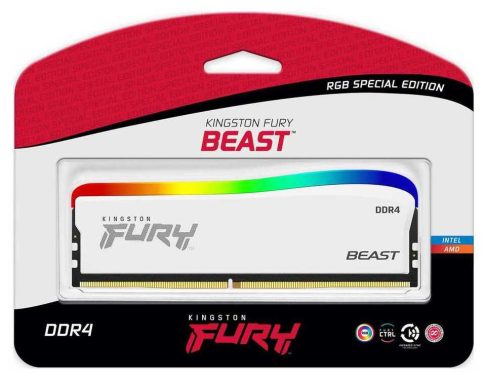
Kingston FURY Beast – New Special Edition RGB DDR4

0

Kingston’s Fury Beast Special Edition RGB DDR4 memory is a high-performance memory module designed for use in desktop computers. It is part of Kingston’s Fury Beast line, which is designed for gaming and high-performance systems.

The Fury Beast Special Edition RGB DDR4 memory is available in various capacity and speed options, with a frequency of up to 3200 MHz. It features an all-aluminum heatspreader with a black finish and RGB lighting, which can be controlled using compatible motherboard software.

The Fury Beast Special Edition RGB DDR4 memory is designed to work with the latest Intel and AMD platforms and is compatible with Intel XMP 2.0 profiles for easy overclocking. It is also backed by a lifetime warranty from Kingston.

Kingston FURY, the gaming division of Kingston Technology Company, Inc., a world leader in memory products and technology solutions, announced today it has unleashed a new member of the pack, Kingston FURY™ Beast DDR4 RGB Special Edition. The white heat spreader with striking RGB lighting makes these modules unique amongst the Kingston FURY line.

Enhance not just the performance of your system but keep it fresh with the library of preset RGB lighting patterns and effects or personalize the settings to create a look that makes your system truly one of a kind with Kingston FURY CTRL software. Along with the patented Infrared Sync Technology™, trust your tailored RGB effects stay aligned.

Kingston FURY Beast DDR4 RGB Special Edition

Whether you are gaming, video editing, or anything in between get the most out your system with Kingston FURY Beast DDR4 RGB Special Edition. It is Intel® XMP Certified, offering advanced pre-optimized timings, speeds and voltages to overclock with ease by a single selection of one of the built-in profiles. As well as being ready for AMD Ryzen, Kingston FURY Beast DDR4 RGB Special Edition will effortlessly integrate making it a hassle-free upgrade for any Intel or AMD-based system.

“As Kingston sets to enter our 35th year we’re happy to offer this Special Edition of the favorited Kingston FURY Beast line for those who want to update the performance and style of their system,” said Kristy Ernt, DRAM business manager, Kingston. “With speeds of 3200 & 3600MT/s and the bright RGB effects illuminating the unique white heat spreader Kingston FURY Beast DDR4 RGB Special Edition will do just that.”

Kingston FURY Beast DDR4 RGB Special Edition is available in single module capacities of 8GB & 16GB, and kit capacities of 16GB & 32GB. 100% tested at speed and backed by a limited lifetime warranty and legendary Kingston reliability.

Overall, the Kingston Fury Beast Special Edition RGB DDR4 memory is a high-performance and visually appealing option for those looking to upgrade their desktop computer’s memory.

Kingston FURY Beast DDR4 RGB Special Edition and Specifications:
• Unique White Heat Spreader with Striking RGB Lighting1: Gives your gaming rig a striking appearance with its unique white heat spreader and customizable RGB lighting.
• Patented Kingston FURY Infrared Sync Technology™: Bright RGB effects stay aligned with Kingston’s patented Infrared Sync Technology.Kingston FURY Beast DDR4 RGB Special Edition• Intel® XMP Certified: Overclock with advanced pre-optimized timings, speeds and voltages with a single selection of one of the built-in profiles.
• Ready for AMD Ryzen™: Reliable, compatible and ready for Ryzen, Kingston FURY Beast DDR4 RGB Special Edition will effortlessly integrate with your AMD-based system to boost your build.
• Capacities:
o Singles – 8GB, 16GB
o Kits of 2 – 16GB, 32GB
• Speeds2: 3200MT/s, 3600MT/s
 Latencies: CL16, CL17, CL18
• Voltage: 1.35
• Operating Temperature: 0°C-70°C
• Dimensions: 133.35 mm x 45.8 mm x 8.1 mm

Cheap, reliable and attractive – Honor Band 5

0

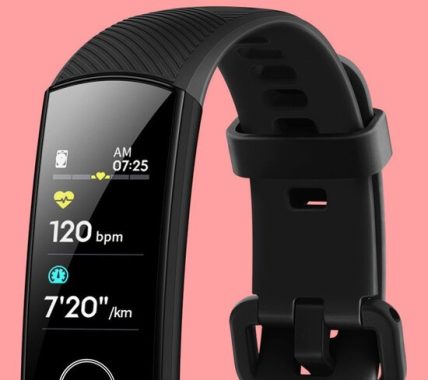
The Honor Band 5’s similarity to the Huawei Band 3 Pro is what first stands out about it. It’s likely that way because the biggest changes are on the inside, but it’s still comforting to know that it can compete with a good that costs more than twice as much. The 0.95-inch OLED touchscreen on the Honor Band 5 has a 282 ppi resolution, which is standard for this kind of fitness wearable. You may activate the touchscreen with a short tap on the touch-sensitive panel directly below it. Those bezels don’t look as terrible as they should because all the backgrounds are black, making it difficult to tell where the screen begins and where the bezels end.

Precision in measuring distance, however, is crucial for runners. Your chances of setting a personal best on a given run will be negatively impacted if the distance is off because the live pace measurement on your wrist will also be off. Without built-in GPS, tasks are transferred to your phone in this situation, which is a perfectly workable solution—but only if your phone has a trustworthy GPS chip—assuming it has one.

With features to meet your active and trendy lifestyle, the brand-new Honor Band 5 smartwatch boasts a small, curved design, AMOLED color display, and AMOLED technology.

Key characteristics include a 0.95-inch AMOLED color display with a 240 x 120-pixel resolution, a 14-day battery life, and water resistance up to 5ATM (50 meters).
Honor Band 5 Features
Blood Oxygen Measurement
You may monitor your blood oxygen level in real-time using the blood oxygen monitoring tool, which is beneficial for your health.Honor Band 50.95″ AMOLED Touch Display Large Color Screen A 45-character, 0.95 AMOLED true-color screen with full touch functionality.
Monitoring Sleep Scientific method
intelligently identifying sleep circumstances with scientific sleep monitoring (difficulty falling asleep, sleeping period, analyzing sleep data).
24-hour Reliable Monitoring of Heart Rate in Real Time
Monitor your heart rate in real time, continuously, and take care of yourself.

Recognizing Professional Swimming Posture
Contains a six-axis sensor, automatically recognizes the four main strokes (freestyle, breaststroke, butterfly, and backstroke), and records data such as speed, distance, turns, calories burned, and average SWOLF.

Different Sports Modes
It features 11 different sports modes, including swimming pool, free training, walking outside, riding outdoors, and indoor cycling.

Long Period Standby Ultra-long standby time of up to 20 days in typical circumstances, sparing the inconvenience of regular charging. The amount of time that can be used continuously when the scientific sleep function is used is nine days.

The 0.95-inch OLED touchscreen on the Honor Band 5 has a 282 ppi resolution, which is standard for this kind of fitness wearable. You may activate the touchscreen with a simple tap on the touch-sensitive panel directly below it. Those bezels don’t look as awful as they should because all the backgrounds are black, making it difficult to tell where the screen begins and where the bezels end.Honor Band 5

The Honor Band 5 actually resembles the Band 3 Pro quite a bit, despite having a different band stamped on it—right down to the plugs keeping the interchangeable straps in place, which can only be removed with steel-tipped fingers.
But the Honor Band 5 gets the essentials right. The screen comes to life with a display of your step count and the time when you lift your arm or tap below it. You may access your heart rate, a sleep diary, and the option to begin exercising by swiping down. The timer, stopwatch, and find phone capabilities, among other rarely used features, are concealed behind another submenu. You can set it up so that rotating your wrist cycles through displays if you find swiping unpleasant, but given that you still need to touch the screen to confirm, this seems like a bit of a waste of time.
Accuracy in measuring distance, however, is crucial for runners. Your chances of setting a personal best on a given run will be negatively impacted if the distance is off because the live pace measurement on your wrist will also be off. Without built-in GPS, tasks are delegated to your phone in this situation, which is a perfectly workable solution—but only if your phone has a trustworthy GPS chip—assuming it has one. Photo: Honor

Honor Band 5 Specs:
Full colour 0.95 Amoled touchscreen
Water Resistant up to 50m
Continuous heart rate monitor
Sleep tracking
6-axis accelerometer
Gyro sensor
Bluetooth 4.2
100mAh battery
22.7g

In summary, it’s about as excellent as it gets for the price. Amazingly, you can get this capabilities for less than the price of a nice restaurant meal for two. If your budget is where it is and running is not your way of life, there is no need to look elsewhere. There are more attractive smartwatches available, but Honor Band 5 cost only £30 (We can only confirm the current retail pricing of the Band 5—between €30 and €35,( US$33 to US$39) from third-party importers. The Band 5 is now slightly expensive than the Xiaomi Mi Band 4, however costs may change in the future).Honor Band 5 1

The Honor Band 5 has a lot of design similarities to its predecessor, but that’s not always a bad idea. It offers a wide variety of superb workout options, dynamic sleep tracking, and sophisticated heart rate monitoring, and even includes deluxe features like blood oxygen analyses. There’s virtually no reason to spend more money unless you prefer premium features like a built-in GPS or NFC, and if you can get beyond a few minor limitations, the Honor Band 5 can be really useful.

ViewSonic VP2756-4K monitor – Specs & Review

0

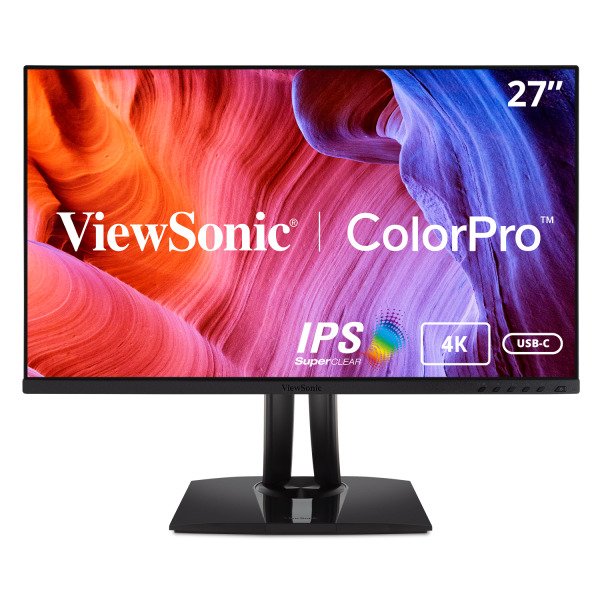
The ViewSonic VP2756-4K UHD monitor, designed to give unmatched color accuracy essential for professional applications, shows off your work in the vibrant, realistic color it deserves. The VP2756-4K offers a nearly seamless viewing experience that is perfect for multi-monitor setups thanks to its SuperClear® IPS panel and stylish 3-sided frameless design. The VP2756-4K has a USB-C port that enables single-cable connectivity for the transfer of video, audio, and 60W of power. Each of our monitors is factory calibrated to give an excellent Delta E <2, helping to ensure accurate, uniform color, so you can be sure that what you see on screen is what your customers and clients will see as well.

With a high-grade 10-bit panel and more than eight million pixels on the screen, the Pantone Validated VP2756-4K monitor is packed with features and offers up to 300% higher pixel density than other Full HD displays on the market. Additionally, the 27-inch display maximizes your creative productivity with a full range of swivel, pivot, tilt, and height adjustments, enabling the most comfortable placement.

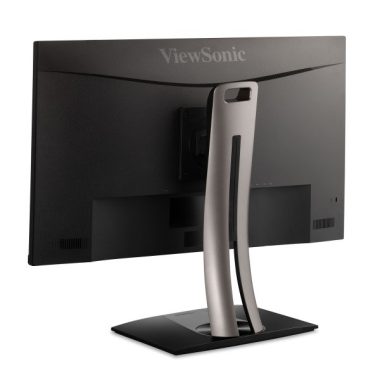
ViewSonic VP2756-4K monitor

The most recent model in ViewSonic’s Pantone Validated professional line offers remarkable features, such as enhanced ergonomics to give personalized comfort, along with high-quality color delivery. In order to provide our customers with an effective workflow, the new displays are made to increase productivity while responding to industry standards.
The ViewSonic VP2756-4K is quite compact at 27 inches, however the base is rather substantial when compared to the size of the monitor. The stand has a beautiful design and is pre-attached to the display panel. The stand allows for a great deal of movement, including swivel, pivot, tilt, and height adjustments. Everything is simple and easy to use.ViewSonic VP2756-4K monitorThere are many desktop monitors available, but not all monitors are created equal, and as soon as you start looking for display panels with true color, your options become limited. This is where the recently released ViewSonic VP2756-4K Pantone Validated ColorPro Monitor fits in, especially if you’re on a tight budget.
A standard ViewSonic OSD menu system is included with the VP2756-4k, and it can be accessed using the buttons on the bottom bezel. However, the ViewSonic VP2756-4k features ViewModel for ‘Mac’, ‘Designer’, and ‘Photographer’, which further open up to creative modes like CAD/CAM, animation, video editing, and so on. When digging deep into the settings, there are various modes that can be found on other monitors as well.

Photojournalists and photo editors can use presets like Portrait, Retro, Landscape, etc. with particular parameters. These presets modify gamma, sharpness, and other factors in addition to color and contrast, and the result is truly remarkable. If preset modes are not your preference, you can also manually adjust the fine settings.
A near-seamless viewing experience is provided by the Pantone monitor’s Energy Star 8.0, EPEAT Silver with Super Clear® IPS (3840 x 2160) resolution panel, and stylish 3-sided frameless design. The HDMI, DP in, USB 3.2, and USB-C interfaces on the display make it easier to connect to other devices. Professionals appreciate the monitor devices because they offer a single-cable solution and quicker data, audio, and video transfer is made possible by USB-C.ViewSonic VP2756-4K monitor

A powerful 10 bit (8 bit Plus A-FRC) IPS panel that can display images in 4K quality at 3840 x 2160 pixels is included with the ViewSonic VP2756-4K. The panel offers 178-degree horizontal and vertical viewing angles, a static contrast ratio of 1000:1, a brightness level of 350 cd/m2, a response time of 5 ms, and a brightness level of 350 cd/m2. This monitor is 100% sRGB color space compliant and has been Pantone validated for use by professionals in the image and video industries. But from what we could tell, it only encompasses around 80% of the DCI-P3 color range and roughly 78% of the Adobe RGB color space. Additionally, the monitor is factory-precalibrated, allowing it to provide superb color accuracy and a great viewing experience right out of the box.

There are plenty of connectors on the rear of the display, including two HDMI 2.0, one DisplayPort 1.4, two USB-A, one USB-B, and one USB-C port. By the way, the USB-C port supports Power Delivery, so you can turn on your MacBook by simply plugging it into the monitor. The additional USB ports can be used to connect graphic tablets and to calibrate the monitor’s colors using a colorimeter. Not least, it’s important to note that the ViewSonic VP2756-4K monitor has two built-in speakers, each with a 2 Watt power rating.
We really value the superb port variety because it enables you to utilize the monitor as a kind of docking station. Owners of MacBooks will undoubtedly enjoy that the USB-C connector supports PowerDelivery because it makes it simple to turn on their gadget by simply plugging it into the monitor.ViewSonic VP2756-4K monitor

Also, the adjustment possibilities are great. Depending on how you like to use the monitor, you may adjust the height of the monitor by approximately 5.12 inches (13 cm) and rotate the screen into either a landscape or portrait position.  Photo: ViewSonicViewSonic VP2756-4K monitorRegarding features and color accuracy, the ViewSonic VP2756-4K is a fantastic monitor. It provides more performance for less money than the competition, making it a great option for videographers and photographers both as well as anyone who prioritizes image quality over all other considerations.

ViewSonic VP2756-4K Pantone Validated ColorPro Monitor price: $399.99

ViewSonic VP2756-4K specs:

Size 27″
Panel Type IPS-Type LCD
Touchscreen No
Resolution 3840 x 2160
Aspect Ratio 16:9
Pixels Per Inch (ppi) 163 ppi
Finish Anti-Glare / Matte
Hardness Rating 3H
Maximum Brightness 350 cd/m2
Contrast Ratio 1000:1
Dynamic Contrast Ratio 20,000,000:1
Variable Refresh Technology None
Bit Depth / Color Support 8-Bit+FRC (1.07 Billion Colors)
Response Time 5 ms (GtG)
Viewing Angle (H x V) 178 x 178°
Backlight Lifespan 30,000 Hours
Inputs / Outputs
Inputs/Outputs 1 x HDMI 1.4 Input
1 x DisplayPort Input
1 x USB Type-C Input/Output
2 x USB Type-A Output
1 x USB Type-B Input
Built-In Speakers Yes, 2 x 2 W
Media Card Reader None
Multi-Input Support (PIP/PBP) None
Power
Power Consumption 122 W (Maximum)
42 W (Typical)
39.5 W (Eco)
37.5 W (Eco)
AC Input Power 100 to 240 VAC, 50 / 60 Hz
Power Adapter Type Internal
USB Power Delivery 60 W (via USB Type-C)
Environmental
Operating Temperature 32 to 104°F / 0 to 40°C
Operating Humidity 20 to 90% (Non-Condensing)
Certifications ICES-3(A), CEC, FCC, cTUVus
*as per Manufacturer
Physical
Height Adjustment 5.1″ / 130 mm
Rotation Adjustment 180° (-90 to 90°)
Swivel Adjustment 60°
Tilt Adjustment -5 to 21°
Max Arm Extension Length None
Mounting-Hole Pattern 100 x 100 mm
Lock Slot Yes, Kensington
Dimensions (W x H x D) 24.1 x 21.3 x 8.5″ / 612.1 x 541.0 x 215.9 mm (with Stand)
24.1 x 14.3 x 2.1″ / 612.1 x 363.2 x 53.3 mm (without Stand)
Weight 15.1 lb / 6.8 kg (with Stand)
9.8 lb / 4.4 kg (without Stand)


TikTok video download without a watermark

0

Free and easy download TikTok video without watermark – With a selection of content unrivaled by any other app, TikTok makes sure that every user can find something they like. It’s possible that you’ll uncover a video that you really like or find helpful as you scroll thru the content. In this case, you might wish to save it so you can access it later without opening the application.
On the other side, a watermark logo that moves between the corners of a TikTok video that has been downloaded may irritate some consumers. Learn how to clear the watermark from a TikTok video by reading on.

Download TikTok Video Without Watermark Free,
photo: Pixabay

TikTok does not offer native ways for downloading a video without a watermark in order to protect copyright holders. Fortunately, there are numerous websites and apps from third parties. The great majority of them are straightforward, which makes the downloading procedure almost as quick as TikTok’s default method.

How to Download a TikTok Video Without a Watermark

A free and easy internet tool called VidsLoader allows you to download TikTok videos without watermarks. You can download any video with just a link to it and a few mouse clicks on your computer’s browser. Installation of any apps is not needed.

Start the TikTok app.
Select the video that you want to download.

Hover your mouse/finger over the share icon (a right-pointing arrow) in the lower-right corner of the screen.
From the button row on the top row, choose “Copy link.”

Open your browser and navigate to the VidsLoader TikTok Video Downloader page.

To add it to your videos, click “Paste.”

Pick the video that was downloaded.

These methods will enable you to see the stored video in your gallery without a watermark.

Users and developers of TikTok may both gain by downloading a video without a watermark. Our tutorial has provided simple instructions for removing the watermark immediately or after the initial download. Regardless of the technique you use, the end result is always a clear video without any watermarks.

IT Assistance for Edge Computing: Easy-to-use Techniques

0

The edge computing market would grow to more than $61 billion by 2028. This translates as a six-year compound annual growth rate of about 38.4%.
Sadly, the IT staffs needed to enable the adoption of cutting-edge technology within businesses are not growing by 38.4%. IT needs to decide how it will support all of this edge technology.

To manage relationships, IT vendors frequently employ account managers to significant customer accounts. This account manager’s “point person” can mobilize the required resources in the event of an issue, then follow up to ensure that the work and/or support are completed to a satisfying conclusion.
IT must make sure that edge IT assets are secure and that only people with permission may use them, both from a security and governance perspective. Expecting end users to implement security and governance on their own is unrealistic, and if they fail to do so, a breach may result in significant support problems. Zero-trust networks automate IT monitoring and safety to avoid incidents by monitoring every IT asset that is on them. The network immediately detects a breach or the addition of a new edge IoT solution that IT is unaware of and delivers a warning.

IT Assistance for Edge Computing
photo: Pixabay

If they aren’t properly maintained, network routers, workstations, industrial robots, drones, sensors, etc. will all fail. Preemptive maintenance AI analytics software is currently available to monitor edge IT assets and send notifications anytime a possible problem is found. This provides technical support with a chance to fix a problem before something truly goes wrong.
These “solutions” can frequently be carried out remotely from a centralized place. This reduces travel time and costs for IT technical help.

The technical support job is significantly impacted by a failure to rapidly upgrade software and firmware for security vulnerabilities and performance enhancements. IT can prevent many of these upgrade-related technical support difficulties by utilizing a software and firmware automation tool that automatically applies new updates as they are released.

The same general principle holds true for network and system backups.
By automating the backup procedure, end users can avoid downtime and recoverable points are created for these assets. Auto backups and failovers also give organizations like technical support more stress-free time to review an incident’s detail information and come up with a preventative measure.Technical assistance is the only sector of IT that is better equipped to provide information on how and where networks and systems are failing. This is because technical support is out there every day listening to end-user complaints, troubleshooting the issues, and figuring out why they are occurring.

It is highly likely that the initial application design will be created so it will avoid many of the trouble spots that existing applications are plagued with, if technical support knowledge of where system and network pitfalls are occurring on the edge is used in the process of creating the initial application (which they aren’t usually).

The administration of vendor relationships is handled by separate vendor or contract management departments at large businesses. These connections frequently center on difficulties with contracts, performance, and vendor services.
If technical support gives vendor management regular feedback regarding the success (or failure) with each vendor in problem solving and performance improvement, the vendor management function can be improved. Particularly with regard to edge technology, where vendor support isn’t usually developed, this is true.

It sometimes makes sense to put IT support staff directly at the edge rather than maintaining help centralized since edge technology is so dense.
The maintenance of edge medical networks and equipment, as well as automated industrial processes, both require quick, on-site technical support. Continuous on-site support may also be required for field activities employing drones and other distributed IoT, large field offices, or both.

CIOs and other IT leaders should carefully consider whether it makes sense to decentralize IT technical support employees so that direct support may be offered at the edge if there is a clear movement of mission-critical IT away from the data center and out to the edge.

Free Format Factory tool – Converter for any file

0

You may convert video, audio, and photo files to various formats with the help of the application Format Factory. The tool also offers the ability to create ISO files, rip DVDs and CDs, and join them.

When working with different media files, you must have programs that can convert them between different media formats. The issue arises when you have formatted files that are incompatible and won’t work together. The excellent thing is that you may solve this issue with the help of numerous programs.
It enables you to use your files more effectively by assisting you in the conversion of multimedia files to other formats.Format Factory app

Format Factory tool presents itself as the go-to solution for converting file formats and is compatible with practically every version of Windows. It also offers compatibility for a large range of formats.

Different Types of Formats are Supported
One of the basic functions of this app is the ability to convert a huge range of formats. The success to this kind of program is adaptability.
Fortunately, Format Factory app offers extensive support for practically any format. You will be able to convert a variety of music and video file types, including MP3, AVI, 3GP, MKV, MOV, MMF, AMR, M4A, MP2, ICO, TIF, PCX, and TGA.Format Factory app

In addition to changing the formats of your files, the application provides a variety of other capabilities. It also can be used for ripping DVDs and CDs. With Format Factory, you can also create ISO files, which is a very useful feature when working with these kind of files.
The menu on the tool’s left side is rationally organized to display all of the program’s functionality.
Similar-format files can be joined together to create larger ones.
Format Factory is a sophisticated tool that enables you to rip CDs and DVDs, create ISO files, and convert file formats.

Format Factory app
photo: pcfreetime

Benefits and characteristics of Format Factory app:
all popular multimedia files have been converted ( video, audio, image )
fixes damaged audio and video files
the compression of multimedia files
Solutions for converting pictures: tags, zoom, rotate
a quick DVD ripper

All these functions are offered to you by the Format Factory application:

Video converter, clipper, joiner, spliter, mixer, crop and delogo.
Audio converter, clipper, joiner, spliter, mixer.
Picture files convertion and supports WebP,Heic.
Rip BD,DVD to video file,Rip Music CD to audio file.
PDF Joiner, PDF to TXT DOC Excel and image files.
Supports Zip,RAR,7z decompression
Screen Recorder
Download the file from the video site
Supports video downloads from many video websites. For example: YouTube, Youku, etc.
Support iphone, ipod multimedia file formats
It can convert to TXT DOC XLS HTM file format,and extract JPG pictures from pdf
Can help you reduce the size of the file, not only to save disk space, but also easy to save and backup

Format Factory

Format Factory application – Free download the best file processing app HERE